For a fixed overhead view with occasional close-ups of the page and details, an interchangeable-lens camera is worth considering if you choose a lens and working distance to suit your table. A fixed zoom can simplify your set-up, but limits your choice of lens later on; a small gimbal camera is a better fit if you also film handheld. Test the framing, white balance and any potential flicker with your actual lights rather than relying on a 4K specification alone.
Which set-up is right for you?
Artists with a permanent table set-up
If you mainly film the whole page from above, check the field of view, mounting distance and stability of the set-up for longer explanations. Sony describes the ZV-E10 II as a camera with interchangeable E-mount lenses; Nikon states that the Z 30 can record for up to 125 minutes.
Teachers who need accurate colours and detail
If you want the paper, colours and individual steps to be clearly visible, test the camera under your lights and choose the right lens or focus setting. Canon lists custom white balance for the PowerShot V1, but this doesn’t replace checking the finished video.
Artists who also need mobile footage
If you switch between filming at the table and handheld shots, a small stabilised camera may be worth considering. DJI lists mechanical three-axis stabilisation for the Osmo Pocket 3; for a fixed overhead view, the mount and framing are still key.
What should you check before buying?
Start with a test recording under your lights. Then check whether you can capture the whole page and the details you want from your actual mounting position.
| Buying consideration |
What to check |
Who it matters to |
| Flicker and banding |
Test with your own lights; check the shutter speed and flicker-reduction features available on the specific model. |
If your lighting causes visible banding or flicker, a clean image is a priority. Around 28% of consumers say flicker is their main concern. |
| Paper and drawing colours |
Assess white balance under your own lights and with your materials by making a test recording. |
If viewers need to see the paper and colours clearly, you’ll need footage you can check under your lighting. Around 22% of consumers put colour reproduction first. |
| Framing and detail |
Measure the page size and mounting distance; test both the full-page view and close-ups with the specific lens or zoom. |
If you want to show both the whole page and fine lines, the framing and focusing distance need to suit your table. Around 22% of consumers prioritise framing and detail. |
| Longer recordings and audio |
Check recording conditions, power supply, storage and microphone connections together. |
If your explanations take longer, a practical recording process and clear speech matter. Around 17% of consumers prioritise longer recording times and audio. |
| What’s included in the set-up |
Check exactly what comes with the kit; factor in the mount, lens and any other accessories you need separately. |
If you want to understand what’s involved in a complete recording set-up before you buy, compare the specific variant and everything included. Around 11% of consumers prioritise the contents of the overall set-up. |
Which buying mistakes should you avoid?
-
Assuming 4K guarantees flicker-free recording under artificial light
A resolution specification doesn’t tell you whether your lights will cause visible flicker or banding in the video.
Test your lights with the video mode you plan to use, and check which shutter speed or flicker settings are available on that specific model.
-
Choosing a kit lens or fixed lens without checking the distance from your table
Capturing the whole page and getting a close-up require different fields of view and working distances. A kit lens alone doesn’t guarantee that small details in your drawings will be visible from your mounting position.
Measure the page and mounting distance, then test both views with the specific lens option. With a fixed lens, make sure its field of view is wide enough for your set-up.
-
Confusing the manufacturer’s warranty with your statutory rights
A voluntary warranty and your statutory consumer rights have different bases. The Verbraucherzentrale explains the difference.
Check the specific warranty terms as well as your statutory rights against the seller.
Which brands are worth considering for this use?
The following camera ranges suit different set-ups. The features listed apply to the specific models and don’t replace testing them with your table, lights and desired framing.
Sony
The ZV-E10 II is an APS-C interchangeable-lens camera with E-mount lenses, which you can consider for a permanent table set-up.
- Sony Deutschland lists the E PZ 16–50 mm F3.5–5.6 OSS II for the ZV-E10 II kit. Check whether its field of view and close-up capability suit your set-up.
- Sony’s general guidance on flicker doesn’t confirm that the ZV-E10 II has a specific flicker-reduction feature.
Canon
The EOS R50 V takes interchangeable RF lenses, while the PowerShot V1 is a separate option with a built-in zoom lens.
- Canon lists custom white balance and a built-in zoom for the PowerShot V1.
- The fixed lens on the PowerShot V1 limits the available framing. The features of this model don’t automatically apply to the EOS R50 V.
Nikon
The mirrorless Z 30 is worth considering for longer explanations at a permanent workstation.
- Nikon lists 4K UHD up to 30p, recording times of up to 125 minutes and the option to use an external microphone for the Z 30.
- The maximum recording time is a manufacturer’s specification, not a guarantee for every recording situation.
DJI
The Osmo Pocket 3 is a small camera with a fixed lens and gimbal, best suited to consider for additional mobile footage.
- DJI lists mechanical three-axis stabilisation and a focus range starting at 0.2 m.
- For a fixed overhead view, the mount and framing are still key; stabilisation can’t replace suitable mounting.
Panasonic
The Lumix GH7 is an interchangeable-lens camera for video production with a more involved workflow.
- Panasonic lists high-resolution video formats and phase hybrid autofocus.
- Some features require additional media or accessories. Panasonic marks the body options listed on its German GH7 page as unavailable.
Cameras for video recording at Joybuy
The following Joybuy products are cameras for video and vlog recording. For an overhead view of your drawing table, check the framing, focusing distance and mount against your specific set-up.
 No image available
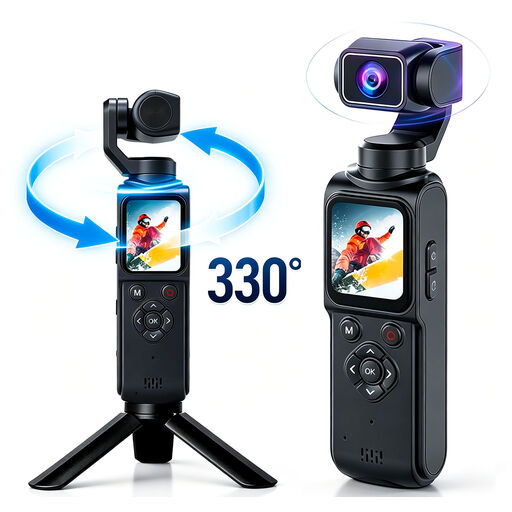
4K action camera with 330° rotating lens
As a compact action and vlog camera, it could make your shortlist for video recording; check the framing at your drawing table.
The product name lists a 330° rotating lens and a 1.72-inch touchscreen. According to the product details, a memory card is not included.
View at Joybuy
 No image available
KINSI Mini Vlog Camera 4K, 64 MP
As a mini vlog camera, it could be an option for video recording; first check that the field of view works from your planned position.
The product name lists a 330° rotating lens, a 1.72-inch touchscreen and Wi-Fi. According to the product details, a MicroSD card is required and sold separately.
View at Joybuy
 No image available
Komery W6 digital camera with 12x optical zoom
As a digital camera for video and vlog recording, it could be an option if you check the framing you need with your specific set-up first.
The product name lists 12x optical zoom, 4K video and Wi-Fi. Zoom alone doesn’t tell you whether you can capture the whole page and the details you want from your mounting position.
View at Joybuy
 No image available
DJI Osmo Pocket 3 Creator Kit
If you’re planning mobile shots as well as filming at the table, a gimbal camera could be worth considering.
The product name lists 4K/120fps and a 1-inch sensor. The lens is built in; for a fixed overhead view, stabilisation doesn’t replace a suitable mount.
View at Joybuy
 No image available
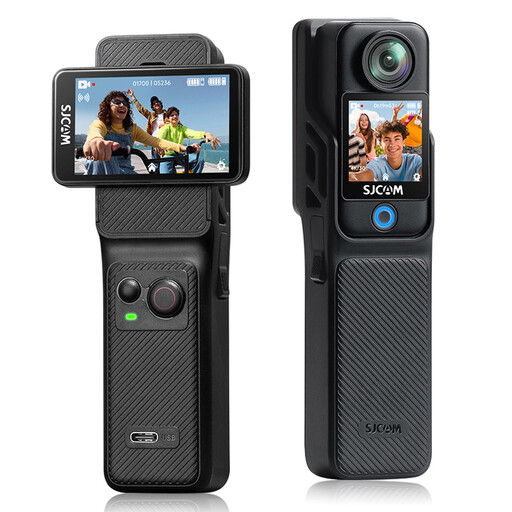
SJCAM C400 4K action camera
As an action camera for video recording, it could suit your needs; check the framing and how you’ll monitor the recording at your chosen location.
The product name lists two touchscreens, 6-axis stabilisation and a 154° wide-angle lens.
View at Joybuy
Frequently asked questions
Is 4K enough to make my drawing demonstration look good under artificial light?
No. The 4K specification alone doesn’t tell you whether there will be flicker, whether the colours will look right or whether the framing will work. Make a test recording with your lights and check that the model you choose offers the settings you need.
What should I do about banding caused by my artificial lights?
Make a test recording with the actual lights before filming a longer demonstration. Adjust the shutter speed if the specific camera model allows it, then check the video; flicker-reduction features and how well they work depend on the model and recording conditions.
How do I get the colours of the paper and drawing right?
Start with a test recording under your final lighting, then check the manual or custom white balance. Artificial light can make white look noticeably different, so check the finished video too.
What should I check for longer tutorial videos?
Check recording conditions, power supply, storage and audio connections together for your chosen model. Nikon, for example, lists up to 125 minutes of recording and the option to use an external microphone for the Z 30; these specifications don’t automatically apply to other cameras.


