Artists who focus on detail
If you want to show the pencil tip, fine lines and shading, check that your framing works from the actual height of your camera.


For changing your framing, consider a mirrorless camera with a suitable lens. For live demos on your computer, a webcam that can be angled downwards or a document camera could work. A compact camera with a fixed zoom lens is a good fit if its field of view from your planned mounting height captures both the page and the details you want to show. The key is to take a test shot under your lamp: white balance and possible banding can’t be determined from camera specifications alone.
If you want to show the pencil tip, fine lines and shading, check that your framing works from the actual height of your camera.
If you’re filming several steps in one sitting, plan your recording time, power supply and storage together. Audio recording also matters if you’ll be adding spoken commentary.
If you want to show your paper during a video call or stream, you’ll need a practical view of your drawing desk and a suitable way to transmit the image.
A good fit if: you want to switch between showing the whole page and close-up details, and adjust your lens and camera position accordingly.
Bear in mind: the lens mount and lens need to be compatible. You’ll also need to plan for a mount, power supply and storage.
A good fit if: you want to film without changing lenses and the fixed zoom range gives you the framing you want from your planned mounting height.
Bear in mind: you won’t be able to replace the lens with one that has a different focal length.
A good fit if: you mainly draw live on your computer or want to show your desk during a call.
Bear in mind: connections and recording options vary. A USB camera isn’t the same as a model with HDMI output or an SD card slot.
| Priority | What to check before buying | Who is it important to? |
|---|---|---|
| Fine lines and framing | Check the page size, mounting height, angle of view and focus together with the specific lens or camera. | If I want to show both the page and fine pencil lines, the framing needs to work from my camera height. Around 33% of consumers would make detail reproduction their top priority. |
| Consistent image under artificial light | Check whether you can adjust the white balance and shutter speed, then review a recording made under your own lighting. | If my white paper looks discoloured in the video or there are visible bands, I want to check the results under my lamp. Around 27% of consumers would make control over artificial lighting their top priority. |
| Long recording sessions | Check the stated recording time, power supply and storage, and whether there’s a microphone input if needed for your planned session. | If I want to record the drawing process with as few interruptions as possible, the camera needs to suit the planned duration and commentary. Around 20% of consumers would consider long recordings their top buying priority. |
| Live demo on a computer | Check how your work area looks in the live image, and make sure the USB, HDMI and software requirements suit your setup. | If I want to show my drawing desk during a call or stream, I need a suitable view of the paper and a working way to transmit the image. Around 20% of consumers would prioritise live demos on a computer. |
A resolution figure won’t tell you whether the whole page will fit in the frame from your planned mounting height or whether the pencil tip will be in focus.
Test the framing and focus with your complete setup before making a decision.
You may also need a suitable lens or mount to get the framing you want.
Sony notes that flicker-reduction features vary by camera model. A setting on its own doesn’t guarantee band-free footage under every LED lamp.
Record under the lamp you plan to use and check the saved video.
A webcam for calls or streams and a document camera with its own output or storage options may require different recording setups.
Before buying, decide whether you want to present on a computer or record a session independently.
A computer and additional recording equipment may be needed for presenting from a computer.
The EOS R50 V is a mirrorless camera with an interchangeable lens, while the PowerShot V1 has a built-in fixed zoom lens.
The ZV-E10 II is an E-mount mirrorless camera for a setup using your chosen lens.
The Z 30 is worth considering for longer tutorials if you want to record without relying on a computer.
The V4K is a USB document camera for showing paper and drawings on a computer.
The MX Brio is a webcam for live demos where you want to show your desk during a call.
The MX-P3 is a document camera with several output and recording options.
The Joybuy products below include a mirrorless camera, an action camera, webcams and a compact vlogging camera. For each model, check that your setup can give you the overhead view and framing you need.
 No image available
The 16–50 mm power zoom lens and tilting screen give you options when setting up your shot. Check the field of view and focus over your page.
The product name specifies 4K video recording and a tilting screen.
 No image available
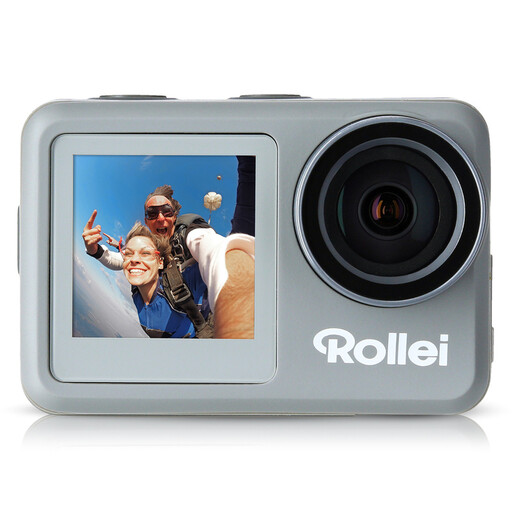
If you’re considering an action camera for drawing videos, pay particular attention to whether its wide-angle lens captures your page as you want it to from your mounting height.
The product name specifies 4K video at 60 fps, a wide-angle lens and waterproofing to 10 m. The description also mentions a 1/4-inch tripod thread.
 No image available
You could consider it as a webcam for live demos on a computer. Check that the clip-on mount captures your drawing page in the frame.
The product name specifies 2K QHD, a noise-reducing microphone and a clip-on mount for a laptop or desktop computer.
 No image available
If you’re planning a live demo from your computer, check in advance that the mount and field of view work for an overhead view of your page.
The product name specifies 4K UHD, 8 MP, autofocus, two microphones and a privacy cover. It also lists compatibility with Zoom and Teams.
 No image available
This compact vlogging camera is worth considering for video recording. Check whether your existing mount can give you the overhead view you want.
The product name specifies a 1-inch CMOS sensor, 4K video at 120 fps, 3-axis stabilisation, fast focusing and a rotating 2-inch touchscreen.
If your camera lets you adjust the shutter speed while filming, try changing it and take a test shot. Sony Germany recommends 1/50 or 1/100 of a second in regions with a 50 Hz power supply. Testing is the only way to find out whether either setting helps with your lamp.
Not necessarily. If the paper looks discoloured under your artificial light or the colour varies, compare automatic white balance with a manual setting suited to your lighting.
Measure your work area and the available mounting height. Then check from the planned position that the whole page is visible and the pencil tip is in focus. A resolution figure alone won’t answer these questions.
The seller is responsible for statutory consumer rights. The European Union’s consumer information states that goods are generally covered by a minimum two-year guarantee from the date you receive them. This is separate from any additional manufacturer’s warranty.
There isn’t a straightforward yes-or-no answer. The State Commissioner for Data Protection and Freedom of Information of Rhineland-Palatinate explains that recording and using images of recognisable people generally requires their consent or another legal basis. Check the specific circumstances of your intended publication; this does not amount to a general statement about rights in any reference materials shown.