Which camera setup is right for you?

Explaining fine details

If you want to show the print, perforations or small lettering, check the focusing distance and how large the stamp appears in the finished image. IPEVO lists autofocus from 10 cm for the V4K PRO, while HUE lists manual focus from 1 cm for the HD Pro.

Demonstrating at the table

When you’re explaining how to sort stamps or demonstrating techniques, the stamp, your hands and enough working space all need to fit in the frame. IPEVO lists a maximum capture area of 34,2 × 25,5 cm for the V4K PRO, but it’s still worth checking how the image looks on your table.

Filming in different places

If you want to change where you film or record without a computer permanently connected, check where the video is stored and which connections your setup needs. ELMO lists an SD card slot for recording on the MX-P3, while Canon states that the PowerShot V10 is compatible with microSD cards.

Which buying criteria matter at a small stamp table?

USB document camera

Best suited to: filming mainly from above and using a compatible computer to handle the USB video feed. IPEVO lists autofocus from 10 cm, while HUE lists manual focus from 1 cm.

Things to consider: The USB video feed needs a compatible computer and recording software. A very short focusing distance doesn’t necessarily leave enough room for your hands and lighting.

Document camera with multiple connections and SD recording

Best suited to: choosing between different outputs and recording to a memory card. ELMO lists USB, HDMI and RGB, as well as an SD card slot for recording, on the MX-P3.

Things to consider: Digital zoom doesn’t guarantee a certain level of detail, and it isn’t the same as optical magnification.

Compact camera with built-in recording

Best suited to: filming in different places or without a computer. Sony lists an 18–50-mm zoom and focusing from around 5 cm from the front of the lens for the ZV-1 II; Canon states that the PowerShot V10 has a built-in stand and is compatible with microSD cards.

Things to consider: A built-in stand doesn’t guarantee an overhead view. Check that the perspective and camera position work for both your stamps and your hands.

Interchangeable-lens camera

Best suited to: choosing a lens and setup specifically for close-up filming. The documented Panasonic DC-G100DK kit includes a 12–32-mm lens.

Things to consider: How well it works for close-ups depends on the lens you choose, so don’t judge it by the camera body alone.

What you need What to check before buying Who is this most important to?
Clear close-up details Check the focusing distance and framing with a stamp in the camera position you plan to use. If I want to show individual printing details, a clearly stated focusing distance matters more to me than the resolution specification alone. Around 36% of consumers put clear close-up details on stamps first.
Showing the stamp and your hands Mark out the table area you need, then test the camera height, angle and space for your hands. If I’m explaining how to sort stamps or demonstrating other techniques, I want the stamp and my hands to stay in frame together. Around 29% of consumers prioritise this wider view of the table.
Choosing how to record Decide in advance whether you’ll record on a computer, save to a memory card or send the image to a screen. Check that the connections and recording modes match. If I’m filming in different places, I want to be able to record video without a computer permanently connected. Around 21% of consumers prioritise recording without a computer.
Balancing commentary and the subject Test with a real stamp and spoken commentary to check the sound, lighting, shadows and reflections in the finished video. If I’m talking through the steps, my voice, the lighting and the space for my hands all need to work together on a small table. Around 14% of consumers prioritise clear explanations and a practical lighting setup.

Common misconceptions about filming stamps

  • “4K” automatically means stamp details will be clear

    Video resolution alone doesn’t tell you how large an individual stamp will appear in your chosen frame or whether its finer details will be clear.

    Compare the focusing distance and capture area, then test your planned framing with a stamp.

  • USB, HDMI and SD recording are all the same thing

    Connections and storage options vary. A USB video feed may require a suitable computer, while an SD card slot for recording offers a different way to work.

    Decide how you want to capture and save the image before checking the connections on the model you’re considering.

    Depending on your setup, you may need a suitable computer, a storage device or compatible connection equipment.

  • A built-in stand automatically gives you a clear overhead view

    A stand keeps the camera steady, but it doesn’t tell you whether you can frame the stamp and your hands properly on a small table.

    Plan the camera angle and available workspace in advance. If you can’t achieve the position you want otherwise, check whether you’ll need a suitable mount.

A guide to relevant camera brands

IPEVO

Document cameras for capturing a tabletop using a computer, illustrated here by the V4K PRO.

  • IPEVO lists autofocus from 10 cm and a maximum capture area of 34,2 × 25,5 cm.
  • The USB-UVC video feed requires a suitable computer for recording; the manufacturer’s specifications don’t confirm how it performs with stamps.

HUE

Compact USB document cameras for close-ups with manual focus, illustrated here by the HD Pro.

  • HUE lists manual focus from 1 cm and native Full HD.
  • A short focusing distance alone doesn’t show whether you’ll still have enough room for your hands and lighting in the position you choose.

ELMO

Document cameras with multiple video connections, illustrated here by the MX-P3.

  • ELMO lists USB, HDMI and RGB outputs, one-touch autofocus and an SD card slot for recording.
  • The stated 16x zoom is digital, so it doesn’t guarantee that fine printing details will be clear.

Sony

Compact cameras for recording on the camera itself, illustrated here by the ZV-1 II.

  • Sony lists an 18–50-mm zoom and a focusing range from around 5 cm from the front of the lens for this model.
  • Whether the stamp and your hands fit in the frame together depends on your setup; these specifications don’t apply to all Sony models.

Canon

Compact cameras for recording on the camera itself, illustrated here by the PowerShot V10.

  • Canon lists 4K video, microSD compatibility and a built-in stand.
  • Check that the fixed wide-angle view and the position of the stand work for the overhead view you want of your stamps.

Panasonic

Interchangeable-lens cameras for a close-up setup tailored to your needs, illustrated here by the LUMIX G100D.

  • The documented DC-G100DK kit pairs the camera with a 12–32-mm lens; Panasonic lists 4K/30p.
  • How well the camera works for close-ups depends on the lens you actually choose.

Joybuy cameras for recording your own videos

The Joybuy products below are cameras for recording your own videos. For a stamp guide filmed at a small table, check the focus, framing, mounting and recording method with your specific setup.
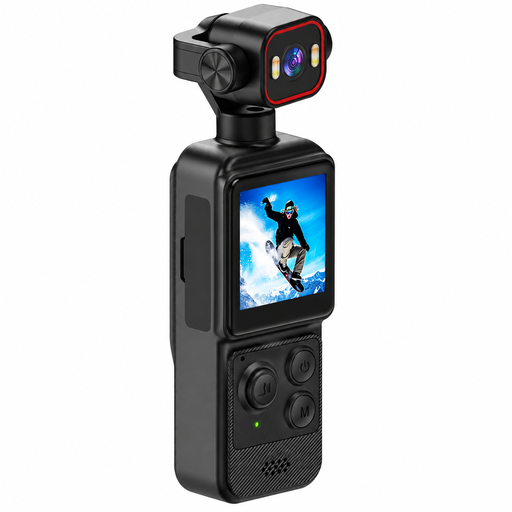
4K mini action camera with clip, display and 140° wide-angle lens

4K mini action camera with clip

Could suit you if you’re looking for a compact camera to record your own videos. Check whether the clip and wide-angle lens give you the stamp framing you want.

The title lists 4K video, a 1,54-inch display, a 140° wide-angle lens, app control, LED lighting and a 1200-mAh battery.

View at Joybuy

2K pocket vlogging camera with 360° rotating lens, black

2K pocket vlogging camera with 360° rotating lens, black

A potential option if you want a portable camera for recording your own videos. Test whether rotating the lens gives you the view you want of the stamp and your hands.

The title lists 2K video, a 360° rotating lens and a portable body.

View at Joybuy
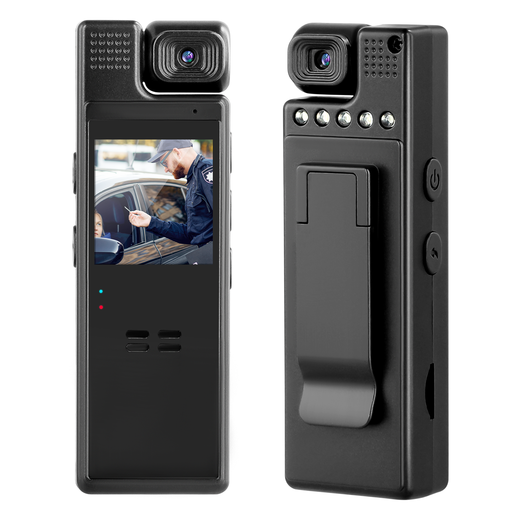
Compact camera with audio, 1080P and 180° rotating lens

Compact camera with 1080P and 180° rotating lens

Could be worth considering if you need a flexible camera position. Check that the clip lets you position the camera securely and at the right angle above your small table.

The title lists audio and video recording, 1080P, a 180° rotating lens and a clip on the back.

View at Joybuy

KOMERY W6 digital camera with 12x optical zoom

KOMERY W6 digital camera

A zoom camera could be an option if you want to adjust the framing. Check the actual size and sharpness of the stamp in your planned setup.

The title lists 12x optical zoom, 4K video, Wi-Fi and 64 MP.

View at Joybuy

KOMERY X9 digital camera with autofocus, zoom and flash, black

KOMERY X9 digital camera, black

Could be worth considering as a compact camera for recording your own videos. Test the autofocus and framing with a stamp before settling on your setup.

The title lists 4K video, 64 MP, autofocus, 18x zoom and a flash.

View at Joybuy

Frequently asked questions

How do I set up a camera for a small stamp table?

First, mark out the area that needs to be visible, including your hands. Position the camera above or in front of it, then check the focus and framing with a real stamp in the finished video. IPEVO’s stated maximum capture area and the close-focusing capabilities of other models describe different features.

Can I record with a USB document camera without a computer?

It depends on the model and how it records. IPEVO describes the V4K PRO as a USB-UVC camera for compatible computers; ELMO lists an SD card slot for recording on the MX-P3. Check the recording mode for the model you’re considering.

What else should I budget for before buying?

Check whether your chosen setup needs a suitable computer, storage device, mount or compatible connection equipment, and whether these are included. Consumers in Germany generally have a 14-day right to cancel an online purchase. The Verbraucherzentrale also distinguishes between the seller’s statutory liability for defects and a voluntary guarantee.

What should I bear in mind when publishing a stamp guide?

Check whether you need permission to use any material you show. Section 51 of the German Copyright Act (UrhG) permits quotations only where their scope is justified by the specific purpose; it doesn’t give blanket permission to use all stamp images. As part of its remit for monitoring the market for electrical and radio equipment, the Federal Network Agency checks matters including labelling, manufacturer information and required German-language notices.