Who will be reading in the flatshare?

Readers in a fixed spot

If you’ll mostly be reading alone and want to keep setup to a minimum, consider a nearby webcam and test the picture and sound from your seat. F.A.Z. Kaufkompass rates the Logitech Brio 500 positively for picture quality, ease of use and microphone performance; the results will still depend on your distance from the camera and the light in the room.

Flatshare reading group

If several people will be taking turns to read or sitting together in shot, seating arrangements, framing and voice capture from each seat are key. Logitech describes the MeetUp as a camera for small rooms; a listening test in your flatshare will show whether everyone’s voice comes through clearly.

Readers on the move

If you’ll be moving around while reading, a camera with automatic tracking can adjust the framing. OBSBOT describes this feature for the Tiny SE; check the audio separately, as tracking says nothing about how well a voice can be heard from different distances.

What should you look for when choosing?

Webcam for a fixed reading spot

A good fit if: you’ll be reading alone or taking turns in the same spot, with the camera close by. F.A.Z. Kaufkompass rates the Brio 500 positively for picture quality, ease of use and microphone performance.

Consider: A listening test from close range won’t tell you how voices from seats further away in the flatshare will sound; also check that you have the right USB port.

Webcam with adjustable framing

A good fit if: you want to show just the reader for some readings and more of the room for others. AnkerWork says the PowerConf C200 has adjustable framing and a choice of microphone direction.

Consider: AnkerWork notes limitations in backlit conditions and when speaking from the side in directional mode; n-tv found that this model offered only limited noise reduction in its practical test.

All-in-one room camera

A good fit if: several people need to be in shot at once and voices from different seats need to be picked up. Logitech describes the MeetUp as a camera for small rooms, with a beamforming microphone array and speaker.

Consider: As a conference-room device, it needs a suitable place to sit. Check the picture and sound from every intended seat instead of assuming that a wide angle will capture speech clearly.

Tracking PTZ webcam

A good fit if: the reader will stand up or move around within the area covered by the camera. OBSBOT says the Tiny SE offers automatic tracking, different framing options and saved positions.

Consider: These picture features don’t guarantee clear speech from every distance; a camera that tracks one person isn’t automatically the right choice when several readers need to be in shot at once.

Priority What to check before buying Who is it important to?
Clear speech Test the sound from every reading spot; consider microphone modes and, if needed, a separate microphone as different solutions. If you want every word to be clear despite the usual background noise at a flatshare reading, I’d test the sound from every seat; around 36% of consumers put speech clarity first.
Suitable framing Set up the camera where you plan to use it and check the actual sitting and standing positions. If readers taking turns need to stay in shot without showing too much of the shared room, I’d test the framing at the intended camera position; around 29% of consumers prioritise different reading spots.
A clear picture in room lighting Test it in your usual evening light and, if relevant, with a window behind you. If changing room lighting could affect the picture, I’d check the actual reading spot under typical lighting; around 21% of consumers prioritise a clear picture in room lighting.
Easy setup and control Check the connection, mount and software required; if the camera will be in a shared room, also consider whether you can cover the lens. If you want to set up the camera easily for a reading and control it in a shared room, check these points in advance; around 14% of consumers prioritise easy setup and control.

Common selection mistakes

  • Assuming a better picture means better room audio

    In n-tv’s practical test, the PowerConf C200’s microphones offered only limited noise reduction. A test from around 50 centimetres away doesn’t show how the audio will sound from every possible seat in a flatshare.

    Test the picture and sound separately before the event, and listen back to a recording from every planned reading spot.

    If the voice test isn’t clear enough, you may need a separate audio solution.

  • Automatically choosing the widest angle for someone who’s moving

    A fixed wide shot and tracking one person solve different framing needs. A wide view shows more of the shared room, while tracking adjusts the shot to follow someone moving around.

    First decide whether you need to keep one person moving or several people in shot at once, then check the framing from the planned camera position.

  • Assuming light correction guarantees a good picture against backlight

    AnkerWork notes that the PowerConf C200 doesn’t have HDR and that backlighting can result in an overexposed picture.

    Check the planned camera position in the actual light from your window and in the evening.

Brands to consider

Logitech

The Brio 500 is worth considering for one fixed reading spot; the MeetUp is designed as an all-in-one solution for small rooms. These roles apply to these models and not necessarily to the entire range.

  • F.A.Z. Kaufkompass rates the Brio 500 positively for picture quality, ease of use and microphone performance. Logitech describes the MeetUp as offering room audio and motorised positioning.
  • Depending on your computer, the Brio 500 needs a compatible USB-C port or an adapter. The MeetUp is a conference-room device, designed more for a fixed position than as a simple desktop webcam.

AnkerWork

The PowerConf C200 is worth considering if you want to adjust the framing and microphone coverage at a compact reading spot.

  • AnkerWork describes adjustable framing and a choice of microphone direction.
  • AnkerWork notes that the model lacks HDR for backlit conditions and that directional mode may have limitations when you speak from the side. In its practical test, n-tv found that it offered limited noise reduction.

Trust

The Taxon QHD webcam is one option if you want a wider webcam view and a mechanical lens cover.

  • Trust lists autofocus, two microphones, a wide-angle lens and a cover for the Taxon.
  • These specifications don’t tell you whether readers further away will be easy to hear in your flatshare, or how much of the room the camera will actually capture.

OBSBOT

With its automatic tracking, the Tiny SE is aimed at readers who move around while reading.

  • OBSBOT describes tracking, different framing options and saved positions for the Tiny SE.
  • These picture features don’t guarantee consistent audio quality at different distances or make the camera suitable for several people speaking at once.

Joybuy products for a flatshare reading

This selection includes webcams for one fixed reading spot, as well as models with a stated wide-angle view or features suited to a computer setup. Check the actual framing and voice capture in your room.

Full HD 1080P webcam with microphone

Full HD 1080P Webcam with Microphone

Could suit a computer setup with an integrated microphone and USB plug-and-play; test how your voice sounds from your actual reading distance.

Full HD 1080P; microphone; USB Plug & Play.

View at Joybuy

Razer Kiyo V2 X Full HD webcam, black

Razer Kiyo V2 X Full HD, 60 FPS, Black

An option for a fixed reading spot at your computer; check that the framing includes your planned seating position.

Full HD 1080p; 60 FPS; black.

View at Joybuy

AOC webcam with microphone, 4K and 99° field of view

AOC 4K Webcam with 99° Field of View

The stated field of view may be useful when deciding whether to include several people in shot; check the actual framing in your flatshare.

4K; 99° field of view; microphone with noise reduction; cover; plug-and-play.

View at Joybuy

AOC 4K PRO webcam with Sony IMX363 sensor and 75° field of view

AOC 4K PRO Webcam with Sony IMX363 Sensor

The stated 75° field of view is suited to a narrower shot; compare it with your planned camera position and the people you want in frame.

Sony IMX363 sensor; 75° field of view; autofocus; dual microphone; lens cover; USB-A/USB-C.

View at Joybuy
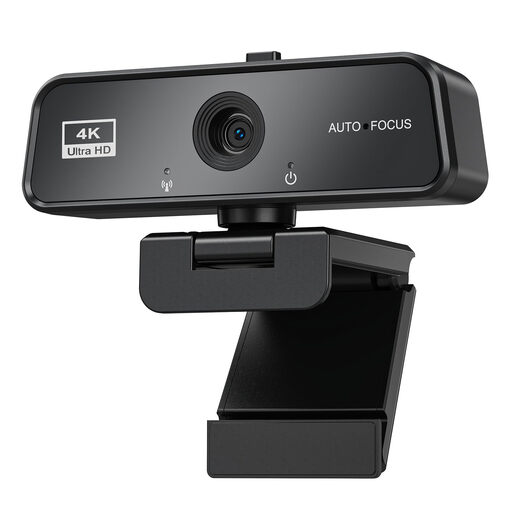
maxineer 4K webcam with autofocus and cover

maxineer 4K Webcam, 3840×2160 at 30 FPS

Could suit a computer setup with autofocus and a cover; check the framing and how clearly your voice comes through before the reading.

3840×2160 at 30 FPS; autofocus; microphone; cover; USB 3.0; plug-and-play; Windows and Mac.

View at Joybuy

Frequently asked questions

How should I set up a camera for several readers?

First, decide where people will actually sit and stand, then check the framing and audio from every spot using the planned camera position. Logitech describes the MeetUp as a room camera with a beamforming microphone array for small rooms; that doesn’t guarantee good acoustics in your flatshare.

Why might a directional webcam setting sound worse when I move around?

For the PowerConf C200, AnkerWork recommends speaking straight towards the camera in directional mode and staying within the recording area, as noise reduction may otherwise affect your voice. Choose a mode that suits how you’ll move and listen back to a recording before the reading.

What should I know about a fault or buying online in Germany?

Your statutory rights against the seller are separate from any voluntary guarantee. Online purchases generally come with a 14-day right to cancel from the date you receive the goods; check the applicable terms and exceptions. Verbraucherzentrale explains both points.

Can I simply record flatmates or guests at the reading or show them publicly?

No, you can’t assume that as a general rule. Section 201 of the German Criminal Code (StGB) concerns the unauthorised recording of privately spoken words; Section 22 of the German Art Copyright Act (KunstUrhG) covers consent to the distribution or public display of images. Before recording or publishing, check who will be audible or recognisable and what permission you have for the specific purpose. In its checklist, the Datenschutzkonferenz explains which legal basis to check for recordings in the video-conferencing scenarios it describes; this isn’t a blanket rule for every purely private call.

Can I stream any poem publicly or post it online later?

No, being allowed to read a poem doesn’t automatically mean you can do either of those things. Under Sections 15 and 19a of the German Copyright Act (UrhG), as published on Gesetze im Internet, public performance and making a work available to the public are rights relevant to the author; Section 19a covers, for example, making a work available on demand at a time of the user’s choosing. Check whether you have the necessary rights for the specific poem and planned use, or whether an exception applies.