Camera guide writers
If you write longer step-by-step guides, a suitable layout and a comfortable typing experience matter. CHERRY describes the STREAM KEYBOARD as a low-profile office keyboard with SX scissor switches and office keys.


For a quick-start camera guide with reference images, choose a keyboard whose layout and keys suit longer writing sessions and the image commands in your software. Programmable keys are only useful if you can use them to set up your actual workflow. A split layout may be worth considering for long writing sessions, while compact or multi-device models prioritise saving space or switching between devices. Before you buy, check the exact German layout, connection type and software compatibility – image quality and captions depend on more than just the keyboard.
If you write longer step-by-step guides, a suitable layout and a comfortable typing experience matter. CHERRY describes the STREAM KEYBOARD as a low-profile office keyboard with SX scissor switches and office keys.
If you often switch between text, image files and captions, check whether the commands you need are available or can be assigned in the software you actually use. Microsoft Support lists Windows key + Shift + S as the shortcut for opening the screenshot selection tool in Windows.
If you spend a long time working on text, you can choose a keyboard shape and position that suit your workstation. The BAuA covers screen-based work within the scope of ASR A6; Logitech describes the ERGO K860 as a split, curved model.
Base your choice on what matters most to you: typing comfort, recurring image commands, hand position, or a compact or shared workspace.
| What matters when buying | What to check | Who it matters to |
|---|---|---|
| Typing feel and layout | Check the exact DE-QWERTZ or DE-ISO version and, if possible, try the feel of the switches you’ve chosen. | When I write longer instructions, I want a familiar layout and key profile that suit me. Around 36 % of consumers put typing comfort and layout first. |
| Recurring image commands | Make a note of the commands you use frequently and check that the keyboard, software and key assignments support them. | When I’m creating a guide, I want to trigger the right commands easily if I often capture or edit images. Around 29 % of consumers prioritise their image workflow. |
| Hand position during long sessions | Compare split and conventional layouts at your workstation, and allow for a possible adjustment period. | When I spend a long time working on a document, I want the keyboard shape and position to suit my workstation. Around 21 % of consumers prioritise hand position and keyboard shape. |
| Space and switching between devices | Measure the available space and check the connections, keys you need and number of devices you use. | When my mouse and reference images take up space, or I switch between computers, I want to choose a keyboard that suits my setup. Around 14 % of consumers prioritise saving space or switching between devices. |
A model may be available with several ISO layouts. The manufacturer’s website lists different versions of the Keychron K3 Max, so the model family alone won’t tell you which layout you’re choosing.
Check the version you’ve selected and the keys shown, rather than relying on the model name alone.
Logitech describes Smart Actions for the MX Keys S as working with Logi Options+. Whether they can trigger recurring image-related steps also depends on your operating system, software and key assignments.
Check that the commands you use most often are supported by the software and specific key assignments.
A split layout changes the way your fingers move and may take some getting used to. Even a well-reviewed design can’t guarantee a particular benefit for every individual.
Assess the keyboard alongside your workstation setup and working habits. Allow time to adjust if the layout is unfamiliar.
The MX Keys S and ERGO K860 take different approaches: a low-profile standard keyboard with customisable features, and a split, curved layout.
The STREAM KEYBOARD is a low-profile, wired office keyboard; the STREAM KEYBOARD ULTIMATE is a separate product line.
The K3 Max is a compact, customisable option for anyone who wants to choose their layout and setup carefully.
The PERIBOARD-535II is a wired, split mechanical option for writers who want to try a different layout.
The E9700M is a low-profile, multi-device option for workspaces where you switch between connected computers.
These keyboards include compact and multi-device models, a wired office keyboard, and split or full-size options for German-language writing.
 No image available
The compact layout may suit a space-saving workstation if you’re comfortable with the key arrangement.
65% layout with German QWERTZ; Bluetooth, 2.4 GHz wireless and USB-C; low-profile MX Speed switches and RGB lighting.
 No image available
The wired connection may suit a dedicated writing space if you don’t need a wireless setup.
Low-profile keys and German QWERTZ; full-size layout with function keys and number pad; USB plug and play and adjustable tilt legs.
 No image available
The split, curved layout is an option if you want the keyboard shape and hand position to suit your workstation during long writing sessions.
Integrated wrist rest and three tilt options; Bluetooth and USB receiver. A split layout may take some getting used to.
 No image available
The compact ISO-DE layout may suit you if you want to save space and choose between several connection types.
75% layout; Bluetooth, 2.4 GHz wireless and USB-C; hot-swappable switches. A compact layout may place familiar keys differently.
 No image available
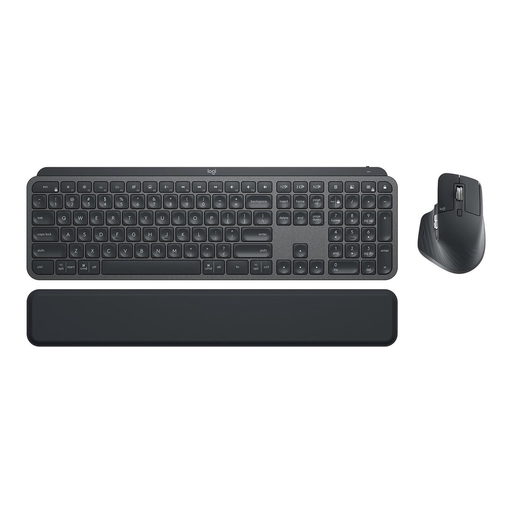
This set may suit you if you’re looking for a full-size keyboard with a German layout and a mouse.
Full-size backlit keyboard; Bluetooth and Logi Bolt; includes an MX Keys keyboard and an MX Master 3S mouse. Smart Actions require Logi Options+ and compatible setup.
No, not necessarily: according to Microsoft Support, pressing Windows key + Shift + S in Windows 10 and 11 opens the area selection tool. Check that the keys are easy to reach on your layout; other systems and programmes have their own commands.
Arrange your keyboard, screen and other work equipment so they’re positioned well together. The BAuA covers the design of screen-based workstations within the defined scope of ASR A6; this doesn’t apply universally to every home desk or prescribe a specific keyboard model.
For wireless models, allow for charging or batteries and, where needed, a receiver; power requirements vary by model. The Verbraucherzentrale distinguishes the statutory warranty against the seller from a voluntary guarantee. For typical online consumer purchases, you generally have a 14-day right to cancel; the conditions of the specific purchase apply.
For products subject to relevant EU harmonisation legislation, the Bundesnetzagentur states that CE marking is required. The marking is the manufacturer’s declaration, not an independent quality mark; any required markings and accompanying documents should be assessed for the specific product.
In Germany, waste electrical and electronic equipment must not be put in household rubbish. The Umweltbundesamt points to local collection centres and suitable in-store take-back options; removable batteries should be handed in separately where they can be removed without damaging the device.