What should you look for when buying?
The key question is whether you want to show the work surface, a small detail, a microscope view or yourself explaining.
A document camera for the table
A good fit if: you mainly want to show samples, notes or a small experiment from above.
Keep in mind: Check that you have room for the camera arm, the field of view you need and a connection to a suitable computer. The IPEVO V4K PRO’s specifications apply to that model, not to all document cameras.
A webcam for explanations and close-ups
A good fit if: you mainly explain things and occasionally want to show an object or part of the table.
Keep in mind: DeskView on the Insta360 Link 2 Pro and the presentation mode on the Logitech Brio 500 are no substitute for testing the actual view of your table. Some additional features require specific software or computer specifications.
A microscope camera for an existing microscope
A good fit if: you want to share a detail you’re observing through your microscope.
Keep in mind: The camera fitting, any adapters you need and your computer must all be compatible; this setup won’t automatically show the entire experiment table. On 8 November 2026, BRESSER listed the MikroCam SF as available to pre-order, with delivery starting on 4 January 2027.
| Priority |
What to check before buying |
Who is this important to? |
| Show the work surface |
Measure the area you need to show and the available distance. Compare both with the capture area, arm position and connection for the specific model. |
If you want to show the whole setup, pay particular attention to the field of view and whether the camera can provide a suitable overhead view. Around 36% of consumers prioritise showing the entire work surface. |
| Show close-up details clearly |
Measure the distance from the lens to the nearest point of the subject and compare it with the focusing range of the exact model. |
If you hold small objects close to the camera, the focusing distance is crucial for your live image. Around 29% of consumers prioritise sharp close-up details. |
| Connect a microscope |
Compare your microscope’s eyepiece fitting with the adapters specifically listed. Check the software and operating system requirements too. |
If you want to share the view from an existing microscope, the camera must be a physical fit. Around 21% of consumers say connecting a microscope is their top priority. |
| Combine explanations and observations |
Plan where to position yourself and the subject. Test switching between views and any additional features in your conferencing or recording software. |
If you want to switch between yourself and the view of what you’re observing as you explain, image composition and ease of use in your own setup matter. Around 14% of consumers prioritise this above all else. |
Webcams at Joybuy
This selection includes USB webcams for explanations, video calls or livestreams where you may occasionally want to show an object. It’s not a substitute for choosing a document camera or microscope camera specifically for your needs.
 No image available
Full HD 1080P Webcam with Microphone
For video calls or livestreams on your PC. Specifications include 1080p at 30 fps, a 120° field of view, an adjustable lens and a built-in tripod.
View at Joybuy
 No image available
Razer Kiyo V2 X
For explanations or livestreams on your PC. Specifications include 1080p at 60 fps, autofocus, an 80° field of view and support for streaming software such as OBS and XSplit.
View at Joybuy
 No image available
AOC 4K PRO Webcam with Sony IMX363
For PC meetings and streaming. Product specifications list PDAF autofocus, two microphones, a 75° field of view, and USB-A and USB-C.
View at Joybuy
 No image available
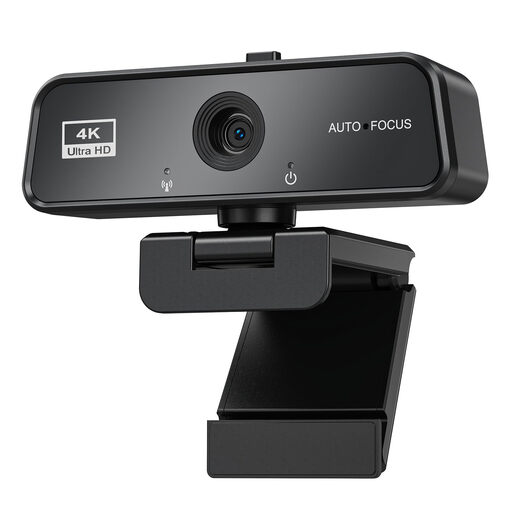
maxineer 4K Webcam with Autofocus
For video calls or streaming, including when you want to show objects as you explain. Specifications include 3840 × 2160 at 30 fps, autofocus, USB 3.0, and a monitor or laptop mount.
View at Joybuy
 No image available
Logitech C922 Pro Stream Webcam
For streaming or recording on your PC. Specifications include autofocus, a 78° field of view and an adjustable desktop tripod that extends up to 18,5 cm. Available image modes are listed as 1080p at 30 fps or 720p at 60 fps.
View at Joybuy
Frequently asked questions
Is a 4K webcam suitable for every small object you want to observe?
No. First, compare the distance to the subject with the focusing range of the exact model. To share the view from an existing microscope, you’ll also need a compatible camera fitting.
How do I show the camera feed in a video call or recording?
In OBS, you can add a webcam as a video capture source in a scene. The virtual camera can send that scene to applications that support webcam input. Test the source, field of view and destination application before your demonstration.
What accessories and setup details should I check before buying?
Check whether you have a suitable mount, any required adapters, lighting and a compatible computer, or whether they’re included with the specific product. Also check that the connection, operating system and software are compatible with your setup.
What should I check if there’s no picture or the camera is faulty?
First, check the connection, operating system and software requirements against the specifications for the exact model. If the product is faulty or its description doesn’t match, contact the seller and have your purchase details ready.
Can I livestream people in my hobby room publicly without asking them?
You can’t assume that you have blanket permission to do so. Germany’s Conference of Independent Data Protection Authorities points out that private individuals may also have data protection responsibilities if they capture other people’s data outside a personal or family context, or make it accessible to others outside that context. Where possible, frame the shot around your experiment, and clarify the details of any recording and sharing in advance.


