What should you look for when buying?
First decide whether close-up stitch detail, a full overhead view or direct streaming to a PC matters most. Then compare the lens, mounting and lighting setup you’ll need to achieve it.
| Buying priority |
What to look for |
Who will find this most important? |
| Show stitches close up |
Check the lens and magnification; test the framing and working distance from your planned camera height. |
If I want to show stitches and thread in close-up, I need suitable close focusing without restricting my hands or tools. Around 31% of consumers prioritise detailed images. |
| Capture an overhead view |
Check the arm’s reach, the visible table area and freedom of movement; compare the frame rate at your chosen resolution. |
If you want to show both hands and your work together, you need an angle that covers the work area without intruding on your sewing space. Around 25% of consumers say a full overhead view is their top buying priority. |
| Balance lighting and focus |
Check the aperture and white balance settings; take a test shot using the light you actually plan to use. |
If I want to control leather colour and the area in focus, I need to match the camera to my studio lighting. Around 19% of consumers prioritise lighting, colour and focus. |
| Record on a PC |
Check the video input, operating system and software compatibility; test the table framing where you plan to set it up. |
For a straightforward stream on my computer, the camera needs to work as a video source in my planned setup. Around 13% of consumers prioritise a PC-based workflow. |
| Keep setup simple |
Check whether your preferred setup needs a specific lens, a stable mount or additional lighting. |
If I want to keep the whole setup simple, I need to consider the mount, lens and lighting as well as the camera body. Around 12% of consumers say the effort involved in getting a ready-to-use setup is their top priority. |
Joybuy products for your sewing table
The Joybuy models below include PC webcams and vlogging cameras for video recording. Check the framing, mounting and room for your hands to move freely with each model at your own sewing table.
 No image available
AOC 4K PRO Webcam
For a PC-based setup at your table; check that the angle covers your work area.
75° viewing angle; USB-A and USB-C; 1080p at 60 frames per second; PDAF autofocus; table tripod according to the product description.
View at Joybuy
 No image available
DJI Osmo Pocket 4 Creator Combo
For filming while moving around your worktable; check that you can mount the camera securely and achieve your preferred framing.
1-inch CMOS sensor; 4K/240fps; 3-axis stabilisation; 2× lossless zoom; 107 GB internal storage; grip with 1/4-inch thread.
View at Joybuy
 No image available
DJI Osmo Pocket 3 Creator Kit
For filming at your table; check that the mini tripod and framing suit your planned camera position.
4K/120fps; 1-inch sensor; 3-axis stabilisation; mini tripod included in the Creator Kit according to the product description.
View at Joybuy
 No image available
Insta360 Link 2C Standard Bundle, Graphite Black
For recording on a PC with the option of an overhead view; check the DeskView framing and how much space it takes up at your sewing table.
4K webcam for PC/Mac; DeskView; PDAF autofocus; 1/2-inch sensor; HDR.
View at Joybuy
 No image available
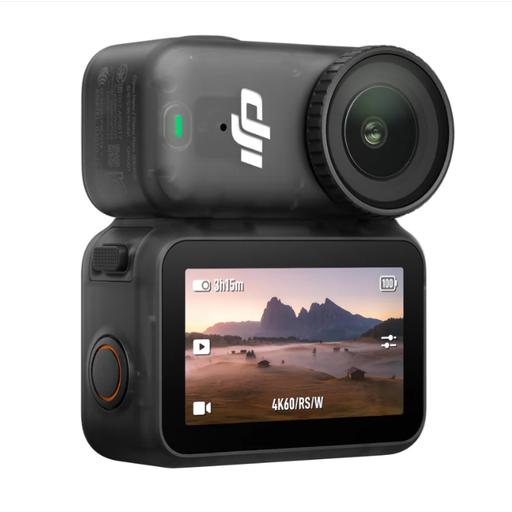
DJI Osmo Nano Standard Combo (64GB)
For a hands-free perspective; check that your chosen mount captures the stitching area without getting in the way of your work.
4K/60fps; 1/1.3-inch sensor; 143° wide-angle lens; RockSteady stabilisation. Magnetic mounting and accessories for hands-free recording are listed.
View at Joybuy
Frequently asked questions
How do I get started with an overhead view on my computer?
Position the camera so that your work and both hands stay in shot as you sew. IPEVO says the V4K outputs USB video; OBS explains how to add a supported video capture device as a source. Check compatibility with your specific system and preferred viewing angle.
What can I do if the seam is sharp but my tools or fingers are out of focus?
Depth of field is shallow at close range. If your camera and lens offer a suitable aperture setting, stopping down further can increase the depth of field; Canon Academy notes that this lets less light reach the sensor. Adjust the lighting and check that the work area is sufficiently sharp with your chosen settings.
How can I prevent the leather colour from changing or banding from appearing in the picture?
Test the white balance with the lighting you actually use. Canon Germany notes that flickering light sources can cause banding; if necessary, try an adjustable shutter speed and record a test sequence. The available settings depend on the model.
What are my rights when buying a camera online from a business seller?
For a typical distance purchase in the EU, you generally have a 14-day right to cancel from the date of delivery; exceptions and possible return costs may apply. The European Union’s Your Europe website distinguishes this right from your statutory rights if goods are faulty, which provide a minimum two-year guarantee for purchases in the EU. A voluntary manufacturer’s warranty is separate.
Can I publish a video if other people are recognisable in it?
In Germany, recognisable images of people may generally only be shared or shown publicly with their consent. The Federal Ministry of Justice and the Federal Office of Justice list statutory exceptions, which depend on the circumstances of each case.


