Close-up tutorial creators
You want to show how you apply paint and the tip of your brush. What matters is suitable framing, reliable focus and a clear view of your work – not just a high resolution figure.


First, choose the camera position and the framing you want. Then check whether that exact model can show your miniature in sharp focus and at a suitable size from the available distance in video mode. A document camera or webcam is more suited to a fixed computer setup; compact cameras and interchangeable-lens cameras are worth considering if you want to record independently or capture close-up details. With every option, test the mount, make sure there’s room for your brush hand, and check the focusing distance.
You want to show how you apply paint and the tip of your brush. What matters is suitable framing, reliable focus and a clear view of your work – not just a high resolution figure.
You need a consistent view of your desk on your computer, and want to operate the camera without constantly interrupting your painting.
You want to record individual painting steps without much set-up, and need to weigh up close-up capability, space on your desk and whether the camera should record without a computer.
On a small painting desk, camera options differ mainly in how they can be mounted, how close they can focus, and whether you record on a computer or independently.
A good fit if: You mainly want to show your hands, brush and work surface on a computer, and have room for the base and arm. IPEVO specifies autofocus from 10 cm and a maximum capture area of 34,2 × 25,5 cm for the V4K PRO.
Keep in mind: You’ll need USB and a compatible computer; the manufacturer’s specifications don’t confirm that brush strokes will appear sharp and large enough from every arm height.
A good fit if: You already record on a computer and occasionally want to switch from filming yourself to filming your painting desk. Logitech describes a Show Mode on the MX Brio that’s activated by tilting the camera.
Keep in mind: Presentation mode alone doesn’t confirm that you’ll get a straight-down view or the close focus your miniature needs.
A good fit if: You want to record without a computer and keep your camera set-up simple. Sony specifies a focus range starting at around 5 cm from the front of the lens for the ZV-1 II; Canon specifies 4K video and a built-in stand for the PowerShot V10.
Keep in mind: A short focusing distance or a built-in stand doesn’t guarantee a suitable overhead view. Check the framing and make sure there’s room for your hand when filming a small subject.
A good fit if: Fine painting details are your priority and you can mount the camera and lens outside your work area. The Sony ZV-E10 II uses an E-mount; the Sony SEL30M35 is an APS-C macro lens with a maximum magnification of 1×.
Keep in mind: Sony specifies a focusing distance of 9,5 cm at minimum focus for the SEL30M35, with only 2,4 cm between the front of the lens and the subject. This can leave less room for your brush and lighting; high magnification also reduces depth of field.
A good fit if: You’re also planning moving shots and can mount the camera suitably for your painting desk. DJI specifies a focus range starting at 0,2 m for the Osmo Pocket 3.
Keep in mind: Stabilisation isn’t a substitute for a suitable fixed overhead view. Check that the miniature appears large enough in the frame from your planned filming distance.
| Priority | What to check before buying | Who it matters most to |
|---|---|---|
| Visible painting details | Test the miniature and brush tip in video mode from your planned camera position; check the focus specifications for the exact model. | If I want to show the brush tip and how paint is applied, the subject needs to appear sharp and large enough from my actual filming height. Around 29% of consumers put visible painting details first. |
| Clear space for painting | Measure the footprint and height of the base, arm or mount; check whether your painting hand blocks the view. | If you work at a cramped desk, you need a camera angle where the mount and your hand block as little of the work surface as possible. Around 23% of consumers prioritise clear space for painting and a usable angle. |
| Lighting and colours | Film under your usual desk lighting; check the available white balance and exposure settings. | If I want to compare painting steps between recordings, I look for consistent lighting and settings. Around 18% of consumers prioritise lighting and colour that make it easy to see what’s happening. |
| Computer workflow | Check the connection, operating system and recording software for the exact model; do a complete test run. | If you want to use a desk camera with a computer and avoid interrupting your painting too often, test the entire recording set-up in advance. Around 18% of consumers prioritise a straightforward computer workflow. |
| Independent recording | Check what’s included and how the camera is mounted; test storage and power in your planned video mode. | If I want to record without a connected computer, the entire set-up needs to suit the length and position of my recordings. Around 12% of consumers prioritise independent recording and the equipment needed for it. |
High resolution won’t fix framing that’s too wide or a subject that’s closer than the minimum focusing distance.
Record a short clip of a typical miniature from your planned filming height. Check the size and sharpness of the subject at the output size you intend to use.
At minimum focus, the Sony SEL30M35 leaves just 2,4 cm between the front of the lens and the subject, according to Sony. This can restrict the room available for your brush and lighting; high magnification also reduces depth of field.
Choose your distance based on the freedom of movement you need and how you’ll position your lighting – not just the maximum magnification.
A webcam that tilts down or a built-in stand doesn’t, by itself, prove that you can position the camera directly above your miniature.
Mark out the camera position and the space you need for your brush hand on the desk. Check the mounting options before choosing a model.
An interchangeable-lens camera needs a compatible lens; a USB document camera needs a suitable computer connection.
Check the camera, lens, mount, connection and storage separately for each option.
The V4K PRO is a USB document camera for an adjustable desk view on a computer.
The MX Brio is a webcam for computer recording, with Show Mode for occasional desk views.
The ZV-1 II has a fixed zoom lens; the ZV-E10 II is an E-mount interchangeable-lens camera, for which you can choose a suitable macro lens separately.
The PowerShot V10 is a small camera with a fixed wide-angle lens and a built-in stand.
The Osmo Pocket 3 is a small gimbal camera for people who are also planning moving shots.
This selection includes compact video cameras and PC webcams. For each specific model, check that the focus, framing and mounting options suit your miniature and the space available.
 No image available
Described as a compact video camera for independent recording; check the framing and focus from your planned distance to the miniature.
The product description specifies a 1-inch CMOS sensor, 4K video and a 20-mm wide-angle lens. 4K/240fps is specified for slow-motion mode; 3-axis gimbal stabilisation is also listed.
 No image available
The clip may be useful for your planned camera position. Before buying, check whether it lets you angle the camera so that your hand and miniature stay in frame.
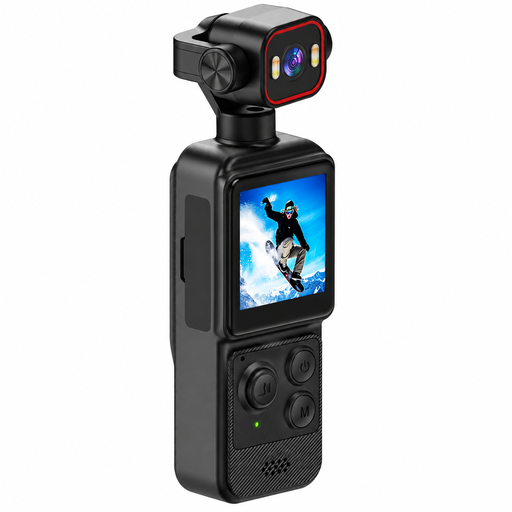
The product title specifies a 1,54-inch display and a 140° wide-angle lens. The product description specifies 4K video, app control and two built-in LED lights.
 No image available
The product description specifies autofocus; test whether the subject stays sharp from your planned filming position and whether the rotatable lens gives you the angle you want.
The title specifies Wi-Fi, 64 MP, a 1,72-inch touchscreen, Type-C and a tripod. The lens is described as rotating through 330°.
 No image available
Designed for recording on a computer; check whether the adjustable mount gives you the view of your painting desk you need at your workstation.
The product description specifies 4K UHD video, HDR and automatic light correction. It also lists a 99° field of view and a mount with 180° tilt and 360° rotation.
 No image available
Described as a webcam for PC recording; check focus and framing with your miniature from the camera’s actual position.
The product title specifies a Sony IMX363 sensor, PDAF autofocus, dual microphones, USB-A/USB-C and a lens cover.
Mark out your planned camera position and film a typical miniature while moving your brush hand. Review the clip at the output size you intend to use, and compare the distance you need with the specifications for that exact camera model or lens. Strong macro magnification gives you a shallow depth of field.
According to IPEVO, the V4K PRO has USB-A-UVC. The OBS Project explains how to add supported webcams and other video devices as a recording source. Check the connection and operating system, then make a test clip with your specific set-up.
Record a test under your usual lighting and check the white balance and exposure settings on the specific device. Logitech lists these controls for the MX Brio; this doesn’t guarantee colour accuracy.
For a consumer purchase in Germany, the seller is generally responsible for the statutory guarantee. The Verbraucherzentrale specifies a two-year period for goods; for goods ordered online, you generally have a 14-day right to cancel from the date you receive them. Voluntary manufacturer warranties are separate. The exact terms and any exceptions depend on the purchase.
No special permission linked to buying a camera is specified for filming your own painting desk. If other people can be recognised in the recording or images are published, this needs to be considered separately: § 22 KunstUrhG governs the publication of images of people. The Federal Commissioner for Data Protection and Freedom of Information explains that processing personal data requires a legal basis under Art. 6(1) GDPR. Which rules apply in a particular case depends on how the recording is made and used.