What should you look for when buying?
First, check whether you can see your camera’s existing display clearly. If not, plan the monitor position, signal path and power supply alongside the playing area.
Keep using the camera display
A good option if: you can reliably check the framing and game components from your seat.
Consider: You won’t need another device on the table, but a camera positioned at an awkward angle can make the display hard to see.
Compact HDMI monitor
A good option if: you need a preview that’s easier to position or focus and exposure aids, and your camera outputs a compatible HDMI live view in your chosen recording mode.
Consider: The mount, HDMI cable and power supply all take up space. The stated peak brightness alone won’t tell you how easy the display will be to read at your table.
Monitor with recording function
A good option if: you specifically want to record externally as well as preview the image, and the signal, storage media and connections suit your workflow.
Consider: A recorder and storage media need extra space and setup. You don’t need this function just to check the image.
| What you need |
What to check before buying |
Who it matters most to |
| Framing from your seat |
Visibility of the existing display; monitor position and mounting; HDMI format supported in your chosen camera mode. |
When I’m sitting at the game table, I want to see the edges of the frame, my hands and the cards without having to turn round to look at the camera. Around 36 % of consumers say framing is their main concern. |
| Checking focus on small pieces |
Specified focus aids such as peaking; a visual check using the actual cards, tokens or figures. |
When I’m showing small print or tokens, I want to check focus directly in the live view. Around 29 % of consumers say checking focus is their main concern. |
| Bright and dark areas |
Which exposure displays the exact model offers; whether you can read them easily where you plan to use it. |
When bright cards and darker playing areas are in the frame together, I want to judge the exposure more accurately. Around 21 % of consumers say exposure control is their main concern. |
| Power and cable management |
Compatible battery types and power connections; what’s included and how to route cables away from the playing area. |
When I’m filming longer explanations, I want to plan the power supply without running cables across the game. Around 14 % of consumers say power and cable management are their top priorities. |
Portable HDMI displays at Joybuy
These portable displays offer HDMI-based preview options if you’re considering a larger screen that you can position differently on a small desk. Before buying, check that your camera outputs a compatible HDMI live view in your chosen recording mode, and that the connections, mounting and power supply suit your setup.
 No image available
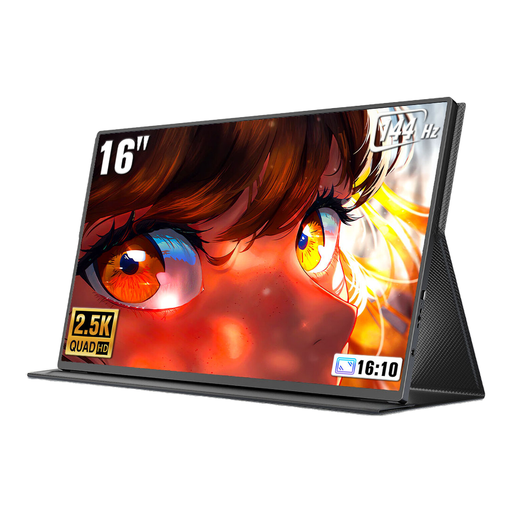
UPERFECT 16″ 2K 144Hz Portable Monitor
A larger display can make it easier to check the preview from your seat, but it takes up more space on a small table than a compact camera monitor.
16 inches; 2560 × 1600 pixels; 16:10 aspect ratio; Mini-HDMI; USB-C; VESA compatible.
View at Joybuy
 No image available
ARZOPA A1 15.6 Inch Portable Monitor
This larger HDMI display is worth considering if you want a preview that you can position differently. Make sure you allow for the extra desk space.
15.6 inches; 1920 × 1080 pixels; IPS panel; HDMI port and HDMI cable listed; stand mentioned in the product title.
View at Joybuy
 No image available
UPERFECT Portable Monitor 15.6″, 100% sRGB
If you want to position or mount the display flexibly on your table, check the stand and mounting options listed. The 15.6-inch size needs room.
15.6 inches; 1920 × 1080 pixels; Mini-HDMI; adjustable stand; VESA compatible; 100% sRGB.
View at Joybuy
Frequently asked questions
Does every camera show an image on an HDMI monitor while recording video?
No, this can’t be guaranteed across the board. Sony documents different displays in standby and while recording, depending on the camera model and settings. Check the manual for your recording mode and test the live view with a suitable cable.
Will an HDMI camera monitor automatically record my board game video?
No. An HDMI input and preview don’t mean the monitor records files. If you want to record externally, check out a monitor-recorder model and make sure its supported signals and storage media meet your needs. The Blackmagic Design Video Assist range includes recording functions.
What should I check before a longer recording?
Check the mount from your seat, route the HDMI cable away from the playing area, and find out which batteries or external power sources work with the specific model. Also test the recording mode you plan to use before you start your explanation.
What rights apply when buying a monitor online from a trader?
For a typical online purchase from a trader in the EU, you generally have a 14-day right to cancel from the date of delivery. Exceptions and the rules on return costs also apply. Your Europe, the European Union’s portal, distinguishes this right from your statutory rights if goods are faulty and from voluntary manufacturer warranties.
What should I know about labelling and disposal?
According to Your Europe, CE marking is only required for products covered by relevant harmonised EU rules that require it; it isn’t an independent quality mark. The German Environment Agency advises that old electrical appliances in Germany must not go in household waste, but should be taken to a suitable collection or take-back point.


