Writers filming close-up details
If you’re filming fine pen or brush strokes, you’ll want to check focus as you record. Magnification and peaking can help, provided your camera outputs a suitable live feed.


If you can’t reliably check your strokes and lettering on the camera screen while filming at your desk, a well-positioned HDMI monitor with magnification or peaking, along with exposure tools, could be a useful option. First, check that your camera outputs a suitable HDMI live feed in your chosen recording mode. Then consider viewing angle, space, power and the monitoring tools you need for your work.
If you’re filming fine pen or brush strokes, you’ll want to check focus as you record. Magnification and peaking can help, provided your camera outputs a suitable live feed.
When filming white pages under artificial or window light, exposure tools can help you retain detail in bright areas. According to Canon Europe, a histogram can indicate when highlights are overexposed.
If your camera is positioned above the paper, you need a preview you can see from your writing position without getting in the way of your workspace or workflow. Make sure the mounting and power arrangements suit your setup.
A good fit if: You can clearly see the framing and focus from where you write, and the camera’s features are enough to check exposure.
The trade-off: You won’t need another device, but looking at the camera screen may be awkward if the camera is mounted above the paper.
A good fit if: You want to view the preview beside your writing space and check fine strokes using magnification or peaking.
The trade-off: The power supply and HDMI compatibility need to suit the monitor, camera and recording mode you’ve chosen.
A good fit if: You sit further from the screen or strong ambient light makes it difficult to see.
The trade-off: A larger display takes up more space, and a high brightness rating alone doesn’t prove it will be better in a normally lit room.
| Buying priority | What to check before buying | Who does this matter to most? |
|---|---|---|
| Compatible HDMI live feed | Check your camera manual, HDMI output format and whether internal recording can run at the same time in your chosen video mode. Support for a 4K input signal doesn’t automatically mean the display itself is 4K. | If I want to use my existing camera for the preview, its signal needs to work with the monitor in recording mode. Around 29% of consumers prioritise HDMI compatibility. |
| Focus on fine lettering | Check whether the specific model offers magnification or peaking, and whether you can see the display clearly from your writing position. Peaking is no substitute for checking a test recording. | If you want to check your pen position and the edges of fine strokes as you write, you need a focus display that’s easy to see. Around 29% of consumers make this a priority. |
| Exposure for paper and ink | Compare the tools available on the specific model, such as a histogram, waveform or false colour, and check a test recording under your actual lighting conditions. | If I’m filming white pages and dark ink together, I want to be able to check the bright areas of the image. Around 24% of consumers prioritise exposure monitoring. |
| Position and power | Plan the screen position, mounting and cable routing together. Check which power supply and accessories are included with the specific offer. | If you film for longer periods at a permanent writing station, you need a preview that’s easy to read and a suitable power source. Around 18% of consumers focus on their workspace setup. |
A monitor may support a 4K input signal and still have a lower-resolution panel. For the FEELWORLD LUT5, the manufacturer lists a 4K input signal at 30 Hz and a Full HD panel.
Compare the input format and native panel resolution as separate specifications.
According to the manufacturer, some control and touch autofocus features on the Portkeys LH5P II are limited to selected cameras.
Check that the feature works with your exact camera model and the required connection before factoring it into your choice.
According to the manufacturer, the Atomos Shinobi II has no built-in battery. Whether a battery is included with the FEELWORLD F5 PROX depends on the offer variant.
Check the contents and power connections of the specific variant before planning a longer shoot.
The Shinobi range is worth considering for a compact HDMI preview. The Shinobi II combines a 5.2-inch panel with focus and exposure tools.
According to the manufacturer, the F5 PROX offers focus and exposure tools. The LUT5 is described as having a high brightness rating for very bright viewing conditions.
According to the manufacturer, the LH5P II combines a 5.5-inch HDMI display with peaking, waveform and optional control features.
The DC-550 Pro II is worth considering for setups where the camera and workflow require HDMI signals up to 4K at 60 Hz.
This selection from Joybuy includes HDMI monitors that could be used as an external display at your writing desk. Before buying, check your camera’s output and recording mode, and make sure the display size suits your workspace.
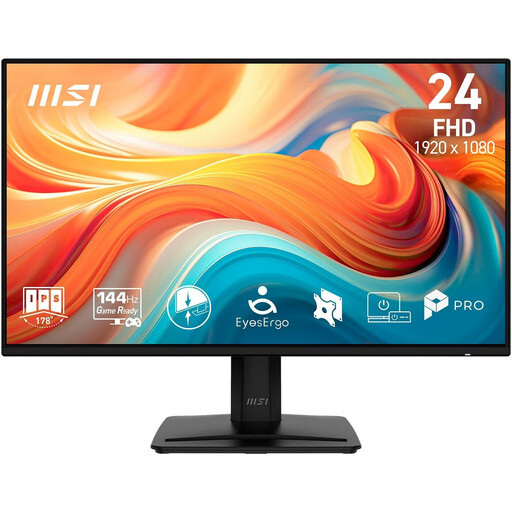 No image available
For an external display at your desk; check signal compatibility with your camera.
Full HD, IPS, 144 Hz; HDMI, DisplayPort and VGA.
 No image available
Using it as a preview at your desk requires a compatible HDMI signal from your camera.
Full HD, IPS, 120 Hz; HDMI and VGA. VESA 100 × 100 mm, tiltable.
 No image available
The large display may be useful if you sit further away; make sure you have enough space at your writing desk.
5120 × 2160 pixels, IPS, 100 Hz; HDMI, DisplayPort and USB-C PD 65 W. Height-adjustable.
 No image available
For a separate display at your desk; check that the connections are compatible with your camera’s HDMI output.
Full HD, IPS, 120 Hz; HDMI and D-Sub. VESA 100 × 100 mm.
 No image available
The height-adjustable design may be useful when positioning the monitor at your desk; check that the connections work with your camera.
Full HD, IPS, 100 Hz, 1 ms MPRT; height-adjustable.
No, the HDMI connection alone won’t tell you that. Sony Deutschland documents restrictions for certain cameras depending on the recording format and settings; Canon lists recording combinations for the EOS R50 where internal recording cannot be used alongside external output. Check your camera’s manual for the model and recording mode you plan to use.
If available, use a histogram and check a test recording under your actual lighting conditions. Canon Europe explains that a graph cut off at the right edge may indicate lost detail in bright areas of the image. The monitor’s brightness rating alone won’t answer this exposure question.
Plan for a power source suited to your monitor model, a secure screen position and a compatible HDMI connection. Atomos specifies an NP-F battery or USB-C PD for the Shinobi II, and confirms it has no built-in battery; whether a battery is included with the FEELWORLD F5 PROX depends on the offer variant.
Products covered by relevant EU harmonisation legislation must carry a CE marking when placed on the EU market. The Bundesnetzagentur recommends checking details such as the marking and manufacturer information; this does not verify a specific model. A CE marking also says nothing about image quality or whether the monitor is suitable for your camera.