If you find it hard to judge the fine pen tip while filming, a well-positioned monitor with focus magnification or peaking can be a useful addition. When window light changes, waveform or false colour can also help you assess exposure. A larger display makes it easier to keep an eye on the paper and your hands, but takes up more space. Before buying, check your camera’s video signal, mounting options and power supply. If your camera’s screen already does the job from where you work, you can keep using it.
Who can benefit from a camera monitor?
Calligraphy teacher filming alone
If you’re not standing right behind the camera while writing, you’ll still want to see whether the pen tip is in focus and stays in frame. An additional monitor can make it easier to check focus. Fotonomaden describe the benefits of an external monitor for close-ups.
Filming in changing window light
You want to assess bright areas of paper and darker lettering, even as the daylight changes. Exposure tools and a monitor with adjustable brightness are important features to consider.
Teacher filming longer sessions
For longer recordings, you’ll need to mount the monitor securely and power it appropriately. Batteries, external power and what’s included can vary by model and product option. For example, NEEWER sells the F700 both with and without a battery.
What should you look for when buying?
Your existing camera screen
A good fit if: you can already check the pen tip, frame edges and exposure from where you work.
Trade-off: You won’t need an extra device or cable. However, a small screen can make it harder to check the image if your camera is in an awkward position.
Compact HDMI monitor
A good fit if: you have limited space above your desk and mainly want to check focus and exposure.
Trade-off: Size, brightness rating and controls vary by model. Check camera compatibility and any accessories you’ll need.
Larger 7-inch monitor
A good fit if: you want to see the paper, your hands and the edges of the frame together from a little further away.
Trade-off: The monitor and mount take up more space. With the NEEWER F700, whether a battery is included depends on the product option you choose.
The figures show the proportion of consumers who prioritise each of the concerns listed for this calligraphy recording scenario.
| Priority |
What to look for when buying |
Who it matters most to |
| Focus on the pen tip |
Check whether the specific monitor offers focus magnification or peaking, and whether you can see the image from where you write. Atomos lists both tools for the Shinobi II. |
When I need to judge the fine pen tip accurately as I write, a clearly visible area of focus is important. Around 31% of consumers put focus checking first in this recording scenario. |
| Exposure in window light |
Check whether the monitor offers waveform or false colour, and whether you can adjust its brightness to suit your workspace. FEELWORLD lists a maximum of 3000 cd/m² for the LUT5; NEEWER lists 2000 Nit for the F700. These are manufacturers’ figures, not measurements of the light coming through your window. |
When daylight changes, I want to assess bright areas of paper and dark lettering rather than relying on screen brightness alone. Around 31% of consumers put exposure checking first. |
| Seeing the paper and your hands |
Compare the screen size with your viewing distance, and plan a mounting position that won’t get in the way of your writing area. NEEWER describes the F700 as a 7-inch monitor; Atomos lists the Shinobi II as a 5-inch model. |
When I want to see the paper, my hands and the frame edges together from where I’m sitting, I need enough screen space without cluttering my desk. Around 23% of consumers put this overall view first. |
| Power and set-up |
Check whether a battery and accessories are included, and what external power options are supported. Atomos lists an NP-F/L-Series battery slot and USB-C-PD power for the Shinobi II; NEEWER sells the F700 with and without an NP-F750 battery. |
For a longer lesson, I want to connect the monitor appropriately and make sure it can stay powered for the planned recording time. Around 15% of consumers put power and set-up first. |
Common buying mistakes
-
Assuming a high Nit rating means the paper is correctly exposed
Screen brightness and exposure tools are separate features. A monitor that’s easy to read won’t automatically show you whether the camera image is correctly exposed.
Check how easy the screen is to read in your workspace. For changing window light, also check which exposure displays the monitor offers.
-
Assuming every camera can be controlled from the monitor
Atomos requires a compatible camera for touch focus and camera control. The connection may also require additional cables.
Check your camera model, the control features you want and the connection against the compatibility information for the exact monitor you’re considering.
Depending on the connection, you may need an additional compatible cable.
-
Assuming a battery and accessories are included
NEEWER sells the F700 in options both with and without a battery. A battery slot doesn’t mean a battery is included with the specific offer you’re looking at.
Check the exact option and what’s included before you buy. Then make sure the power supply will suit your planned recording time.
Depending on the option and set-up, you may need a battery, compatible cable or mount.
Key brands at a glance
Atomos
The Shinobi range includes compact monitors for checking your image. The Shinobi II is a specific model with an HDMI input, as well as focus and exposure tools.
- Atomos lists focus magnification, peaking, waveform and USB-C-PD power for the Shinobi II.
- According to Atomos, touch focus and camera control only work with compatible cameras. Check compatibility with your camera model.
FEELWORLD
The LUT5 is a compact model for checking your image in bright surroundings.
- FEELWORLD lists a 5.5-inch display, a maximum brightness of 3000 cd/m², HDMI input and output, and a light sensor for the LUT5.
- The manufacturer’s claim about visibility in sunlight isn’t an independent test, and doesn’t tell you how easy the screen will be to read from every angle by a window.
NEEWER
The F700 is a larger 7-inch option for checking the paper and your hands together in the frame.
- NEEWER lists false colour, peaking, waveform and several power options for the F700.
- The German product page lists options both with and without a battery, so check what’s included with the specific offer you’re considering.
Portkeys
The LH5P II combines a compact 5.5-inch display with monitoring tools and camera control that depends on the model.
- Portkeys lists features for the LH5P II including peaking, waveform, false colour, and HDMI input and output.
- According to Portkeys, control features depend on the camera and connection type. Check compatibility with your set-up.
SmallHD
The Cine 5 is a compact option if its controls and monitoring tools suit the way you work.
- SmallHD lists a 5-inch display, a maximum brightness of 2000 Nit and PageOS focus and exposure features for the Cine 5.
- Extra professional features aren’t automatically useful for a simple calligraphy recording. What matters is whether you need them for your own set-up.
Joybuy product selection
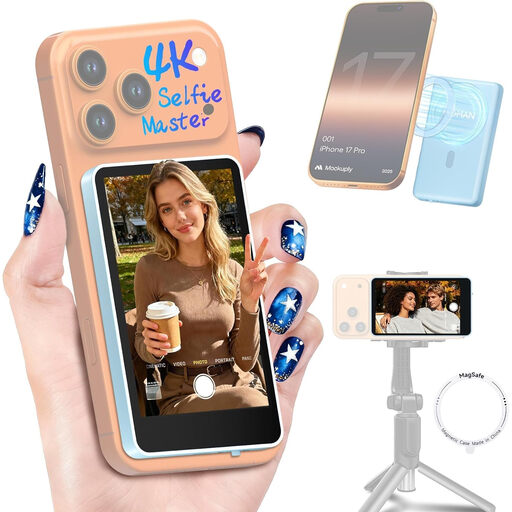
This selection is for smartphone recordings using the rear camera with a wireless preview. It isn’t a selection of traditional HDMI monitors for separate cameras.
 No image available
Moman M4 Phone Vlog Selfie Monitor for iPhone 7-18 and Android (Blue)
For checking your image wirelessly while filming with a smartphone’s rear camera. This use only partly covers what a conventional HDMI camera monitor for a separate camera can do.
The product description lists a real-time preview, screen rotation, mirroring and brightness control. The battery is said to last for up to 3 hours.
The remote control described can take photos and start or stop recordings from up to 50 m away. According to the product description, the device isn’t compatible with Google Pixel devices.
Joybuy
Frequently asked questions
Does the monitor’s screen resolution need to match my camera’s recording resolution?
No, not necessarily. Atomos lists a 1920 × 1080-pixel display for the Shinobi II, while also listing 4K HDMI input formats. Check your camera’s specific output format, including the frame rate, against the input list for the monitor you’ve chosen.
Can I simply connect the monitor and use it to focus the camera too?
For the monitor to display the image, the video signal and connection need to be compatible. Camera control and touch focus are additional features. Atomos limits these features to compatible cameras and lists additional accessories for some connections, so check the information for your camera model.
What should I check about power for longer calligraphy recordings?
Check whether the product option you’ve chosen includes a battery and which external power options it supports. Atomos lists NP-F/L-Series and USB-C-PD for the Shinobi II. NEEWER’s German product page offers the F700 in options both with and without a battery.
What rights do I have if a monitor I’ve bought is faulty?
For goods bought from a trader in the EU, Your Europe explains that you’re entitled to a legal guarantee of at least two years from the date you receive the goods. This is separate from any additional manufacturer’s guarantee. Online distance purchases are also generally covered by a 14-day right to cancel, subject to exceptions. The specific circumstances can determine whether it applies.


