Close-ups of fine coin details
If you film a coin’s design and lettering close up, a larger preview helps you check that the focus is on the detail you want. Focus peaking can make it easier to check sharpness.


For close-up shots of coins, focus peaking and exposure tools such as a histogram, waveform or false colour are useful. In direct window light, screen visibility matters too. A compact 5-inch monitor takes up less space, while a 7-inch model may be easier to see from further away when you’re presenting. Before you buy, check the camera signal, power supply and what’s included: a monitor won’t eliminate reflections on the coin.
If you film a coin’s design and lettering close up, a larger preview helps you check that the focus is on the detail you want. Focus peaking can make it easier to check sharpness.
In window light, you need to be able to see the monitor and assess bright areas on shiny coins. Screen brightness and exposure tools serve different purposes.
If you’re showing your collection to camera yourself, make sure the monitor is easy to see from where you’ll be presenting and can be mounted securely. Remember to plan for the power supply you’ll need during filming.
First, decide where you’ll need to view the screen from. Then check that the focus and exposure tools, along with the connections, are suitable for your camera and filming setup.
| What matters | What to check before buying | Who it matters most to |
|---|---|---|
| Sharpness of fine coin details | Check whether the specific model offers focus peaking and, if needed, image magnification. | If I’m filming a coin’s design and lettering close up, I want to be able to check the focus directly on the detail. Around 36% of consumers would put the sharpness of fine coin details first. |
| Screen visibility and exposure | Check the maximum screen brightness separately from tools such as a histogram, waveform or false colour. | When filming shiny coins by a window, I want to check the screen and exposure separately. Around 29% of consumers would prioritise screen visibility and exposure in window light. |
| Framing while presenting | Check the screen size, viewing distance and how it can be mounted on your table. | When I’m presenting my collection, I need to see the framing from where I’m standing too. That’s why around 21% of consumers prioritise checking the image while presenting. |
| Connections and power supply | Check that the camera signal, connections, power source and what’s included match the version you’ve chosen. | For a straightforward setup, I want to know that the camera signal, power supply and connections are all compatible. Around 14% of consumers would put connections and power first. |
A monitor may accept certain 4K signals but still have a lower-resolution panel. Atomos, Portkeys and NEEWER each list a resolution of 1920 × 1080 pixels for the Shinobi II, PT5 II and F700 respectively; references to 4K relate to supported input signals.
Check the panel resolution and the camera signals it accepts separately.
Maximum brightness describes the screen, not reflections on the coin’s surface. Exposure tools help you assess the image, but they won’t change the window light or reflections on the coin.
Check screen visibility and exposure separately, and test the setup with your own coins.
Power options and what’s included vary by model and version. According to Atomos, the Shinobi II’s additional camera control requires a supported camera and the right connection.
Before buying, check the specific version against your camera connection, video signal, power source and planned filming time.
The PT5 II is a compact HDMI option for checking focus and exposure close to the camera.
According to Atomos, the Shinobi II combines a compact display with tools for checking focus and exposure.
The F700 has a larger screen, making it a good option if you want to check the framing at your coin table from a little further away.
The LUT7 is another 7-inch option if you’d prefer a larger screen for your setup.
The options below range from a smartphone preview monitor to larger displays. For your camera setup, check that your camera’s signal and connections are compatible with the model, and that its size, power supply and positioning work for your table.
 No image available
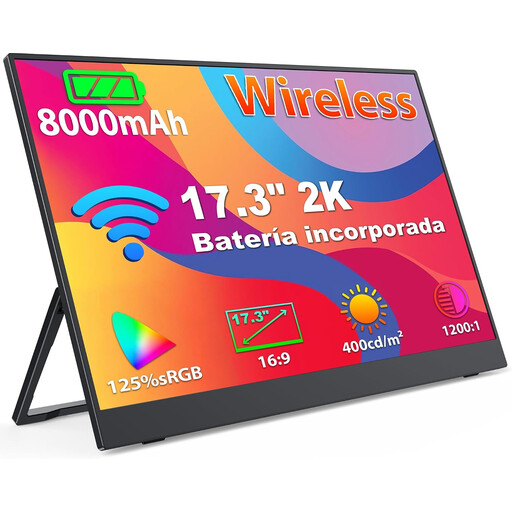
For a mobile setup with a compatible smartphone, laptop or PC. Before using it with a camera, check that the signal and connection are compatible.
Specifications include a 1440p IPS panel with 125% sRGB, a built-in 8000-mAh battery, and support for AirPlay and Miracast.
VESA mount support is listed.
 No image available
A large, stationary display option if you want to check the framing from further away. Check whether your camera signal can connect to the HDMI input.
Specifications include a 32-inch VA display, 4K UHD, 60 Hz, HDR10+, 400 cd/m² and an HDMI input.
The stand is height-adjustable and tiltable; VESA mounting is also listed. According to the product description, the monitor weighs 7 kg with the stand and needs mains power.
 No image available
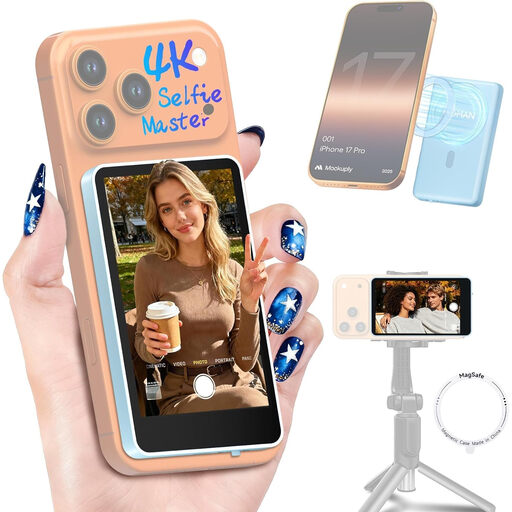
For previewing footage while filming with the rear camera of a compatible smartphone. The product description says this model isn’t compatible with Google Pixel devices.
Features listed include a real-time view from the smartphone’s rear camera, screen rotation, brightness control, a 1300-mAh battery and a remote control.
The description says it attaches magnetically to the smartphone.
 No image available
A larger, stationary display option if you want to check the framing from where you’ll be presenting. Before you buy, check that the camera signal is compatible with the monitor’s connections.
Specifications include an anti-glare 27-inch IPS panel with 2560 × 1440 pixels, 60 Hz and 350 cd/m², plus HDMI and DisplayPort connections.
The stand can be adjusted for height, tilt, swivel and pivot; VESA mounting is also listed. According to the product description, the monitor weighs 6.8 kg with the stand and needs mains power.
Not necessarily. Atomos lists a 1920 × 1080-pixel monitor panel for the Shinobi II, Portkeys for the PT5 II and NEEWER for the F700, even though these models accept certain 4K HDMI signals. Check your camera’s output signal and use focus tools to inspect fine details: a 4K input isn’t the same as a 4K panel.
Mount it so you can see the framing and focus from where you’ll be presenting, without obscuring the camera or coins. During a test recording, check the focus and exposure tools and reposition the screen if reflections are distracting. The mount and cables need to be compatible with your camera and monitor model.
Check the battery, cables and what’s included with the specific version. Atomos says the Shinobi II has no built-in battery and can be powered via NP-F or USB-C PD. NEEWER offers the F700 without a battery or with one; FEELWORLD’s standard package description for the LUT7 doesn’t list a battery.
According to the Verbraucherzentrale, online purchases generally come with a 14-day right to cancel; you must notify the retailer that you wish to cancel. For faulty goods, statutory warranty rights against the seller are separate from a voluntary manufacturer’s warranty. The European Union’s consumer information states that covered purchases of goods have a minimum two-year statutory guarantee; check the terms and any possible exceptions for your specific purchase.