For a small drawing desk, a compact HDMI monitor that’s easy to mount makes sense if you can check your camera’s live feed in the recording mode you’ll actually use. Then choose based on viewing position, focus and exposure aids, and power options. A larger display, or one described by the manufacturer as brighter, isn’t automatically the best fit for a limited workspace.
Who can benefit from a camera monitor?
Drawing instructors filming close-ups
If you want to check fine lines and paper sharpness while recording, look for an easily accessible preview and focus aids that are available on the specific model. Atomos and Portkeys list relevant monitoring features for the models mentioned.
People filming at a cramped desk
If the monitor, mount and cables need to stay clear of your drawing area, the size of the unit, how it attaches and how the cables are routed all matter. The models described differ in their design and the setup they require.
People filming longer sessions
If you record longer drawing sessions, decide in advance how the monitor will be powered and check what’s included in the specific package. Atomos, Portkeys and NEEWER describe different power options and package contents.
What should you look for when buying?
First, check that your camera and monitor can transmit a live feed in your chosen recording mode. Then consider the space it takes up, its image aids and power options to find a monitor that suits your desk and the length of your planned sessions.
| What to consider |
What to check before buying |
Who it matters most to |
| Camera connection |
Check the HDMI connection, supported resolution and frame rate against your camera and recording mode; check control functions separately. |
If I need a reliable live feed while recording, I check that the camera output and monitor input work together. Around 26% of consumers put camera connectivity first. |
| Space and viewing position |
Consider the unit’s dimensions, mounting options, bracket and cable routing in the space where you plan to position the camera. |
If I want to keep paper and hand movements clear on my small desk, I need a preview I can see easily that doesn’t encroach on the drawing area. Around 26% of consumers prioritise clear workspace and a suitable viewing position. |
| Focus and detail |
Check whether the specific model has focus peaking or magnification, and whether you can see the display clearly from where you sit. |
If I want to check the pencil tip and fine lines on screen, a usable focus aid matters; it doesn’t replace checking the actual camera image. Around 21% of consumers put detail and focus checks first. |
| Power |
Check the battery, charger, power adapter and supported power options for the specific model and package. |
If I’m filming a longer drawing session, I want to decide on a power source before setting up and plan for the right connections. Around 16% of consumers prioritise uninterrupted power. |
| Lighting and exposure |
Plan the monitor’s position and any potential shadowing; only prioritise a histogram or waveform if you need these aids. |
If the light at my desk changes, I want to see the camera image clearly and assess the exposure accurately. Around 11% of consumers prioritise readability and exposure aids in changing light. |
Avoiding common misconceptions
-
Assuming “4K HDMI” means a 4K display
A monitor can accept a UHD signal and still have a Full HD panel. For the Portkeys PT5 II, the manufacturer lists HDMI input up to UHD 30p and a display resolution of 1920 × 1080.
Check signal input, frame rate and panel resolution separately against your camera’s recording mode.
-
Assuming the model name tells you whether it comes with a battery or power adapter
Power options and what’s included vary by model and package. Atomos says the Shinobi II has no built-in battery, while FEELWORLD lists different F5-PROX accessory options.
Depending on the offer, you may need to buy a suitable battery, charger or power adapter separately. Check the package contents and the power source you’ll need before buying.
Compare the details of the specific offer with your planned power setup.
-
Assuming every HDMI connection lets you control the camera
An HDMI live feed and controlling a camera through the monitor are separate functions. Atomos lists camera control separately for supported models.
If remote control matters to you, check support for your exact camera model and the control connection required.
Brands to consider
Portkeys
The PT5 II is a compact HDMI option for viewing a preview at your desk.
- Portkeys lists a 5-inch, 1920 × 1080 display for the PT5 II, along with peaking, a histogram and HDMI input and output. Its stated maximum brightness is 500 nits.
- Accepting a UHD signal up to 30p doesn’t make the panel a 4K display.
FEELWORLD
The F5 PROX combines a 5.5-inch display with focus and exposure aids.
- FEELWORLD states that the F5 PROX offers 1600 nits, along with peaking, a histogram and a waveform.
- The brightness figure comes from the manufacturer; it isn’t an independent measurement taken at a drawing desk. Accessories and battery may vary by version.
Atomos
The Shinobi II is a 5.2-inch monitor with monitoring aids and additional control for supported cameras.
- Atomos lists a 1920 × 1080 display, 1500 nits, focus peaking and power via NP-F or USB-C PD.
- There’s no built-in battery. Camera control depends on the camera model being supported.
NEEWER
The F500-PRO version described on the German manufacturer’s website is a 5.5-inch HDMI option supplied with an NP-F750 battery.
- NEEWER lists HDMI input and output, focus and exposure aids, and several power options.
- Different brightness figures are listed for F500-PRO offers. Check the exact version and don’t base your choice on this figure alone.
Related products at Joybuy
The Joybuy products below range from smartphone monitors to a 32-inch desktop monitor. Before buying, check that the device is suitable for your camera or smartphone and fits the available space on your drawing desk.
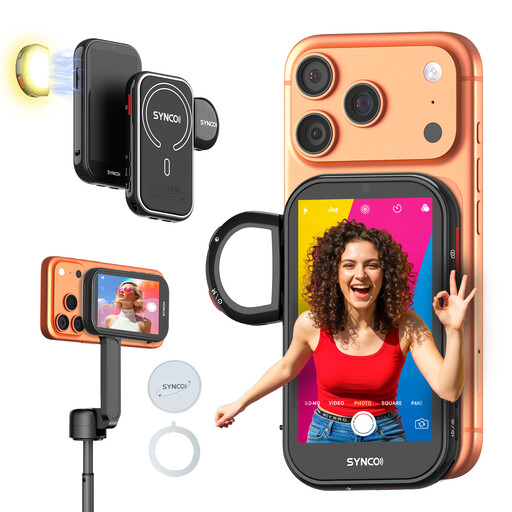 Image unavailable
SYNCO Wireless AI Selfie Monitor Screen
An option if you’re filming with a compatible smartphone and want to monitor its image while recording; it isn’t a dedicated HDMI monitor for a separate camera.
The product description lists a 4.02-inch screen, wired mirroring, wireless monitoring, gesture recognition and built-in fill light.
View at Joybuy
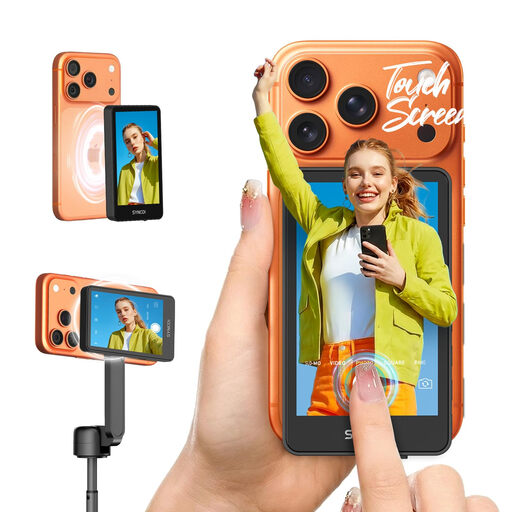 Image unavailable
SYNCO XView M4 TOUCH
A useful option if you want to monitor smartphone footage from a little further away; check it’s suitable for your recording device and planned setup.
The product description lists a 4-inch touchscreen and wireless framing from up to 50 m away. The product title lists iPhone and Android smartphones as compatible devices.
View at Joybuy
 Image unavailable
Samsung M8 M80F (2025), 32-inch
As a large desktop monitor, this model takes up a lot of space on a small drawing desk; measure the space available before buying.
The product details list a 32-inch VA display with 3840 × 2160 pixels, 60 Hz and an HDMI input. Its stated width is 713.4 mm; an HDMI input alone doesn’t confirm compatibility with your camera’s live feed.
View at Joybuy
Frequently asked questions
Is a 4K HDMI input enough to let me see my drawing on a 4K display?
No. A 4K HDMI input doesn’t prove that the display itself has 4K resolution. The manufacturer says the Portkeys PT5 II accepts up to UHD 30p, but it has a 1920 × 1080 display. Check the input format and panel resolution separately.
What should I consider when setting up a monitor for a longer drawing session?
Plan the monitor position, connection cables and power source together. Atomos lists NP-F or USB-C PD power for the Shinobi II, which has no built-in battery; Portkeys lists a battery plate and other power connections for the PT5 II. What’s included depends on the specific model and package.
Can I control my camera through any HDMI monitor?
No. An HDMI live feed doesn’t automatically mean you can control the camera through the monitor. Atomos lists control for supported camera models; check compatibility with your specific camera and the connection required.
Can I simply film other people during a drawing session that I’m going to publish?
Filming your drawing desk doesn’t automatically mean you’re allowed to record and publish identifiable images of other people. If personal data is being processed, there must be an appropriate legal basis for the specific circumstances. Valid consent is one possible legal basis, but it isn’t automatically the only one.


