Close-up filmmakers
When you’re showing individual stitches or fabric edges, you need to be able to check focus while you work. Atomos and FEELWORLD list peaking and magnification as monitoring aids, but they don’t focus the camera for you.


For fabric repairs by a window, a compact HDMI monitor is a good fit if you work close to the camera. A larger display may work better if you sit to the side of the table, while a monitor-recorder is mainly worth considering if you also need to record externally. What matters most is whether you can read the display from your seat, and whether the camera signal, power supply and included accessories are right for your setup.
When you’re showing individual stitches or fabric edges, you need to be able to check focus while you work. Atomos and FEELWORLD list peaking and magnification as monitoring aids, but they don’t focus the camera for you.
When daylight changes, you need a display you can read from your seat, along with tools to help check exposure. The brightness figures quoted by NEEWER and FEELWORLD alone don’t tell you how easy the display will be to read by your window.
If you’re sitting beside the worktable, you’ll want to keep your hands, fabric and work area in shot without constantly going behind the camera. The display size, mounting and camera signal all need to work together for your setup.
A good fit if: You work close to the camera and want a compact setup. Atomos lists a 5.2-inch display for the Shinobi II, along with peaking, magnification and exposure tools.
Keep in mind: The Shinobi II has no built-in battery. Camera control requires a compatible camera and the right connection.
A good fit if: You sit to the side of the table or need a larger image to check. NEEWER and FEELWORLD both list a 7-inch display for the F700 and LUT7S respectively. Their brightness figures are manufacturer specifications, not measurements taken at your window.
Keep in mind: Allow space for the monitor and make sure it’s securely mounted. The battery included with the F700 depends on the variant; you may not need the LUT7S’s extra SDI connection for an HDMI-only setup.
A good fit if: You want to record externally as well as monitor the image, or use the audio inputs on the Blackmagic Video Assist 7 Zoll 3G.
Keep in mind: According to Blackmagic Design, the Video Assist 7 Zoll 3G supports formats up to 1080p60. Specifications for 12G-HDR models don’t automatically apply to the 3G version.
| Buying priority | What to check before buying | Who is it most relevant to? |
|---|---|---|
| Focusing on fine repair work | Check whether the exact model offers peaking or magnification, and whether your camera outputs the live view you need while recording video. | When I’m filming fine stitches, I want to check the focus on the needle and fabric edge in the live view; a focus aid doesn’t focus the camera for me. Around 33% of consumers put focusing on fine repair work first. |
| Readability and exposure in window light | Compare the manufacturer’s brightness specifications with the viewing angle, reflections and mounting position. Check whether the model offers False Color or Waveform. | When the light from the window changes, I want to assess the fabric and bright areas of the image from my seat, without treating the stated brightness as a real-world test. Around 27% of consumers prioritise readability and exposure in window light. |
| Framing from your work chair | Compare display sizes from your actual viewing distance and check the mounting thread and compatible brackets. | When I’m sitting beside the table, I want to keep my hands and the repair in shot without constantly going behind the camera. Around 20% of consumers prioritise framing from their workspace. |
| Camera connection, power and what’s included | Check the HDMI format and frame rate in the camera mode you plan to use, along with the battery, cable and power supply included with the specific variant. | Before a longer lesson, I want to know that the camera and monitor will work together in recording mode and that I have enough power. Around 20% of consumers put system compatibility first. |
A monitor may accept certain 4K HDMI signals even though its own display has a lower resolution. The Atomos Shinobi II accepts 4K HDMI input formats but has a 1920 × 1080-pixel panel.
Check the supported input formats and panel resolution separately for the exact model.
A monitor on its own won’t necessarily cover your power and mounting needs for a full lesson. The battery included with the NEEWER F700 depends on the variant you choose.
Check what’s included against your needs for a battery, power supply, HDMI cable and bracket.
Depending on the offer, you may need to buy a compatible battery, power supply or mount separately.
An HDMI monitor doesn’t automatically include recording functions. The formats supported by the 3G and 12G-HDR models of the Blackmagic Video Assist also differ.
Choose recording functions only if you need them for your workflow, and check the full model name and supported formats.
If you’re recording externally, you’ll also need to plan for compatible recording media.
The Shinobi range includes compact HDMI monitors; Ninja devices are monitor-recorders and should not be confused with them.
According to the manufacturer, the LUT7S combines a 7-inch display with HDMI and 3G-SDI; SDI is only relevant if it suits your signal chain.
The F700 is a 7-inch HDMI option for setups that need a larger monitoring image and a suitable power supply.
According to the manufacturer, the LH5P II is designed for setups that need camera-compatible wired or wireless control as well as HDMI monitoring.
The Video Assist range includes monitor-recorders for setups that need to record externally as well as monitor the image.
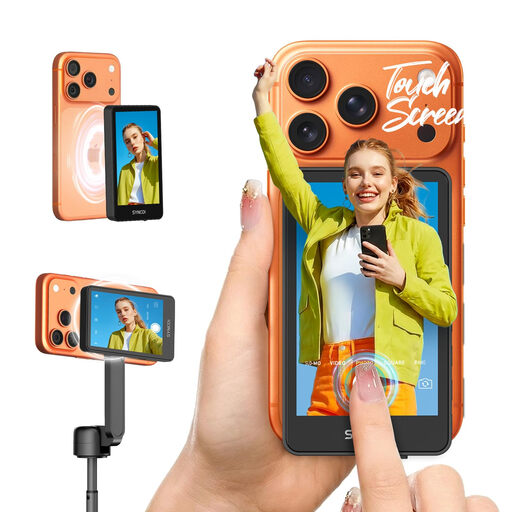
The product below is listed for smartphone filming when making tutorial videos. It isn’t an HDMI solution for a separate camera like the monitors covered in the previous sections.
 No image available
Listed for smartphone filming when making tutorials; according to the product description, you can control recording from the monitor.
The product details list touch controls for recording, zoom and mode, adjustable brightness and a wireless connection. The product description states that it can be controlled from up to 50 m away.
No. Atomos lists a 1920 × 1080-pixel screen for the Shinobi II, even though the model accepts certain 4K HDMI signals. Check the input format and panel resolution separately.
Test whether an image appears while recording at your intended camera resolution and frame rate, and check what information is shown on the camera and external monitor. Sony documents different displays for certain cameras depending on the HDMI and proxy settings; this behaviour doesn’t necessarily apply to every camera model.
Check the battery option, external power supply, HDMI cable and mount included with the specific version. Atomos lists no built-in battery for the Shinobi II; NEEWER offers the F700 with different battery configurations.