If you can already check fold lines, your hands and the framing clearly on the camera’s display from your folding position, you may not need an extra monitor. If it’s difficult to see the camera above the table, an HDMI monitor that you can position easily and that offers focus and exposure tools is worth considering. First, check your camera’s actual HDMI signal, and remember to factor in a cable, mount and power supply. Only consider a monitor-recorder if you also need to record externally.
Who would benefit from an extra monitor?
Paper folders using a hard-to-see overhead camera
When your camera is above the table, what matters is whether you can see the fold lines and your hands from where you actually sit. A well-positioned display and focus aids may be more important than screen size alone.
Crafters filming on their own
A separate live view can help you keep an eye on the framing without having to reach for the camera at every step. Camera control is only worth considering if the feature you want is compatible with your exact camera model.
Filming by a bright window
In changing daylight, you need to assess both the monitor image and the exposure of bright areas of paper. Screen brightness and tools such as a histogram or waveform are separate things to consider.
What should you look for when buying?
| What matters when buying |
What to check before buying |
Who is it most important for? |
| Is it compatible with the camera signal? |
Compare your camera’s HDMI output in recording mode, including its resolution and frame rate, with the input formats supported by the exact monitor model. |
I want to connect the camera in the recording mode I actually use and get a compatible live view; HDMI compatibility is likely to be the main concern for around 26% of consumers. |
| Can I see the fold lines clearly? |
Check the live view from your folding position and see whether the model offers focus peaking or image magnification. |
If I want to check small fold lines while recording, focus aids matter more than simply being able to see the framing. Around 26% of consumers would put this first. |
| Will the monitor fit my folding space? |
Try out the viewing angle, mounting position, cable route and space needed for your hands and paper at the table you’ll actually use. |
At a small table, I want to see the display without the mount or cables getting in the way; setup is likely to be the main concern for around 21% of consumers. |
| Can I assess the image in light from a window? |
Think about reflections where you work and compare the brightness specifications and exposure tools of the specific model. |
In changing daylight, I want to check both what’s on screen and the paper’s exposure; around 16% of consumers would prioritise the lighting conditions. |
| What do I need to power and use it? |
Check what’s included, the power supply, the cable length you need and the mount available for the specific version. |
I want to know what else I’ll need for my setup before choosing a model; around 11% of consumers are likely to make the required accessories their main concern. |
Avoid common buying mistakes
-
“4K HDMI” doesn’t automatically mean a 4K display
A monitor can accept a 4K signal and still show it on a lower-resolution panel. Portkeys lists an input of up to 4K UHD/30p for the PT5 II, but the panel has a resolution of 1920 × 1080 pixels.
Compare your camera’s output in the recording mode you want to use with the input formats supported and the panel resolution of the exact monitor model.
-
Don’t assume camera control works just because the monitor supports your camera brand
Features such as touch-to-focus depend on the model. Atomos lists the camera models supported by the Shinobi II’s control features; a brand name or connection alone doesn’t confirm compatibility.
Check your exact camera model against the compatibility list for the specific feature before factoring it into your buying decision.
-
Choosing a monitor-recorder just to check the image
External recording is a different requirement from having a clearly visible live view. Video Assist models also vary in their features; specifications for 12G-HDR models don’t automatically apply to the Video Assist 5” 3G.
First decide whether you want the camera to record, or whether you genuinely need an external recording workflow.
External recording may require suitable storage media as part of your setup.
-
Ordering without checking what’s included and the returns policy
Power supplies and included accessories vary by model and version. A battery listed in a particular bundle won’t necessarily be included with other offers for the same model.
Before ordering, check what’s included with the specific version and the returns policy that applies to your purchase.
Depending on your existing setup, you may also need a mount, power source or cable; return postage may be payable in certain circumstances if you cancel your order.
Key brands at a glance
Portkeys
The PT5 II is a compact HDMI monitor for setups where focus and exposure aids are important.
- Portkeys lists a 5-inch, 1920 × 1080-pixel panel for the PT5 II, along with peaking, waveform, histogram and HDMI input and output.
- The stated maximum brightness of 500 Nit is a manufacturer’s specification, not a guarantee of how easy it will be to read by your own window.
FEELWORLD
The F6 PLUSX is worth considering as a brighter HDMI alternative for a workspace with more ambient light.
- FEELWORLD lists a 5.5-inch, 1920 × 1080-pixel display, 1600 Nit brightness, waveform and HDMI input and output up to 4K/30.
- The manufacturer’s specifications don’t confirm independent colour measurement, the power supply or what’s included with the specific version.
Atomos
The Shinobi II may appeal to people filming who want to use a camera control feature supported by their camera as well as viewing the live image.
- Atomos lists 1500 Nit brightness and HDMI monitoring for the Shinobi II; the technical specifications show a 5.2-inch panel.
- Touch-to-focus and other camera controls require a supported camera model and aren’t available with every camera.
NEEWER
The F500-PRO offer described here is a useful comparison for a bright monitor supplied with a battery in the bundle.
- The German product page lists a 5.5-inch, 1920 × 1080-pixel display, 2000 Nit brightness, peaking, exposure aids and an included NP-F750 battery for this offer.
- These details relate to the offer described and aren’t an independent performance test or a guarantee for other F500 versions.
Blackmagic Design
The Video Assist 5” 3G is an option if you need external recording as well as image monitoring.
- Blackmagic Design lists the 5” 3G monitor-recorder as a separate version in the Video Assist range.
- Features of the 12G-HDR models, including their Ultra HD recording, shouldn’t be attributed to the 5” 3G model.
Joybuy products on this topic
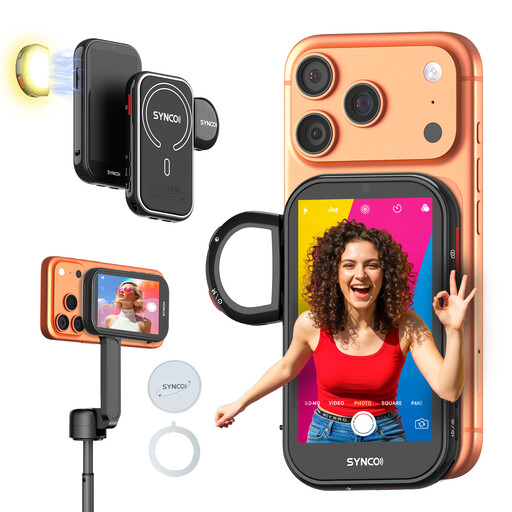
For the specific case where you’re filming paper-folding steps with a compatible smartphone’s rear camera and want to view the image separately.
 No image available
SYNCO Wireless AI Selfie Monitor Screen
For filming with a compatible smartphone’s rear camera when you want to view the image separately from your phone. Before buying, check that the device works with your exact smartphone and filming setup.
View at Joybuy
Frequently asked questions
How do I connect a monitor for overhead filming?
Compare your camera’s HDMI socket and actual video output in recording mode with the monitor’s HDMI input and supported frame rates. Also plan a viewing angle and cable route that leave your hands free for folding; you can’t confirm the right connection from the monitor specifications alone.
Does “4K HDMI” mean I’ll see the paper on a 4K display?
No, not necessarily. The Portkeys PT5 II is listed as accepting input up to 4K UHD/30p, while its built-in panel has a resolution of 1920 × 1080 pixels. Check the input signal and panel resolution separately.
Do I need an extra battery for longer filming sessions?
It depends on the power option you choose and the specific version. Portkeys lists certain battery types and external inputs for the PT5 II; an NP-F750 battery is listed for the German NEEWER F500-PRO bundle described here. Check what’s included with the offer you’re planning to buy.
What are my rights when buying a monitor online in Germany?
For a standard distance purchase from a business seller, the withdrawal period is generally 14 days from delivery; exceptions and rules on return postage also apply. Your statutory rights if the product is faulty are separate from any voluntary manufacturer’s warranty.
What product marking is relevant for a new electronic camera monitor?
If a device is covered by EU harmonisation rules that require CE marking, the required marking must be displayed. The European Union describes CE as a declaration of conformity by the manufacturer, not an independent quality mark; the requirements for the specific device configuration apply.


