For miniature build videos, an external monitor can be a useful addition if it supports your camera’s live view in the actual recording mode and lets you assess small details from the planned viewing position. Check the HDMI format and frame rate, along with the focus-assist tools and power options for the specific model. Atomos lists peaking and magnification for the Shinobi II, while Sony notes that flicker in recorded footage needs to be checked through your camera settings and lighting. Manufacturer specifications are no substitute for testing with your own setup.
Who can benefit from a camera monitor?
Miniature filmmakers struggling to focus
If small connections or build steps are difficult to judge on your camera’s screen, peaking and image magnification can help when checking focus. An article by Fotonomaden on macro photography describes how difficult it can be to judge the focus on small details using a camera screen. Check these features on the specific monitor you’re considering.
Filmmakers working at a cramped desk
If you need to keep your building area clear of the screen, mount and cables, the monitor’s size and position matter just as much as its power options. Atomos, Portkeys and NEEWER list a range of screen sizes and power options for their respective models. The key is finding what works in your workspace.
Filmmakers dealing with changing artificial light
If bright work lights and dark model parts appear in the same shot, exposure tools can add useful information to your preview. FEELWORLD and Portkeys list tools like these for certain models. Sony suggests camera settings as one possible way to address flickering lights, but a test recording is still important.
What should you look for when buying?
| Buying priority |
What to check before buying |
Who is it important to? |
| Focus on small components |
Check peaking and image magnification on the specific model, and see whether you can make out the details from your intended filming position. |
If I want to check fine connections while filming, I need a preview I can assess easily on set. Around 29% of consumers prioritise sharpness on small details. |
| Compatible live view |
Compare your camera’s HDMI output in recording mode with the resolutions and frame rates supported by the monitor. |
If I need a live view while recording, I want to know that the camera output and monitor input are compatible. Around 29% of consumers prioritise a compatible camera signal. |
| Exposure under artificial light |
Check which tools are available, such as waveform or false colour, and review a recording made under your lighting for flicker or banding. |
If bright lights and dark model parts appear in the same shot, I want to assess the exposure repeatedly and check the recorded footage. Around 24% of consumers put checking exposure under artificial light first. |
| Space and power |
Plan the screen size, mounting and cable routing at your build desk; check the power source and what’s included with the exact variant. |
If my desk has limited space, the monitor needs to be easy to see without getting in the way of my hands or building area. Around 18% of consumers prioritise a practical setup that fits their space and has a suitable power supply. |
Avoid common buying mistakes
-
Assuming “4K HDMI” means a 4K display
A monitor may accept a 4K signal while having a lower display resolution. The supported frame rate also depends on the model.
Check your camera’s output in recording mode separately against the monitor’s maximum supported resolution and frame rate. Atomos lists 4K UHD monitoring up to 30p for the Shinobi II, with a display resolution of 1920 × 1080 pixels.
-
Prioritising maximum brightness over space and viewing distance
A high brightness rating alone doesn’t guarantee an advantage in a consistently lit indoor space. A large screen can also take up valuable room on a miniature set.
Before prioritising brightness ratings for outdoor shoots, check that you can read the display from your planned position and that it fits on your work desk.
-
Assuming every variant includes a battery and cables
The battery included with the FEELWORLD F5 PROX varies by package. The connections and power supply also need to suit your setup.
Before buying, check the exact package, your camera’s socket and the power source you’ll need.
Depending on the package, you may also need to buy a compatible battery, a suitable power adapter or an appropriate cable.
Key brands to consider
Atomos
The Shinobi II is a compact preview option with focus and exposure tools.
- Atomos lists a 5.2-inch display with 1920 × 1080 pixels, peaking, magnification and waveform for the Shinobi II.
- Its stated 4K UHD monitoring goes up to 30p. Check camera compatibility and power options for your setup.
FEELWORLD
According to the manufacturer, the F5 PROX combines a 5.5-inch preview with focus and exposure tools.
- FEELWORLD lists peaking, waveform, histogram and false colour for the F5 PROX.
- The advertised brightness of 1600 Nits isn’t automatically a deciding factor for a controlled indoor space. The standard and battery packages differ in what’s included.
Portkeys
The PT5 II is a compact HDMI option if a 5-inch screen suits your viewing distance.
- Portkeys lists waveform, histogram, peaking, false colour and 500 Nits for the PT5 II.
- The stated HDMI limits are up to 4K UHD 30p or 4K DCI 24p. Software details for specific variants don’t automatically apply to every PT5 II.
Viltrox
The DC-550 range shows why the exact model variant matters.
- Viltrox lists 400 cd/m² and button controls for the DC-550 Lite, 1200 cd/m² for the DC-550, and touch controls for the DC-550 Pro.
- These specifications and control options don’t apply across the entire range. The manufacturer’s comparison was published in 2023.
NEEWER
The F700 is a 7-inch alternative if you’ll be viewing the preview from further away.
- NEEWER lists a 1920 × 1080-pixel display, HDMI input and loop-through, and up to 2000 Nits for the F700.
- These manufacturer specifications don’t prove an advantage for indoor filming or that the display will fit on every work desk.
Portable displays with Mini-HDMI at Joybuy
The following Joybuy products are portable displays with Mini-HDMI. They’ll work as external previews only if the camera output and monitor input are compatible, including their resolution and frame rate. Remember to allow space for the screen on your build desk, too.
 No image available
UPERFECT 18.5" 120Hz Portable Gaming Monitor
This portable display will work as an external preview only if your camera’s HDMI output provides a compatible live view. Test the connection in recording mode.
Specifications listed in the product title: 18.5 inches, 120Hz, matt IPS display with 1920 × 1080 pixels and Mini-HDMI. Make sure you have room for the screen on your work desk.
View at Joybuy
 No image available
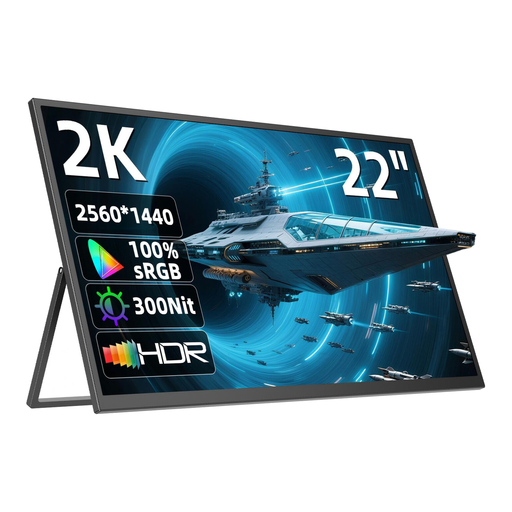
UPERFECT 22" 2K Portable Monitor
The adjustable stand may be useful when positioning your preview. First, check that the display will fit on your work desk and that your camera outputs a compatible signal.
This model is listed with a 22-inch IPS display with 2560 × 1440 pixels, Mini-HDMI and an adjustable stand. The screen may take up a lot of space on a compact desk.
View at Joybuy
Frequently asked questions
How can I tell whether the monitor will show a picture while I’m recording video?
Compare your camera’s HDMI output in the recording mode you plan to use with the monitor’s input specifications, including resolution and frame rate. Portkeys lists a maximum of 4K UHD 30p or 4K DCI 24p for the PT5 II. Whether it’s compatible with a particular camera depends on that camera’s output.
Will an external monitor get rid of banding under LED or other artificial lights?
No. A monitor displays the camera signal, but it can’t remove banding that’s already been recorded. For flickering lights in regions with a 50-Hz power supply, Sony suggests shutter speeds such as 1/50 s or 1/100 s as possible settings. Check the results with your camera and light, and make a test recording.
What should I check before a longer recording session?
Check the mount and cable routing on your work desk, and make sure you have a power source that suits the exact model. Atomos lists NP-F/L-Series batteries or USB-C PD for the Shinobi II. The battery included with the FEELWORLD F5 PROX varies by package.
What are my rights when shopping online in Germany?
For a standard distance purchase of goods, you generally have a 14-day right to cancel from the date of delivery, although exceptions may apply. Your Europe explains the right to cancel distance purchases in the EU. Verbraucherzentrale distinguishes the statutory warranty from a voluntary manufacturer’s guarantee.
What should I check on the labelling of an electrical product for sale?
The Bundesnetzagentur lists aspects of market surveillance including correct CE marking, manufacturer details and German-language instructions. Check the details for the specific device and seller; this doesn’t confirm anything about an individual listing.


