What should you look for when buying?
First, check that your camera’s signal is compatible with the monitor and that you can see the repair area clearly from your working position. Then consider the exposure tools you need, suitable mounting and whether you actually want to record externally.
| What matters |
What to check before buying |
Who is this especially important for? |
| Focus on intricate repair work |
Peaking or image magnification, and a display position suited to your viewing distance. |
If I want to assess the needle and thread precisely while filming, checking focus is my priority. Around 31% of consumers put sharp focus on intricate work first. |
| Exposure and artificial light |
The model’s exposure tools and a test clip recorded with the light you’ll actually be using. |
If light-coloured fabric and dark seams are in the same shot, I want to check the exposure and spot any bands in the recorded clip. Around 25% of consumers prioritise checking artificial lighting and exposure. |
| Camera signal and connections |
Check that your camera’s HDMI output and video mode match the supported input of the exact monitor model. |
If I want to view my chosen camera mode on the monitor, the signal must actually be supported. Around 19% of consumers focus mainly on signal and connection compatibility. |
| Positioning and power supply |
Check the mounting option, cable routing, power connection and whether batteries are included with the specific variant. |
If the screen needs to stay visible beside the fabric without getting in the way of my hands or work surface, it must suit my workbench setup. Around 19% of consumers prioritise positioning and power during the lesson. |
| External recording |
Check whether you need the extra recording function, and confirm the recording format and compatible storage media for the exact recorder model. |
If I need an extra recording alongside the camera file, the recorder function is essential for me. Around 6% of consumers prioritise external recording. |
The figures shown refer to the main priority for each person when making this buying decision. The checks address different questions: a compatible signal ensures the monitor displays the image, while a test clip shows how the lighting affects the recording.
Products on Joybuy
This selection is for live previews on compatible iPhones, not an HDMI monitor for a separate camera.
 No image available
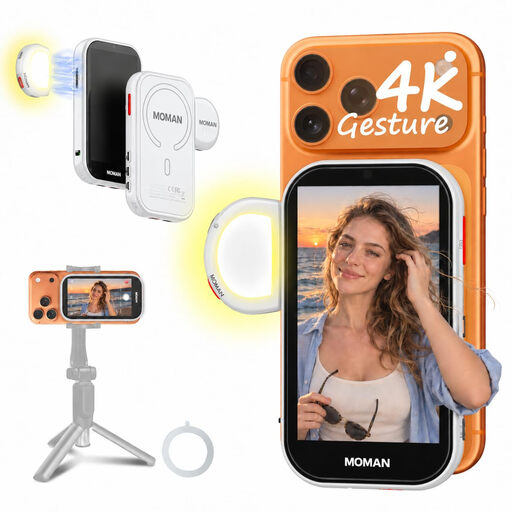
Moman M4 AI selfie monitor for iPhone, white
For compatible smartphones, this device provides a live preview from the rear camera, making it useful for checking your framing when filming on the move.
4.02-inch screen; gesture control; magnetic LED light with three colour temperatures and three brightness levels. A supported smartphone is required for the preview.
View on Joybuy
Frequently asked questions
Will a bright camera monitor eliminate bands caused by LED or other artificial lighting?
No. A bright monitor won’t eliminate flicker in your recording. Sony describes banding under flickering light sources as a recording issue and lists adjusted shutter speeds or supported anti-flicker functions as possible solutions, depending on the camera and lighting. Check a short clip under your actual lighting conditions.
How should I set up a monitor for a longer repair lesson?
First, check that your camera’s HDMI output in the selected video mode matches the monitor input. Position the display where you can see it, secure the cables and mount, and check the power supply. Portkeys lists battery and external power options for the PT5 II.
Do I need a monitor-recorder if my camera already records?
Not just for previewing. The Blackmagic Video Assist 5″ 3G also includes an SD card recorder. Whether you need one depends on whether you want an external recording and whether the formats and storage media are compatible with your camera.


