Choose a remote shutter based on your exact camera model and whether you simply want to take a photo or also check the framing on set. A compatible wired or Bluetooth remote is enough to trigger the shutter, while a supported camera app can give you extra control. Before buying, check the connection or wireless compatibility. If your cake isn’t moving, using your camera’s existing self-timer could save you buying an extra accessory.
Who can benefit from a remote shutter?
Cake photographers using a tripod
If you want to photograph icing and decorations in natural window light, you can trigger your mounted camera without touching the body. Canon Germany points out that even pressing the shutter button can cause camera shake.
Bakers working on a photo set
If you’re arranging the cake and props several times, a compatible app can be useful for checking the framing or focus from your work surface. Canon Germany and FUJIFILM describe these app features for their respective supported cameras.
Buyers unsure about their camera connection
If you’re looking for an accessory for a camera you already own, check the exact connection or wireless compatibility against your camera model. Canon Germany, Nikon Germany and FUJIFILM each list specific compatibility requirements.
What should you look for?
First, think about what matters most for your cake photos: compatibility, taking a photo without touching the camera, checking the image while arranging the set, or keeping extra equipment to a minimum.
Wired remote shutter
A good fit if: your camera supports the specific connection and you mainly want to trigger the shutter.
Consider: the cable and its length may limit where you can stand on set.
Bluetooth remote
A good fit if: your exact camera model supports the remote and you want to move around without a cable.
Consider: you’ll also need to pair it and keep an eye on the battery. Canon Germany lists a range of up to 5 m for the BR-E1.
Infrared remote
A good fit if: your camera has a compatible infrared receiver and you can trigger it from the required position in front of the camera.
Consider: Canon Germany lists a range of up to 5 m in front of the camera for the RC-6. You can trigger the shutter immediately or after a 2-second delay.
Camera app or self-timer
A good fit if: you want to try a feature you already have or use a compatible app to control the shot on set.
Consider: app features depend on your camera model, while a self-timer won’t let you see the image from your work surface.
| Priority |
What to check before buying |
Who it matters most to |
| Camera compatibility |
Check the exact camera model and connection against the manufacturer’s compatibility list. If you’re considering an app, check which features it supports too. |
If I’m looking for an accessory for a camera I already own, it needs to be explicitly compatible with that model. Around 36% of consumers prioritise compatibility above all else. |
| Taking a photo without touching the camera |
Check whether a simple shutter button will do, or if your camera’s existing self-timer is enough. |
If my camera is on a tripod, I don’t want to touch the body when taking a photo. Around 29% of consumers prioritise being able to trigger the shutter without touching the camera. |
| Checking the image while arranging the set |
For your camera model, check whether the app supports Live View and the focus or settings features you need. |
If I’m moving the cake and props around several times, I want to check the framing and focus from the set. Around 21% of consumers say checking the image is their top priority. |
| Keeping extra effort to a minimum |
Before buying, try your camera’s existing self-timer and a compatible camera app. |
If I only photograph cakes occasionally, I’d rather not buy or set up another device. Around 14% of consumers put keeping extra effort to a minimum first. |
Avoiding common buying mistakes
-
Assuming cameras from the same brand are compatible
Connections for wired remotes and supported wireless models can vary even within the same camera system. So an accessory won’t necessarily work with every camera from the same brand.
Before ordering, check the full model name and connection against the manufacturer’s list.
For certain Fujifilm cameras, FUJIFILM says an additional adapter is needed for the RR-100. Check whether this applies to your model.
-
Confusing a shutter button with Live View
A basic remote can trigger the shutter, but it won’t automatically show you the cake photo for checking. Canon Germany and FUJIFILM describe Live View features in their supported apps.
Before buying, decide whether you only want to trigger the shutter or also check the framing and focus from a distance.
-
Treating wired, infrared and Bluetooth remotes as interchangeable
A wired remote needs the right connection, while infrared depends on the receiver and your position. Depending on how your cake set is arranged, one type of remote may work better than another.
Check where you’ll be standing while arranging the set and which connection or receiver feature your camera actually has.
Brands and compatible remote controls
The examples below refer to documented product ranges and manufacturer information. They aren’t ranked and don’t, in themselves, indicate whether a particular model is available.
Canon
For supported EOS models, Canon lists wired, Bluetooth and infrared remotes, as well as Camera Connect, as different ways to control your camera.
- The RS-80E3 is designed for cameras with an E3 connection; the BR-E1 and RC-6 each have their own compatibility requirements.
- Camera Connect features vary by camera. Manufacturer information isn’t an independent performance comparison.
Nikon
Nikon offers wired models such as the MC-DC2 and MC-DC3, as well as the ML-L7 Bluetooth remote, for compatible cameras.
- Nikon’s compatibility guidance matches wired remotes to specific camera models.
- The ML-L7 product name alone doesn’t confirm that the remote will work with every Nikon camera.
Sony
Sony describes the RMT-P1BT as a Bluetooth remote for compatible cameras; depending on your camera, a suitable app may also be an option.
- According to Sony, the RMT-P1BT has a status indicator for shutter release, video recording or autofocus.
- Sony doesn’t describe a live image view for this remote. The available apps and pairing requirements depend on the camera and, in some cases, its firmware.
Fujifilm
Fujifilm offers the RR-100 as a wired option and the XApp as an app alternative for specified camera models.
- Fujifilm describes Live View features in the XApp for compatible cameras.
- For certain camera models, Fujifilm says an additional adapter is needed for the RR-100. Check which models it applies to.
Panasonic
For compatible cameras, Panasonic offers the DMW-RS2E as a wired remote with a shutter button and video start and stop functions.
- Panasonic lists a tripod clip for the DMW-RS2E.
- Panasonic notes that the latest firmware is required. Check the exact camera model compatibility and your camera’s firmware.
Joybuy products for smartphone photography
The products below are designed for smartphone photography, with hands-free positioning and remote control. They aren’t a substitute for a remote shutter confirmed to be compatible with a specific mirrorless or DSLR camera.
 No image available
Verbex K60 Black selfie stick with tripod and remote control
For smartphone photography when you want to position your phone hands-free and take photos from a distance.
Bluetooth remote for taking photos and recording video; the product description lists a tripod and a smartphone holder that can be positioned vertically or horizontally.
View on Joybuy
 No image available
3-in-1 Bluetooth selfie stick with 360° smartphone holder
For smartphone photography when you want to set up your phone or take photos from a distance using a remote.
The product title lists a holder that rotates through 360°; the product description lists a detachable remote for taking photos and recording video, as well as a tripod function.
View on Joybuy
 No image available
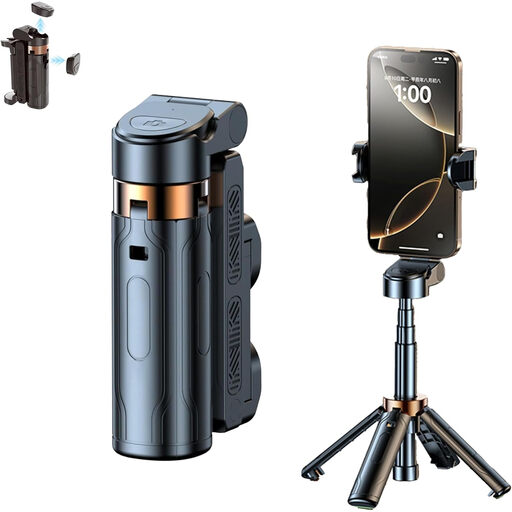
Magnetic smartphone grip with remote control and fill light (Black)
For smartphone photography when you want a grip that can also be mounted on a tripod.
Detachable Bluetooth remote, 1/4-inch tripod thread, two cold shoe mounts and built-in fill light, according to the product description.
View on Joybuy
 No image available
KINSI smartphone tripod with Bluetooth remote control
For smartphone photography when you want to position your phone hands-free and take photos from a distance.
The product description lists a foldable, height-adjustable tripod and a Bluetooth remote for your smartphone camera.
View on Joybuy
Frequently asked questions
Do I need to buy a remote shutter for window-lit cake photos?
Not necessarily. If a delayed shot is enough, try your camera’s self-timer first. To check the image and focus from a distance, see whether a compatible app supports your camera model. Canon Germany also explains why a remote can be useful when your camera is on a tripod.
How do I find a remote shutter that works with my camera?
Check the full model name against the manufacturer’s compatibility list, then check the required connection or supported wireless connection. According to Fujifilm, some of its cameras also need an additional adapter for the RR-100.
Can a Bluetooth remote also show a live view?
Not automatically. A remote may only trigger the shutter, while Live View depends on a compatible camera app. Sony describes a status indicator on the RMT-P1BT, but no image preview; Canon Germany and Fujifilm list Live View features for their respective supported apps and cameras.
What should I check about product compliance when buying a wireless remote shutter?
Germany’s Federal Network Agency lists correct CE marking, an identifiable product and accurate manufacturer details among the things to check for covered electronic products with wireless technology. This is a guide to what to check, not proof that a particular listing is compliant.


