Filming drawing videos on your own
You want to start or stop recording from your drawing desk without going back to the camera. The key is to check that the remote control or app supports this video function with your camera.


For continuous video, you need a remote control or app that supports starting and stopping video recording with your specific camera; a standard photo shutter release won’t necessarily do the job. Canon, Nikon and Sony list compatible features for certain camera and accessory combinations, but you’ll need to check compatibility against your camera’s full model name. For individual progress photos, a self-timer, compatible app or wired shutter release may also do the job, depending on your setup.
You want to start or stop recording from your drawing desk without going back to the camera. The key is to check that the remote control or app supports this video function with your camera.
You want to capture individual stages of your work as photos. Depending on your camera, you can choose between the self-timer, a compatible camera app or a wired shutter release. Canon describes Camera Connect as a remote-control option for many Canon cameras.
You want to take a series of photos at set intervals. Check the interval function and camera connection, and whether you’ll need an additional cable. Rollei describes these features for the Wireless Remote Release 28146.
Right for you if: you want to start or stop continuous video recording remotely from your drawing desk, and your camera supports this function.
Keep in mind: the Canon BR-E1, Nikon ML-L7 and Sony RMT-VP2 are compatible with supported cameras in their respective systems.
Right for you if: your camera and mobile device already support the remote-control functions you need.
Keep in mind: check specifically for video start and stop. The ability to take photos remotely doesn’t confirm that this function is available.
Right for you if: you’re taking individual progress photos with a fixed setup and don’t need to control ongoing video recording remotely.
Keep in mind: the cable and connection need to be compatible. For certain RR-100 camera combinations, Fujifilm specifies an additional 2.5 mm to 3.5 mm adapter.
Right for you if: you want to take a series of individual photos to create a time-lapse later.
Keep in mind: Rollei requires a compatible camera cable for the Wireless Remote Release 28146. Don’t assume it can control video unless this is confirmed for your setup.
| What you need | What to check before buying | Who is this important to? |
|---|---|---|
| Start and stop video remotely | Check that video start and stop are supported for your exact camera model and the remote control or app. | I want to control ongoing recording from my seat while I draw. That’s why around 36% of consumers put video start and stop at the top of their list. |
| Compatible with your camera body | Check the full model name, manufacturer’s compatibility list, recording function and, for cables, the connection. | If I want to be sure the device, connection and required function will work with my existing camera, this check is essential. Around 29% of consumers prioritise compatibility. |
| Freedom to move around your drawing desk | Decide where you want to control the camera from, then choose a suitable Bluetooth remote, app or wired control. | When switching between my drawing, lighting and camera, I don’t want to be tied to one spot. Around 21% of consumers mainly look for freedom to move around. |
| Interval photos rather than video | Check the interval function and any camera cable you’ll need. First decide whether you need individual photos or continuous video. | If I want to capture progress as individual images for a time-lapse, interval control is what matters. Around 14% of consumers prioritise this way of shooting. |
An accessory may be able to take photos without being able to start or stop video recording.
Before buying, check that video start and stop are supported by the specific camera and remote-control combination.
The Rollei Wireless Remote Release 28146 requires a camera cable.
Check that the receiver connection and required cable are compatible with your camera model, and confirm what’s included.
For certain camera combinations, Fujifilm also specifies an additional 2.5 mm to 3.5 mm adapter.
Check the details for your exact camera model and connection before choosing the wired shutter release.
A remote control doesn’t adjust the lighting or white balance. Nikon recommends setting the white balance before shooting and using lighting that’s as even as possible.
Take a test shot with your intended setup and check the lighting and white balance.
Canon offers the BR-E1 Bluetooth remote control for listed compatible cameras. Camera Connect is another option for supported devices.
The ML-L7 is a Bluetooth remote control for compatible Nikon cameras.
Sony lists the RMT-VP2 for wireless photo and video control with supported cameras. Depending on your camera, Imaging Edge Mobile may offer an app alternative.
The RR-100 is a wired shutter release for listed Fujifilm X and GFX cameras. It may be suitable for taking individual photos with a fixed setup.
The Wireless Remote Release 28146 is designed for wireless photo and interval control, with a receiver connected to the camera.
The Joybuy options below are remote controls for compatible action cameras and smartphone photography. They won’t automatically work with a standard camera body, so check the model and recording function before buying.
 No image available
Suitable for remotely controlling recording only if you’re using one of the specifically listed Osmo cameras.
Bluetooth connection; listed as compatible with Osmo Action 4, Osmo Action 5 Pro, Osmo 360 and Osmo Action 6.
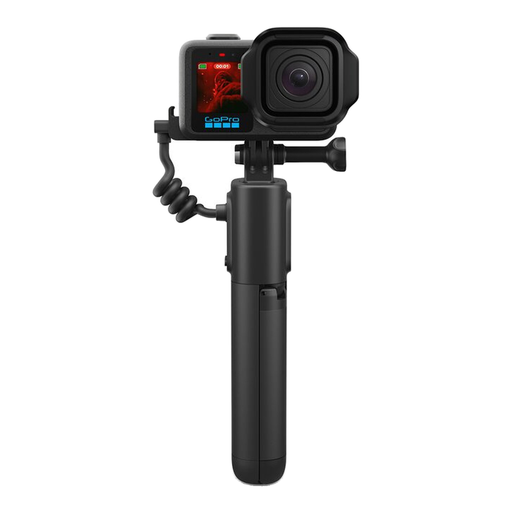 No image available
Described as a battery grip with an integrated remote control and tripod for listed GoPro cameras. It isn’t a universal remote control for camera bodies from other systems.
Product name includes: 5800mAh, USB-C, Bluetooth and Black. Listed as compatible with HERO13 Black, HERO12 Black, HERO11 Black, HERO11 Black Mini, HERO10 Black, HERO9 Black, MAX2 and the MISSION-1 series.
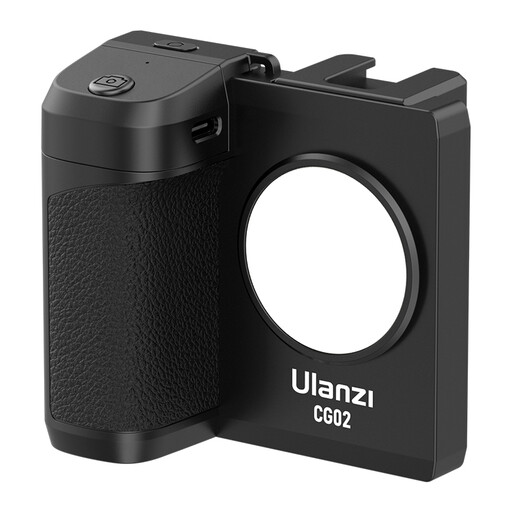 No image available
For taking smartphone photos remotely; product details list Bluetooth shutter release and a fill light.
The fill light is listed with three brightness levels. This is described as a smartphone grip, not a remote control for a standard camera body.
 No image available
For smartphone photography with a fixed setup, when you need a fold-out stand and a remote control for your smartphone camera.
Product name includes: 3-in-1 design and two cold shoes. Listed as a smartphone holder for iPhone, Samsung and Android devices.
No, provided your specific camera and app support the remote start and stop functions you need. Check before buying an accessory: being able to take photos remotely doesn’t mean you can control video.
Take a test shot and check the lighting and white balance with your actual setup. Nikon recommends setting the white balance in advance and using lighting that’s as even as possible; the remote control won’t adjust these settings for you.
Rollei says that the Wireless Remote Release 28146 requires a compatible camera cable. For certain RR-100 camera combinations, Fujifilm specifies an additional 2.5 mm to 3.5 mm adapter. Check the requirements against your exact camera model.
The German Federal Environment Agency recommends not putting used batteries in household waste. Instead, use collection boxes in shops or local authority collection points.
Section 22 of the KunstUrhG governs consent from the person depicted when an image is distributed or displayed publicly. Whether it applies to a specific drawn portrait and its intended publication, or an exception applies, depends on the subject and purpose of use. This is a question about publication, not the remote control.