What should you look for when buying?
Cable release
A good fit if: Your camera is set up in a fixed position and you mainly want to take photos.
Bear in mind: The connection and cable length need to suit your setup; this type of control doesn’t provide a live view in an app. For example, Canon uses both E3 and N3 connections.
Camera app
A good fit if: Your camera supports remote shooting and you want to check the framing or available settings on your mobile device while rearranging your cups.
Bear in mind: Supported features vary by camera model; Canon specifically highlights this limitation.
Bluetooth remote
A good fit if: You want to take photos wirelessly while arranging your setup, without having to use the app for every shot.
Bear in mind: Your camera must support the remote; a shutter button doesn’t automatically give you a live preview.
First, check which remote controls your camera supports. Then choose between simple shutter control, an additional view of your shot or the freedom to move around wirelessly.
| What you’re looking for |
What to check before buying |
Who is it important to? |
| Camera compatibility |
Check the exact camera model, connection or wireless support, and whether an adapter is required. |
If I’m looking for a remote for my existing camera, I want to be sure the model and connection are compatible. Around 36% of consumers prioritise this compatibility. |
| Taking photos without touching the camera |
Check whether the self-timer or camera app will do the job; if not, consider a compatible cable release. |
With a fixed composition, I want to take a photo without touching the camera as I press the shutter. Around 29% of consumers prioritise taking photos without touching the camera. |
| Checking your shot while arranging the scene |
Check which remote-viewing, focus and settings features are available for your camera. |
When I’m rearranging cups and props, I want to check the framing from my mobile device. Around 21% of consumers prioritise being able to check their shot. |
| Wireless control |
Check that your specific camera and remote are compatible, and that the remote has the controls you need. |
When moving between my camera and the cup setup, I want to take photos without a cable. Around 14% of consumers prioritise this freedom to move around. |
Joybuy products for remote shooting
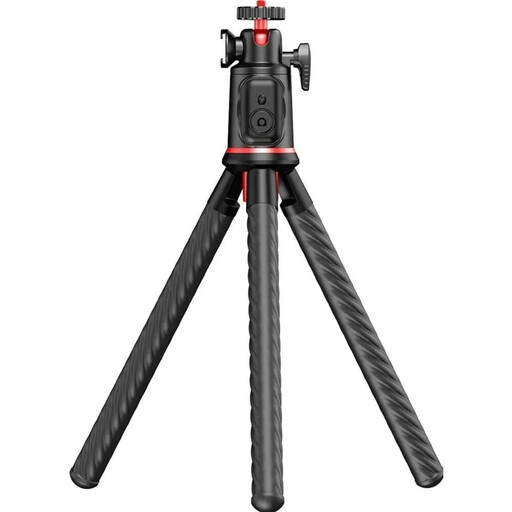
This product selection features a mini tripod with a Bluetooth remote for a fixed setup. Before buying, check that the remote works with your camera.
 No image available
Rollei Easy Creator MonkeyPod Flexible Mini Tripod Selfie Stick with 360° Ball Head and Bluetooth Remote
The Bluetooth remote may be a good option for taking photos wirelessly with a fixed setup. Check that it’s compatible with your camera model.
The tripod is designed for cameras and accessories weighing up to 2 kg. Make sure it’s secure before letting go, and keep the supplied button cell battery away from young children.
View at Joybuy
Frequently asked questions
How do I set up remote shooting for photos of cups?
Set up your camera securely so you can keep the framing consistent, then check the focus and composition. Next, connect a cable release, supported app or compatible remote that works with your camera model. For supported cameras, Canon lists features such as remote viewing and focus adjustment via Camera Connect, though not every feature is available on every model.
Do I need a separate remote if my camera has an app?
Not necessarily. If your camera supports remote shooting through the app, you can use it to take photos. Canon also lists remote viewing and settings control for certain models, so a separate shutter button is a matter of preference rather than a general requirement.
What should I know about batteries and making a complaint?
For a wireless remote, check the power requirements and what’s included rather than assuming a battery is supplied. In Germany, used batteries must not go in household rubbish. Verbraucherzentrale distinguishes between the statutory warranty and a voluntary guarantee.
Which German product requirements apply to a Bluetooth remote?
Among other things, Germany’s Federal Network Agency monitors devices with Bluetooth against relevant radio and EMC requirements. It may check details such as CE marking, product identification, manufacturer information, German-language instructions and a declaration of conformity. These requirements apply to products and their availability on the market; they aren’t individual permission to take photos and don’t confirm that a particular product complies.


