What should you look for?
First, check whether your camera has a self-timer or a supported app for occasional shots. If you want to take shots more immediately or from further away, compare the compatible wired and wireless options.
Self-timer or camera app
A good fit if: You photograph a static setup occasionally and are happy to wait for a short delay before the shot.
Trade-off: You don’t need a separate device, but app support and features depend on your camera model.
Wired remote release
A good fit if: You’re working close to a fixed setup and want to take a shot straight away without touching the camera.
Trade-off: Cable length and routing limit where you can stand; a matching plug diameter alone doesn’t guarantee compatibility.
Bluetooth remote
A good fit if: You want to keep your distance from the camera while rearranging your stationery, and your model supports the specific remote.
Trade-off: Camera support, pairing, button functions and power requirements vary by model.
Infrared remote
A good fit if: Your camera specifically supports a compatible infrared release and you can use it from the intended direction.
Trade-off: With an overhead shot, the receiver’s position may limit where you can operate the remote from.
The percentages refer to the priority given to each concern when choosing a remote release for this setup.
| Priority |
What to check before buying |
Who should pay particular attention? |
| Camera compatibility |
Check the full camera model, supported connection or wireless standard, and any adapters required. |
If I want to make sure the release works with my specific camera, matching the two precisely is essential. Around 36 % of consumers say compatibility is their main concern. |
| Touch-free shooting on a tripod |
Check for direct shutter release, a compatible connection and a cable long enough for your setup. |
With a fixed setup, I want to take a shot without knocking the camera or reaching for the body for every picture. Around 29 % of consumers prioritise this. |
| Freedom of movement while arranging your set |
Check the supported camera model, operating distance and the button functions you need. |
If I want to check and adjust the arrangement from a distance, a compatible wireless release is worth considering. Around 21 % of consumers value this freedom of movement most. |
| Taking repeated shots |
Check whether single-shot release or extra features, such as focus control, are supported and actually needed. |
When taking several rearranged shots, I want to release the shutter repeatedly with ease, without paying for features I won’t use. Around 14 % of consumers prioritise this. |
Joybuy products for smartphone photography
If you’re using a smartphone rather than a system camera for your setup, you’ll find smartphone tripods and holders with remote controls here. These haven’t been confirmed as compatible remote releases for system or DSLR cameras; check support for your specific smartphone before choosing one.
 No image available
Verbex K60 Selfie Stick, Black
For a smartphone setup when you want a tripod, holder and remote control in one product.
The product description states a remote control range of around 10 m and compatibility with iOS and Android. The holder is designed for smartphones.
View on Joybuy
 No image available
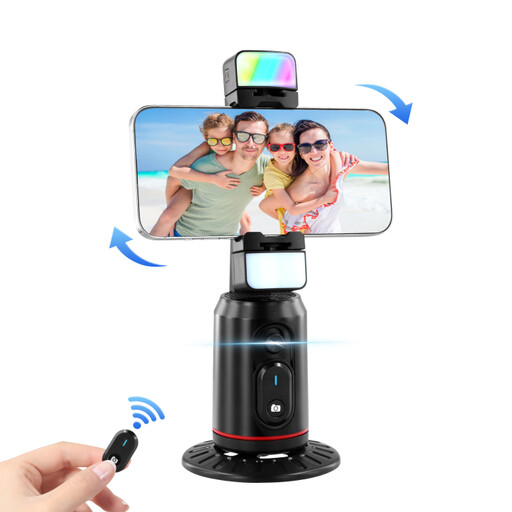
Auto Face Tracking Tripod, 360-Degree Rotation
For smartphone videos when face tracking and a rotating smartphone holder suit your setup.
The product description lists 360° rotation, gesture control, a fill light and a remote control. The tripod is described as a smartphone model.
View on Joybuy
 No image available
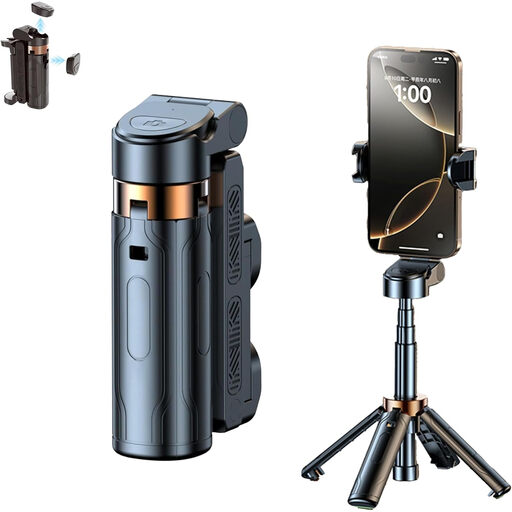
3 in 1 Bluetooth Selfie Stick
For smartphone photography when you want an extendable selfie stick with a tripod and remote control.
The product description lists a 360° rotating smartphone holder and a detachable Bluetooth remote control for photos and videos. Compatible devices include iPhone, Samsung and Android smartphones.
View on Joybuy
 No image available
Magnetic Smartphone Grip, Black
For smartphone photography when you want to combine a grip with a detachable remote control and tripod mounting.
The product title specifies a 1/4-inch tripod thread; the description lists a fill light and an accessory mount. The grip is designed for smartphones.
View on Joybuy
 No image available
Ulanzi JJ02 Smartphone Tripod
For an extendable smartphone setup when you need a remote control and mounting options for accessories.
The description lists a wireless remote control for the smartphone camera and two cold shoe mounts for accessories such as a microphone or LED light. The holder is designed for smartphones.
View on Joybuy
Frequently asked questions
Will a remote release get rid of bands or colour shifts under artificial light?
No. A remote release helps you avoid touching the camera when taking a shot; bands or colour shifts caused by artificial light are a separate issue. Canon Academy describes anti-flicker settings and shutter speed adjustments for supported cameras, among other options.
How do I set up a remote release for an overhead shot of stationery?
First, check your camera’s full model name against the release’s compatibility list. For a wired model, check the connection, any adapter required and how the cable will run; for infrared, note the intended operating position. Test the shutter release and composition before starting a longer series of shots.
Do I need to allow for extra accessories or software?
It depends on the combination. Fujifilm specifies an additional connection adapter for the RR-100 with certain cameras; Panasonic notes that a firmware update is required for the DMW-RS2E. If you’re using an app or wireless remote, also check that it’s supported by your specific camera model and find out how to set it up.
What are my rights when buying online from a business seller?
For distance purchases of goods in the EU, you generally have 14 days from delivery to cancel; exceptions and the rules on return costs also apply. Your Europe also states that the legal guarantee is at least two years. This is separate from any additional manufacturer’s warranty.
What should I check to ensure a Bluetooth remote complies with regulations?
The German Federal Network Agency lists the CE marking and information identifying the product and manufacturer among the points checked during market surveillance. These general checks don’t confirm that an individual listing complies; check the details for the specific product.


