Which option is right for you?

Close-ups with a fixed tripod

If you’re photographing stationary vintage cameras under studio lighting and don’t want to touch the tripod when taking a shot, first check whether your camera has a self-timer. Alternatively, you could use a cable release with a connector that matches your camera model.

Photographers working with changing setups

If you often change the camera position, background or lighting, a supported camera app or a wireless remote confirmed as compatible can let you take shots without leaving your setup. Check that it supports your exact camera model.

Photographers planning a sequence of shots

If you’re planning repeat shots with set delays or intervals, check the timer functions and make sure the connector is suitable. For the JJC TM-F2, the manufacturer’s specifications apply to the cameras listed for that model.

What should you look for when buying?

First, check the exact camera model and connector. Then consider what matters most to you: an acceptable shutter delay, freedom to move around your setup or a programmed sequence of shots.

What you need What to check before buying Who it’s for
Taking a shot without touching the camera Check the camera’s self-timer, or the cable connector and cable length. If you don’t want to touch your camera on the tripod when taking a shot but are happy to accept a short delay, the self-timer may be right for you. Around 36% of consumers put taking shots without touching the camera first.
Connector and compatibility Check the full model name against the manufacturer’s compatibility list and the connector on the specific remote release. If you want to make sure the release is right for your camera, don’t choose based on brand alone. Around 29% of consumers prioritise connector and compatibility checks.
Freedom to move around your setup Check support for an app, Bluetooth or a wireless kit, as well as any required receiver, cable and power supply. If you don’t want to return to the tripod when adjusting your subject or lighting, compatible wireless control is worth considering. Around 21% of consumers prioritise freedom of movement.
Planned sequences of shots Check the timer, delay and interval functions on the exact model, along with camera compatibility. If you need to take repeat shots at planned intervals, a suitable timer is more important than a simple shutter button. Around 14% prioritise programmed sequences.

Common buying mistakes

  • Choosing based only on the camera brand

    Different camera models within the same brand can have different connectors or compatibility requirements. Canon, for example, distinguishes between E3 and N3 connectors; for certain RR-100 cameras, Fujifilm also specifies an adapter.

    Before buying, check the full model name of your camera against the manufacturer’s compatibility list and the connector on the exact version of the remote release.

  • Assuming wireless means “no extra accessories needed”

    Sony says the RMT-P1BT uses the built-in Bluetooth receiver in supported cameras. Rollei, by contrast, says its Wireless Remote Release requires an additional compatible camera cable.

    For the specific model, check separately that the camera, connection, receiver, cable and power supply all work together.

  • Blaming the remote release for banding in artificial light

    Canon Europe notes that flickering LED or fluorescent lights can cause banding when using the electronic shutter. Nikon Germany describes a high-frequency flicker reduction feature for compatible cameras.

    Take some test shots and check your camera’s shutter and flicker settings. A remote release doesn’t change the light source or shutter type.

Key brands at a glance

Canon

Cable, infrared and app-based options for supported Canon cameras.

  • Canon describes the RS-80E3 as an 80 cm cable release for compatible E3 cameras. Camera Connect can control supported cameras using a smartphone or tablet.
  • E3 and N3 are different connectors. The infrared specifications for the RC-6 apply to that model and the cameras listed by Canon. These are manufacturer specifications, not independent performance measurements.

Nikon

Model-specific cable releases for compatible Nikon cameras.

  • Nikon says the MC-DC2 lets you take a shot via the accessory port without touching the camera.
  • The MC-DC2 isn’t universally compatible with every Nikon camera. Nikon also lists the separate MC-DC3 for compatible Z-series mirrorless cameras.

Sony

Bluetooth remote for supported Sony cameras.

  • Sony says the RMT-P1BT connects via the built-in Bluetooth receiver in a compatible camera, without a separate receiver.
  • You’ll need a compatible camera, the right settings and a paired connection. The manufacturer’s description doesn’t confirm support for all Sony cameras.

Rollei

Wireless and interval options with a suitably selected camera cable.

  • Rollei lists shutter-release and interval functions for its Wireless Remote Release, item 28146.
  • Rollei says you’ll need to select an additional camera cable for use. The stated range is a manufacturer specification, not an independently measured result.

JJC

Model-specific wired timers, including the TM-F2 for the Sony cameras listed.

  • JJC lists delay, exposure and interval control for the TM-F2, along with two AAA batteries in the box.
  • Connector and compatibility specifications apply to the TM-F2, not to the entire TM series.

Fujifilm

The RR-100 is designed for the X and GFX cameras listed by Fujifilm.

  • Fujifilm lists the camera models compatible with its RR-100 cable release.
  • For certain models, Fujifilm also specifies a 2.5 mm to 3.5 mm adapter. Check your exact camera model and the connector it requires.

Joybuy products

A wireless remote paired with a flexible mini tripod for versatile close-up setups.
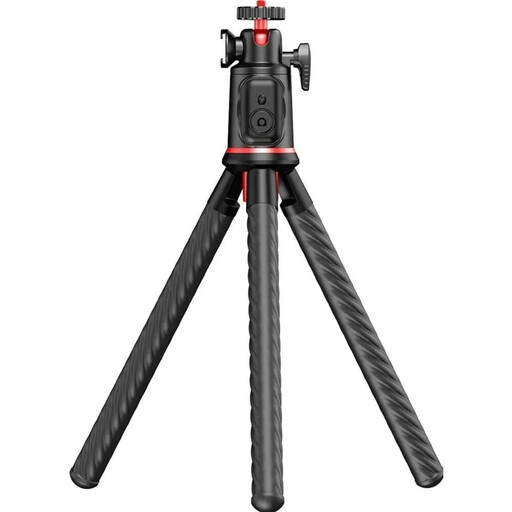
Rollei Easy Creator MonkeyPod flexible mini tripod with 360° ball head and Bluetooth remote

Rollei Easy Creator MonkeyPod flexible mini tripod with 360° ball head and Bluetooth remote

If you want to take shots without touching the camera and position it flexibly, this model combines a Bluetooth remote with a flexible mini tripod.

The stated maximum load for the tripod is 2 kg; use it within this limit and secure it safely.

Joybuy

Frequently asked questions

Can the self-timer replace a separate remote release?

Yes, if your camera has a suitable self-timer and you’re happy to accept the delay. Canon specifically describes it as a way to prevent camera shake on the PowerShot G3 X; check the function and settings on your own model.

How do I check whether a cable release will work with my camera?

Check the full model name of your camera against the manufacturer’s compatibility list and the connector on the specific version of the remote release. Choosing a matching brand isn’t enough: Canon, for example, has both E3 and N3 connectors.

What do I need to set up for a Bluetooth remote?

For the Sony RMT-P1BT, Sony specifies that Bluetooth and Bluetooth remote control must be enabled, and that you need to pair the devices the first time you connect. Menus may vary by camera, so follow the instructions for your model.

Why do my photos have banding under LED lights even when I use a remote release?

A remote release controls when the shutter fires, not the flicker of the light source. Canon Europe describes possible banding when using an electronic shutter with flickering LED or fluorescent lights; Nikon Germany describes a high-frequency flicker reduction feature for compatible cameras. Check the light source and camera settings by taking some test shots.

Does a wireless remote release also need a camera cable?

It depends on the specific model. Rollei says its Wireless Remote Release, item 28146, requires an additional compatible camera cable. Sony, on the other hand, describes the RMT-P1BT as working with compatible cameras that have a built-in Bluetooth receiver. Check accessories and compatibility separately.