What should you look for when buying?
First, check that the release works with your exact camera model. Then decide whether you’d rather trigger the camera from a fixed tripod position or have more freedom to move around your sample table. Lighting and colour control are separate considerations.
| What matters |
What to check before buying |
Who it matters most to |
| Compatibility |
Check the exact camera model against the accessory list. For cable releases, check the connector type and whether you’ll need an adapter. |
If you want to avoid buying a release with the wrong connector or an unsupported wireless function, it’s essential to check the exact model. Around 36% of consumers put compatibility first. |
| Triggering the camera without touching it |
For a cable release, check the connector and the reach you need. If you’ll be using a longer exposure, check whether the specific button can be locked. |
When taking repeated close-up shots from a fixed tripod, you won’t want to disturb the composition as you trigger the camera. Around 29% of consumers prioritise keeping their shooting set-up steady. |
| Freedom to move around |
Check that the cable will reach across your work area. For Bluetooth or app control, check that your exact camera model is supported and find out what set-up is required. |
If you reposition the sample on the table, you’ll want to trigger the camera from there instead of walking back to it each time. Around 21% of consumers prioritise freedom of movement when arranging their shots. |
| Lighting and colour |
Take test shots with the lighting you plan to use, then check the white balance and, if necessary, the camera’s anti-flicker settings. |
If you want fabric colours to look consistent across several shots, don’t confuse the remote release with control over lighting and camera settings. Around 14% of consumers prioritise this aspect of image control. |
Related products at Joybuy
The products below are tripods with Bluetooth remotes. Before using one, check that the remote works with your exact camera model. A tripod with a remote isn’t the same as a standalone cable release.
 No image available
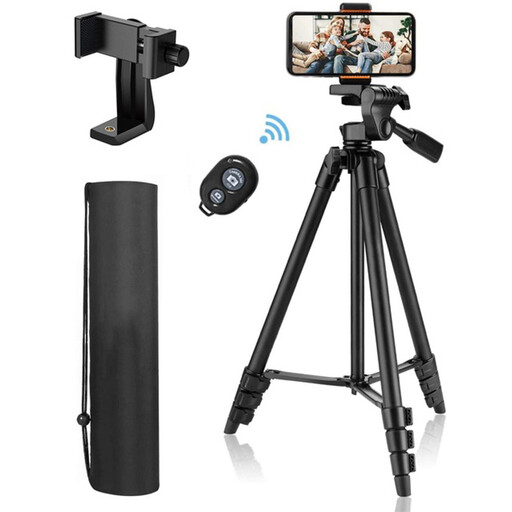
KINSI smartphone and camera tripod with Bluetooth remote
The product title describes a tripod with a Bluetooth remote for camera and DSLR set-ups. Check in advance that your camera is supported.
The product specifies a 1/4-inch thread and cameras weighing up to 2 kg.
The stated height is 44–106 cm.
View at Joybuy
 No image available
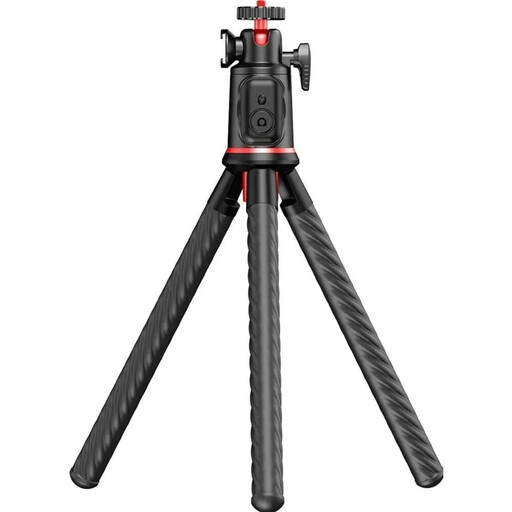
Rollei Easy Creator MonkeyPod flexible mini selfie stick with 360° ball head and Bluetooth remote
This flexible tripod with a Bluetooth remote could be a good option for a tabletop set-up. Check in advance that the remote supports your camera.
The product specifies a 1/4-inch thread and cameras weighing up to 2 kg.
The description mentions flexible legs and use as a tabletop tripod.
View at Joybuy
Frequently asked questions
Do I need to buy a remote release to take repeated shots of a fabric sample?
Not necessarily. First, check whether your camera has a suitable self-timer or supports remote control via an app. If you want to trigger the camera directly from the sample table, a compatible cable or Bluetooth release may be more convenient.
How can I check whether a cable release works with my camera?
Check your exact camera model against the release’s compatibility list and confirm the connector type. For example, Canon specifies E3 and N3 connectors for different models, while Fujifilm says certain RR-100 combinations need an additional adapter.
What should I check if a Bluetooth remote won’t trigger the camera?
For the Sony RMT-P1BT, first check that your camera model is supported, then make sure Bluetooth remote control is enabled and that the devices are paired. For other combinations, check the relevant manufacturer’s compatibility details and settings.
Can a remote release prevent colour shifts or banding under artificial light?
No. A remote release won’t change the white balance or prevent possible flicker. Take test shots with your chosen lighting and check the white balance. If you see banding, check which anti-flicker settings are available for your camera.
What should I use if I reposition the fabric sample between shots?
A supported Bluetooth remote or camera app can let you trigger the camera from the sample table. Before buying, check that your camera is supported, and remember that app control also requires the right camera feature.


