Choose a remote shutter based on how you plan to shoot and your exact camera model. For continuous video, the camera and remote must work together to support video recording start and stop; for individual photos, a compatible shutter release may be all you need. A compatible camera app can also let you check the image, but neither a remote shutter nor an app can fix banding or incorrect white balance caused by artificial light.
Who would benefit from a remote shutter?
Artists filming their process
If you draw beneath a camera fixed in position, a compatible remote can let you start and stop recording from a distance. The key is that your specific camera and remote combination must support video recording; Canon Deutschland, Nikon Deutschland and Panasonic list this feature for certain models.
Artists taking a sequence of photos
Taking individual photos and shooting a time-lapse are different from using a shutter release: the latter requires an interval shooting function. Canon Deutschland notes that some cameras already have an interval timer.
Artists who want to check the shot
If you want to check from your desk that the paper and your hands are in frame, a supported camera app with Live View may be more useful than a simple shutter button. Canon Academy describes this option for supported EOS cameras using Camera Connect.
What should you look for when choosing one?
Wired remote shutter
A good fit if: your camera is in a fixed position, has a compatible port and the required function is confirmed for your model.
The trade-off: The cable limits how far you can move. Panasonic lists video recording start and stop for the DMW-RS2E; Canon describes the RS-80E3 as a shutter release.
Bluetooth remote
A good fit if: you want to shoot without a cable and your camera supports the specific model and the photo or video function you need.
The trade-off: Check pairing, camera compatibility and battery requirements. The range of up to 5 metres listed by Canon Deutschland applies to the BR-E1.
Camera app
A good fit if: you want to check the framing on your smartphone as well as shoot remotely, and your camera and app support this feature. Canon Academy describes Remote Live View for supported EOS cameras using Camera Connect.
The trade-off: You’ll need a compatible smartphone and will have to set up the connection; this doesn’t automatically give you an interval shooting function.
Built-in interval timer
A good fit if: you want to create a time-lapse from individual photos and your camera already has a suitable interval timer. Canon Deutschland gives the EOS RP as an example.
The trade-off: An interval timer for photos is no substitute for a button that starts continuous video recording.
| What you need |
What to check before buying |
Who is this important to? |
| Camera compatibility |
Check the exact camera name, remote model and supported photo or video function against the manufacturer’s information. |
If I’m looking for a shutter release for my existing camera, this exact combination needs to work; around 36% of consumers have compatibility as their main concern. |
| Video or interval photos |
Decide how you want to shoot, then check video recording start and stop or the interval function separately for the camera and accessory. |
If I want to record my drawing process as a video or as a series of individual photos, I need the right function for that; around 29% of consumers have the recording function as their main concern. |
| Controls at your drawing space |
Consider the distance, cable routing and whether you need a live preview for your particular setup. |
If I don’t want to touch the camera while drawing and need to check the framing from my desk, the right remote or app matters; around 21% of consumers have ease of use and image monitoring as their main concern. |
| Artificial light and extra costs |
Check your lighting with a test shot. For wireless models, check the battery requirements; for wired models, check the connection or whether an adapter is needed. |
If I want to avoid banding or colour casts under artificial light, I should look at the lighting and camera settings rather than the shutter release; around 14% of consumers have this as their main concern. |
Common buying mistakes
-
A compatible plug doesn’t automatically mean you can control video
Canon describes the RS-80E3 as a shutter release, while Panasonic explicitly lists a video recording start/stop button for the DMW-RS2E. A compatible connection alone doesn’t confirm that the function you need is supported.
Check the camera model, connection and photo or video function separately in the manufacturer’s information.
-
Buying an interval remote when your camera already has a timer
Some cameras already have an interval timer; Canon Deutschland gives the EOS RP as one example.
Before buying an accessory, check your camera’s menu and manual for interval shooting.
-
Blaming artificial-light problems on the remote shutter
Canon Academy describes possible banding or colour shifts under artificial light. A remote shutter controls the recording, not the light source or white balance.
Check your lighting and camera settings with a quick test shot before choosing any additional shutter accessories.
-
Forgetting to allow for batteries or adapters
For wireless models, the required battery type is part of your choice. Fujifilm notes that certain RR-100 camera combinations also require an adapter.
Check the battery type, what’s included and whether an adapter is needed for your exact camera and remote combination.
Depending on the model, you may also need batteries or a compatible adapter.
Brands and compatible model ranges
Canon
For compatible EOS cameras, options include a wireless remote for photos and video, a wired shutter release or a supported app.
- Canon Deutschland lists wireless photo and video shooting and a range of up to 5 metres for the BR-E1.
- The RS-80E3 is described for compatible E3 ports; its product description doesn’t confirm video recording start and stop. This information applies to the models listed, not all Canon cameras.
Nikon
The ML-L7 is a Bluetooth option for compatible Nikon cameras if you need photo and video buttons.
- Nikon Deutschland lists buttons for the shutter release and video recording.
- A matching model name or Bluetooth alone doesn’t confirm compatibility; check your specific camera before buying.
Sony
The RMT-P1BT is a Bluetooth remote for supported Sony cameras, letting you control your camera wirelessly from your drawing space.
- Sony Deutschland describes photo and video control and a status LED for this model.
- Sony notes that not every camera supports Bluetooth remote control, and that you need to enable the function on the camera.
Panasonic
The wired DMW-RS2E is an option for a fixed setup with a compatible LUMIX camera.
- Panasonic lists a shutter release and a button to start and stop video recording for this model.
- This doesn’t confirm compatibility with every LUMIX camera; also check the manufacturer’s firmware note.
Fujifilm
The wired RR-100 may be suitable for taking individual photos with certain X and GFX cameras.
- FUJIFILM X Series & GFX USA lists a 2.5 mm connection.
- Some of the camera combinations listed there also require a 3.5 mm adapter. Check the US information against your own camera model before buying; it doesn’t confirm a video recording start function.
Joybuy products for smartphone filming
This selection includes smartphone tripods and grips with remotes for taking photos from a distance. They may suit you if you’re filming your pastel drawing with a smartphone rather than a camera.
 No image available
Verbex K60 Black selfie stick with floor tripod and zoom remote
For taking individual smartphone shots from a distance; the product description lists a detachable Bluetooth remote.
The title mentions a phone holder and floor tripod. The product description gives a maximum supported phone size of 6.0 inches.
View at Joybuy
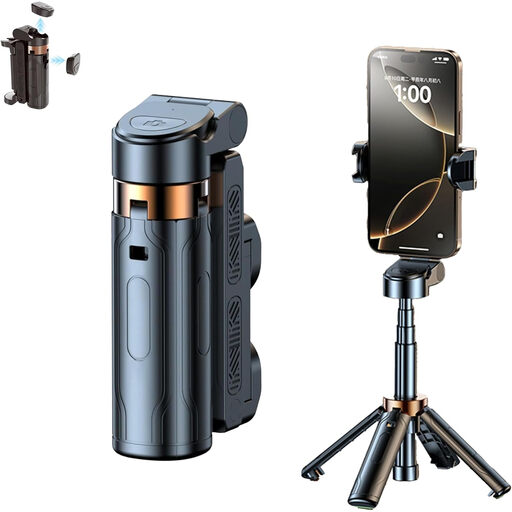 No image available
3-in-1 Bluetooth selfie stick with tripod and 360° phone holder
For taking smartphone shots from a distance; the product title lists a Bluetooth remote.
The title also mentions a tripod, an extendable selfie stick and a phone holder that rotates through 360°.
View at Joybuy
 No image available
Magnetic smartphone grip with remote and fill light, 1/4-inch thread (Black)
For taking smartphone shots from a distance; the product description lists a detachable remote.
The title mentions a 1/4-inch tripod thread. The product description also lists a cold shoe and built-in fill light.
View at Joybuy
 No image available
KINSI smartphone tripod with Bluetooth remote, foldable and height-adjustable
For hands-free smartphone shots; the product description lists a Bluetooth remote for triggering the camera from a distance.
The title describes a foldable, height-adjustable tripod for desks and outdoor use.
View at Joybuy
Frequently asked questions
Can any photo remote start video recording?
No, it depends on the specific remote and camera. Panasonic lists video recording start and stop for the DMW-RS2E, and Nikon lists a video recording button on the ML-L7; Canon describes the RS-80E3 as a shutter release. Check that the function is supported by your camera model.
Do I always need a separate timer for a time-lapse?
Not necessarily: some cameras already have an interval timer; Canon Deutschland gives the EOS RP as an example. First check your camera’s features, and distinguish interval photos from continuous video recording.
Will a remote shutter fix flicker and incorrect colours under artificial light?
No, a remote shutter only controls the recording. Canon Academy describes possible banding and colour shifts under artificial light; white balance affects how colours are reproduced. Take a test shot using your actual lighting and check your camera settings.
What should I check if my Bluetooth remote won’t pair?
First check whether your camera supports Bluetooth remote control. Sony also recommends enabling Bluetooth and remote control on supported cameras, then pairing again if necessary; menus may vary by model.
What additional accessories should I consider?
For wireless models, check the required battery type; for wired models, check the connection and whether an adapter is needed. Fujifilm lists an additional adapter for certain RR-100 camera combinations, so check the requirements for your exact model.


