For a fixed window-side setup, a compatible wired remote may be all you need. If you rearrange your truffles between shots, a Bluetooth remote that’s explicitly supported by your camera gives you more freedom to move around. A compatible camera app may make an additional remote unnecessary, provided your camera and mobile phone support the remote shooting features you need. Before you buy, check your exact camera model, its connection and the app’s features – a remote shutter release won’t make an unstable camera position steady.
Who can benefit from a remote shutter release?
Photographers with a fixed window-side setup
If your camera and framing stay in place, a compatible remote lets you take close-up shots without touching the camera. Make sure the connection and cable length suit your setup. For example, Canon lists different cable connections for compatible EOS cameras, while Fujifilm notes that certain models require an additional adapter.
Styling truffles right at the set
If you rearrange truffles and props between shots, a compatible wireless remote can save you a trip back to the camera. Your specific camera model must be supported; Sony requires you to pair the RMT-P1BT with the camera before connecting.
Photographers who want to check the image in an app
If you want to check the framing or focus on your mobile phone, first make sure your camera and app support these features. Canon describes remote shooting with Camera Connect for many compatible cameras; available features depend on the particular combination.
What should you look for when choosing one?
First, check whether you want to trigger a camera or a smartphone. For a camera, the key considerations are confirmed model compatibility and whether your setup will stay in place or you need the freedom to move around the set.
| Concern |
What to look for when buying |
Who it matters most to |
| Camera compatibility |
Check the full camera model, connection and any required adapter against the manufacturer’s information. |
If I want to avoid buying a remote with the wrong connection or wireless setup, I check compatibility first. Around 36 % of consumers put finding the right connection for their existing camera first. |
| Steady triggering with a fixed setup |
Check that the cable connection is compatible and long enough to reach your position beside the tripod. |
If the framing stays in place, I want to take the shot without touching the camera in my close-up setup. Around 29 % of consumers prioritise a fixed setup and triggering the camera without touching it. |
| Freedom to move while arranging the set |
Check that your camera model is supported, and find out whether pairing is required and how the remote is powered. |
If I move truffles or props between shots, I want to be able to take the picture from the set. Around 21 % of consumers give freedom to move while arranging the set top priority. |
| An app instead of extra accessories |
Test with your camera and mobile phone to see whether remote shooting and the image or focus controls you want are available. |
Before buying more accessories, I want to know whether my existing camera app already offers the remote shooting I need. For around 14 % of consumers, checking for a suitable feature in an existing app comes first. |
Avoid common buying mistakes
-
Assuming an accessory is compatible just because it shares your camera’s brand
Connections and supported models can vary, even within one camera brand. Fujifilm notes that the RR-100 requires an additional adapter for certain cameras.
Check your full camera model against the manufacturer’s list, and confirm the connection and any required adapters before choosing a remote.
-
Assuming wireless triggering will keep your setup steady
A remote shutter release helps you avoid touching the camera when taking a shot, but it won’t stabilise a moving tripod or your subject.
Secure your camera and composition first. Then choose the type of shutter release that suits where you’ll be positioned by the window.
-
Overlooking a useful app feature before buying an accessory
A compatible camera app may let you take photos remotely. However, the connection and available features depend on your camera and mobile phone.
Test remote shooting and image preview with your specific combination of devices before choosing an additional remote.
A guide to the leading camera brands
Canon
For compatible EOS cameras, Canon lists wired remotes with E3 or N3 connections, the BR-E1 and – with compatible combinations – Camera Connect.
- For the EOS R6 Mark II, Canon lists both the BR-E1 and the RS-60E3 cable.
- Connections and supported features vary by camera model. These details don’t automatically apply to every EOS camera.
Nikon
For compatible cameras, Nikon offers the ML-L7 Bluetooth remote control; SnapBridge provides a separate option for app-based remote shooting.
- Nikon says the ML-L7 has buttons for the shutter and video recording.
- It isn’t compatible with every Nikon camera body. SnapBridge’s help guide explains how to take photos remotely and notes that this feature can’t be used to record video.
Sony
The RMT-P1BT is a Bluetooth option for specific Sony cameras listed as compatible.
- Sony describes it as operating through the camera’s built-in Bluetooth receiver, with no additional receiver needed.
- You need to pair the remote with a compatible camera before use.
Fujifilm
The RR-100 is a wired option for the X and GFX cameras listed by Fujifilm.
- The compatibility list names the supported camera models.
- Certain models need an additional adapter. Check the list for your camera body before buying.
Panasonic
Panasonic lists the DMW-RS2E as a LUMIX wired remote shutter release, with shutter and video start/stop buttons.
- According to Panasonic, the accessories include a tripod clip and controls for taking photos and recording video.
- Panasonic notes that firmware requirements apply. Check the information for your specific camera model.
Joybuy products for smartphone photography
The products below are smartphone tripods or grips with remote controls. They’re designed for taking truffle photos with a smartphone, not for triggering a camera body.
 Image unavailable
Verbex K60 Black selfie stick with smartphone holder
For taking truffle photos with your smartphone when you want to position it on a tripod and take the picture with a remote; not for a camera body.
The product title mentions a tripod function, a Bluetooth remote control and a smartphone holder that rotates through 360°.
View on Joybuy
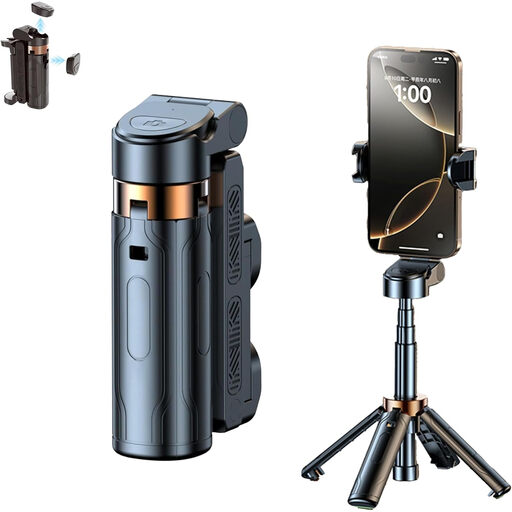 Image unavailable
3-in-1 Bluetooth selfie stick with tripod
For smartphone photography with a fixed setup when you want to take pictures from a distance; the remote isn’t described as compatible with a camera body.
The product title mentions an extendable selfie stick and a smartphone holder that rotates through 360°. The product description says the Bluetooth remote control is detachable.
View on Joybuy
 Image unavailable
Magnetic smartphone grip with remote control and fill light, black
For smartphone photography when you want to use a grip with a remote or attach the grip to an existing tripod; it doesn’t have its own stand.
The product title mentions a 1/4-inch tripod thread. The product description says the Bluetooth remote control is detachable and suitable for taking smartphone photos from a distance.
View on Joybuy
 Image unavailable
KINSI smartphone tripod with Bluetooth remote control
For a fixed smartphone setup when you want to take pictures without touching your device; not described as a remote shutter release for a camera body.
The product title describes a foldable, height-adjustable tripod for use on a table or outdoors. The product description mentions a remote control for compatible smartphones.
View on Joybuy
 Image unavailable
Ulanzi JJ02 3-in-1 mini tripod
For smartphone photography with a fixed setup when you want to take pictures from a distance; the remote isn’t described as a shutter release for a camera body.
The product description mentions an extendable mini tripod, a smartphone holder and a remote control. It also lists two cold shoe mounts.
View on Joybuy
Frequently asked questions
Is my camera’s self-timer enough, or do I need an extra device?
It depends on how you want to operate your setup: first check whether your specific camera’s self-timer is enough for a fixed setup. If you want to take the shot from the set after rearranging things, or check the image on your mobile phone, consider a compatible remote control or app-based remote shooting instead.
How do I set up a Bluetooth remote control?
First check that your exact camera model is supported, then follow the relevant pairing instructions. Sony requires you to register the RMT-P1BT before connecting; the process may vary by camera.
Which adapters or accessories should I check before buying?
For a wired remote, check that it matches your camera’s connection and whether your model needs an adapter. For certain camera models, Fujifilm lists an additional adapter for the RR-100. For a wireless remote, also check the model-specific information and any setup requirements.


