Artists filming on their own
If you’re filming by yourself and want to keep your hands in shot, look for a remote that lets you start and stop video recording. A photo button doesn’t automatically offer this function.


First, check the full camera model and whether the remote you’re considering can explicitly start and stop video recording. A remote that only takes photos won’t be enough. For a fixed setup, a compatible wired remote may be suitable; for greater freedom of movement, consider a compatible Bluetooth remote or camera app. The right option depends on your camera, its connections and the functions it supports.
If you’re filming by yourself and want to keep your hands in shot, look for a remote that lets you start and stop video recording. A photo button doesn’t automatically offer this function.
If your camera stays in the same place while you film, a compatible wired remote could be an option. Check that the connection and video controls work with your camera model.
If you’re filming with a smartphone or want to use an existing camera app, first check whether the app supports the video function you need from a distance.
Suitable if: your camera is stationary and has a compatible connection.
Trade-off: The cable limits how far you can move from your recording device.
Suitable if: you want to control video from your drawing table and your camera and remote are explicitly compatible.
Trade-off: Models for different camera systems aren’t automatically interchangeable.
Suitable if: your camera and smartphone support the remote control functions you need.
Trade-off: With Canon Camera Connect, live view controls differ from a simple Bluetooth shutter release without live view.
Suitable if: you’re filming with a smartphone and its camera app supports the video function you need.
Trade-off: Working with a smartphone doesn’t prove that it’s compatible with a system camera.
| Criterion | What to check before buying | Who it matters most to |
|---|---|---|
| Starting and stopping video | Check the video button and the functions supported by the full camera model. | If I’m filming my drawing on my own, I want to start and stop recording from my workspace. Around 36 % of consumers are likely to prioritise video control. |
| Device compatibility | Compare the camera model, connection or Bluetooth support, and any relevant firmware requirements. | If I want to avoid buying the wrong product because of an incompatible connection or unsupported model, I check the exact combination. Around 36 % of consumers are likely to prioritise device compatibility. |
| Freedom of movement | Weigh up a compatible wireless model against a cable, and check the stated range. | If I want to move between my drawing and camera, I don’t want a cable to keep me tied to one spot. Around 21 % of consumers are likely to prioritise freedom of movement. |
| Using an existing app | Test whether your camera app lets you control the video function you need from your chosen position. | If I want to try an app I already have before using any extra accessories, I check its remote control options. Around 7 % of consumers are likely to have this as their main concern. |
A remote shutter release may take a photo without being able to start or stop video recording. For a drawing video, what matters is whether the specific camera supports video control.
Before buying, check the video function and, if possible, test starting and stopping a recording with your camera or smartphone app.
The brand name alone doesn’t confirm that the connection is right or that the accessory is supported. Panasonic notes that the DMW-RS2E requires a firmware update; for certain RR-100 cameras, Fujifilm specifies a 2.5 mm to 3.5 mm adapter.
Compare the full camera model with the manufacturer’s information, and check the connection, accessory and any firmware requirements.
Hama describes the BRS5 as being for smartphone and tablet cameras, and says its function depends on the device’s software. This doesn’t mean it’s compatible with a system camera.
Test the video function you need with your smartphone app. For a system camera, check for accessories or a camera app that are explicitly supported instead.
The DMW-RS2E is a wired remote shutter release for compatible LUMIX cameras.
The ML-L7 is a Bluetooth remote for compatible Nikon cameras; Nikon cites the Z 30 as a specific example.
The BR-E1 is designed for listed Canon cameras; Camera Connect is a separate app option for compatible EOS cameras.
The RMT-P1BT is a Bluetooth remote for compatible Sony cameras.
Hama describes the BRS5 as a Bluetooth shutter release for smartphone and tablet cameras, not as a proven substitute for a system camera remote.
The products below include remotes for specific action cameras and a smartphone tripod setup with a Bluetooth shutter release. Before buying, pay particular attention to device compatibility and whether the video function you need is supported.
 No image available
The product description mentions a Bluetooth remote; check whether it can start and stop video recording with the camera you use.
6 GB integrated RAM; loop recording; 8K at 10 fps; IP68; Bluetooth remote.
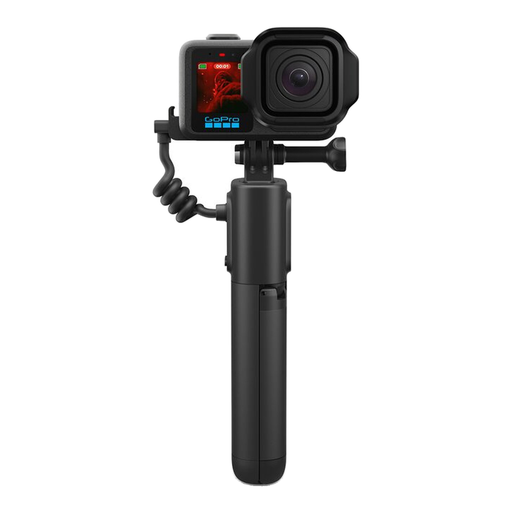 No image available
According to the product description, the grip combines a fixed setup with wireless control; compatibility is limited to the GoPro models listed there.
Built-in tripod; wireless control up to 30 m according to the product description; 5800 mAh; USB-C; Bluetooth.
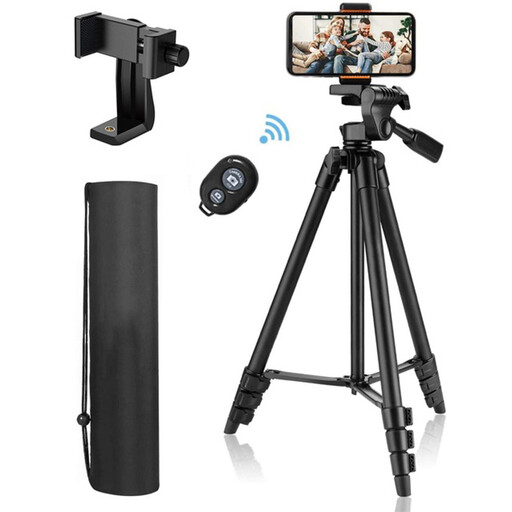 No image available
For a fixed smartphone setup, the product description says it can trigger video recording on iOS or Android devices. This doesn’t confirm that it can control a system camera.
Tripod height: 44–106 cm; smartphone holder for devices up to 9 cm wide.
 No image available
The product description mentions starting and stopping recording, as well as a wrist-worn design. Compatibility is limited to specific Osmo models.
Compatibility according to the product name: Osmo Action 4, Osmo Action 5 Pro, Osmo 360 and Osmo Action 6.
Only if video control is explicitly supported for your camera. Nikon, Sony and Panasonic list video controls for the models described here, but you should still check that your specific camera and remote work together.
Check the full camera model, the supported connection or wireless link, and test video start/stop. For Panasonic’s DMW-RS2E, you should also check the firmware requirements; with an app, the available control options may vary.
Hama lists a CR1632 battery for the BRS5. The German Environment Agency advises that batteries and rechargeable batteries must not be put in household waste; take them to a suitable collection point.
As part of its market surveillance, the German Federal Network Agency advises checking that the CE mark is present on the product and displayed correctly. This isn’t an individual confirmation for a particular model, so check the information provided for the specific device.