
Lieferung heute & morgen

Qualitätsgarantie

Willkommens-Angebote freischalten: KOSTENLOSE Lieferung | Bis zu 80 % RABATT | Kostenlose 30-Tage-JoyPlus-Testphase
App herunterladen
When buying camera and smartphone tripod accessories, you’ll usually want a secure mount, flexible positioning and easy handling. In practice, however, problems are often caused not by the camera itself, but by incompatible threads, unstable designs or overly complicated accessories. This can affect content creators, vloggers, livestreamers and photographers, as well as home cinema users.
“Universal” doesn’t automatically mean that every smartphone, action camera or projector will fit straight away. The key things to check are:
A universal camera mount may offer several interfaces, but that still doesn’t mean it’s suitable for every combination of devices. Before buying, compare your device’s technical specifications with those of the accessory.
A mini tripod is handy for a desk, kitchen or travel bag. But with its legs fully extended, a heavy lens attached or weight applied from the side, its base may be too small. So when choosing a smartphone tripod with an extendable centre column, don’t just look at the maximum height. Leg spread, joint strength and centre of gravity are important too.
Projector stands have additional considerations: the platform must support the device centrally, the legs must be fully locked into place and cables mustn’t pull on the stand.
A Bluetooth remote, magnetic mount, cold shoe or multiple connections can be useful. But they won’t solve every setup problem. For example, a selfie stick with a Bluetooth remote needs a compatible smartphone connection and a secure clamp. A magnetic tripod should only be used if the magnetic connection is specifically designed for the device or a suitable case.
The 1/4-inch-20 thread is common on many tripods, camera mounts and projector stands. A 1/4-inch thread adapter can connect different systems, but it won’t replace a mechanically compatible mount. Action cameras may also require 2-prong interfaces or specific frames.
The load capacity should always exceed the combined weight of your camera, smartphone, microphone and light. For example, the Ulanzi OA-11 Dual Interface Holder for Osmo Action 2 has a stated maximum load of 1 kg. This limit should not be exceeded.
Aluminium alloys are common in compact mounts and offer relatively low weight. Carbon steel and aluminium alloy are used in larger designs, such as the J.ZAO projector stand. But materials aren’t the only factor in everyday safety. These features matter too:
The ability to pan and tilt is useful for video recording. A cold shoe can hold a microphone or light, for example, while a 1/4-inch connection lets you attach the mount to a tripod. For DJI Osmo Pocket 3 accessories, check that the adapter fits around the lower connection area correctly and leaves the controls accessible.
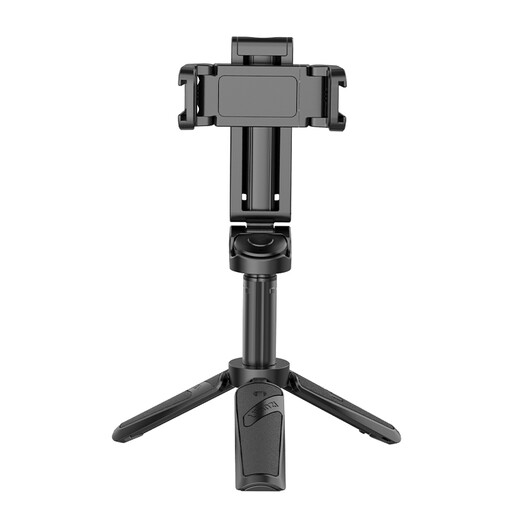
Why this product suits this user: Combining a phone grip, extendable selfie stick and mini tripod, it’s well suited to your first smartphone videos, video calls and short livestreams.
The smartphone mount and stand are clearly designed for mobile use. Before using it, make sure your phone is clamped securely and place the base on a stable surface.
3-in-1 design, Bluetooth remote and two cold shoes for extra accessories.
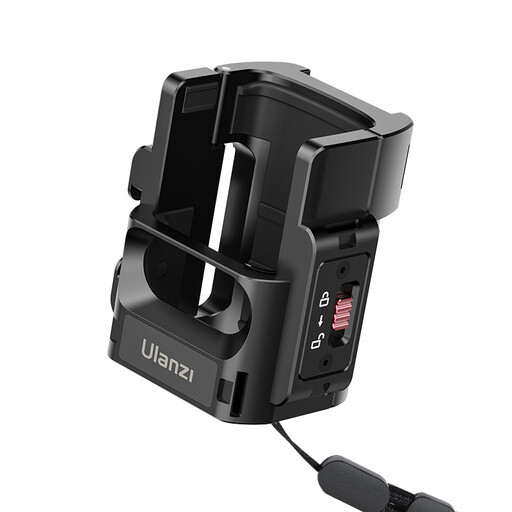
Why this product suits this user: Designed for DJI Osmo Pocket 3 users who want to combine their camera, microphone, light or tripod in a modular setup.
The dedicated mount around the lower part of the Osmo Pocket 3 provides defined connection points instead of improvised clamps. Even so, check that the camera is secure after fitting the adapter.
Metal cage with 1/4-inch screw holes and a cold shoe; designed for Osmo Pocket 3 accessories.
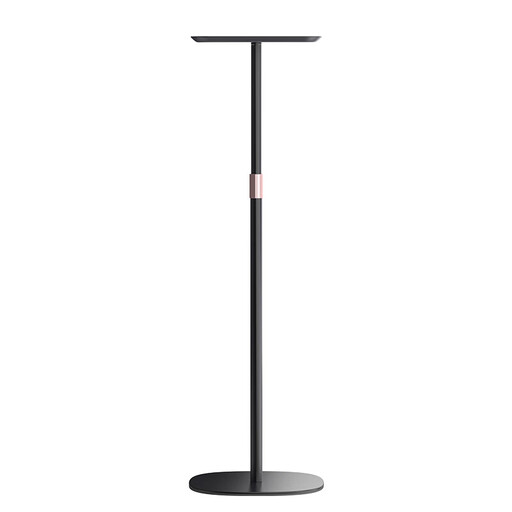
Why this product suits this user: For home cinema users and those who move their setup around, this floor stand provides a height-adjustable platform for projectors of different sizes.
The design specifies a height of around 60 to 160 cm, a shelf and a 1/4-inch screw. Before use, check the legs, locks, tilt and cable tension.
Adjustable centre column, 360-degree rotation, tilt function, shelf and direct 1/4-inch mounting.
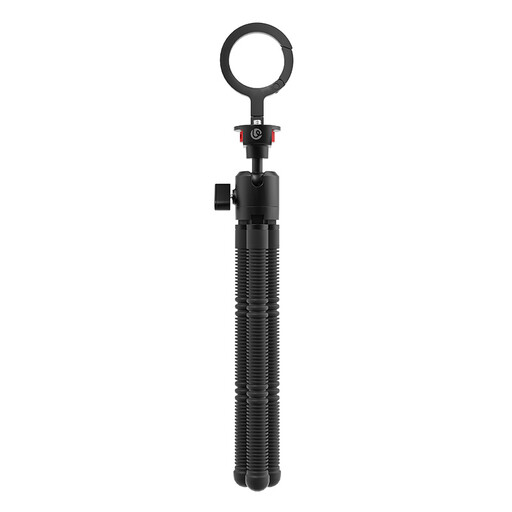
Why this product suits this user: This flexible phone mount is suited to creative smartphone shots on suitable surfaces, as well as compact setups with a 1/4-inch connection.
Only use the magnetic mount with compatible devices or cases. Check that it’s secure before letting go, and keep small parts out of children’s reach.
Flexible tripod legs, magnetic mounting and a 1/4-inch thread for mobile setups.
We’ve put together a complete, regularly updated list of products that meet these strict selection criteria and fully comply with the safety regulations in force in the EU.
For simple recordings, a smartphone tripod with a suitable clamp is often all you need. For livestreams or vlogs, a Bluetooth remote, cold shoe and microphone connection can be useful. Before buying, check your smartphone’s width, the thread and whether you need portrait or landscape orientation.
A mini tripod is suitable for stable, level surfaces and lightweight devices. For outdoor shooting, long focal lengths or a projector, a wider base with a specified load capacity is a better choice. Flexible legs give you more setup options, but don’t remove the need to check the surface.
Check screws, clamps and joints regularly for looseness, cracks and play. Store accessories somewhere dry and free from sand or dust. With magnetic models, also make sure the magnetic base is fully in contact before each use, and don’t use it near sensitive magnetic storage media.