Which camera type is right for you?

Close-up filming at the workbench

If you want to show the soldering iron tip, pads and small components from a fixed angle, the field of view, focus and available workspace all need to work together. Remember to allow room for your hands and fume extraction, too.

Live explainers at the computer

For streaming to a PC, you may want a quick-to-set-up view of your hands and work surface. Check how large the subject actually appears in the preview rather than relying on the stated resolution alone.

Filming longer work sessions

If you want to record a series of steps in one go, plan for the framing, power supply, storage and audio you’ll need in your intended recording mode.

What should you look for when buying?

Interchangeable-lens camera

A good fit if: you want to capture small solder joints in close-up and adjust the lens, focus and framing to suit.

The trade-off: the lens and camera need to be compatible, and a macro lens can greatly reduce the available working distance.

USB webcam

A good fit if: you mainly want to explain things live on a computer and set up a straightforward desk view.

The trade-off: a presentation mode or high resolution doesn’t automatically mean that small solder joints will appear large enough.

Camcorder with a fixed zoom lens

A good fit if: you’re planning longer recordings without a computer and want to adjust the framing using the zoom.

The trade-off: close-focus performance may depend on the zoom setting, and you can’t change the lens.

Compact gimbal camera

A good fit if: you want to capture moving shots as well as a fixed view of your workbench.

The trade-off: check whether the subject looks large enough from the stated focus distance. Stabilisation doesn’t replace a suitable mount for an overhead view.

What you need What to check before buying Who is this important to?
See small solder joints clearly Check the field of view and magnification of the specific camera-and-lens combination, along with the distance in front of the lens. If you need small pads to be clearly visible while still leaving room for your hands and fume extraction, a detailed view is the priority. This matters to around 31% of consumers.
Set up an overhead view easily Test the mount, viewing angle, subject distance and preview in the recording software you plan to use. If you’re explaining things on a PC, you’ll want to show your work surface without the camera getting in the way of your hands or workspace. Around 25% of consumers particularly value a straightforward setup.
Record longer work sessions Check the power supply, storage and close-focus performance from the camera’s intended position. If recording a complete demonstration matters more than having the easiest possible PC setup, recording performance and suitable framing are key. Around 19% of consumers prioritise this.
Record spoken explanations clearly Check for a microphone input or separate audio solution, and test audio transmission in your chosen mode. If you talk through each step, you’ll want your video and explanation to come across clearly together. Around 13% of consumers prioritise audio.
Plan a complete setup Consider the camera, a suitable lens, mounting, power supply and, if needed, an audio solution together. If the cost of a complete, usable setup matters more than extra recording options, compare the full package of equipment. Around 12% of consumers focus on cost.

Common buying mistakes

  • Assuming 4K automatically means useful macro shots

    Resolution doesn’t tell you how large the solder joint will appear in the frame or how much room there’ll be between the lens and your workpiece.

    Check the field of view and available working distance from the camera’s intended position, including space for your hands and fume extraction.

  • Assuming close focus works at every zoom setting

    For the LEGRIA HF G70, Canon gives a minimum focusing distance of around 1 cm at wide angle, but 60 cm across the rest of the zoom range.

    Check the minimum focusing distance at the exact zoom setting and framing you plan to use for the solder joint.

  • Assuming USB video also means USB audio

    Canon notes that the LEGRIA HF G70 doesn’t output audio over USB when streaming via USB.

    Test video and audio together in the streaming software you plan to use, and arrange a separate audio solution if needed.

  • Letting the macro framing take priority over safety

    BG ETEM describes soldering fumes from soft soldering as a potential cause of irritation to the respiratory tract and eyes.

    Set up the camera and lighting so they don’t get in the way of suitable protective measures or fume extraction at your workstation.

Key camera brands at a glance

Sony

The ZV-E10 II is an E-mount interchangeable-lens camera designed for video recording.

  • Sony says the ZV-E10 II can record video in 4K at up to 60p.
  • According to Sony, the separately sold E 30 mm macro lens offers 1:1 magnification, but leaves just 2.4 cm between the front of the lens and the subject. This could limit the space available at your workbench.

Canon

Canon offers the EOS R50 interchangeable-lens camera and the LEGRIA HF G70 camcorder for different types of video recording.

  • Canon Academy describes a Movie Close-up Demo mode on the EOS R50, which can switch focus between a face and an object held up to the camera.
  • For the LEGRIA HF G70, Canon gives a close-focus distance of around 1 cm at wide angle and 60 cm across the rest of the zoom range. Canon says this model doesn’t output audio over USB when streaming via USB.

Logitech

The MX Brio is a webcam for explaining things from your PC workspace.

  • Logitech lists a downward-facing Show Mode and 4K at 30 frames per second.
  • These specifications don’t confirm that the magnification is suitable for small solder pads. Check how large the subject appears in your own setup.

Panasonic

The HC-VX3 is a camcorder with a fixed zoom lens for recording video at your workstation.

  • Panasonic lists a 24x optical zoom and 4K autofocus for the HC-VX3.
  • Its suitability for close-ups of small solder joints depends on the working distance. Check the source of the information and the framing before you choose.

DJI

The Osmo Pocket 3 is a compact gimbal camera for video recording, including shots from moving angles.

  • DJI gives a focus range starting at 0.2 m for the Osmo Pocket 3.
  • The focus range doesn’t guarantee that every component will appear large enough from that distance, or that the camera can be mounted suitably above your workbench.

Joybuy products for video recording

The following Joybuy products include webcams and Osmo cameras for PC-based explanations or video recording. For close-ups of soldering, check the field of view, focus distance and whether you can mount the camera safely with enough clear space in your own setup.

Osmo Pocket 4P Vlog Combo in black

Osmo Pocket 4P Vlog Combo, Black

Could be worth considering for compact video recording; check whether the subject appears large enough from your intended position.

The product description lists a 20 mm wide-angle lens and 4K/240fps in slow-motion mode.

View at Joybuy

Full HD webcam with microphone

Full HD 1080P Webcam with Microphone

For PC-based explanations, a webcam with a built-in microphone and stand could be a simple starting point. Check the framing and audio in the software you plan to use.

The description lists 1920 × 1080 at 30 fps, USB plug and play, a built-in microphone and an integrated stand.

View at Joybuy
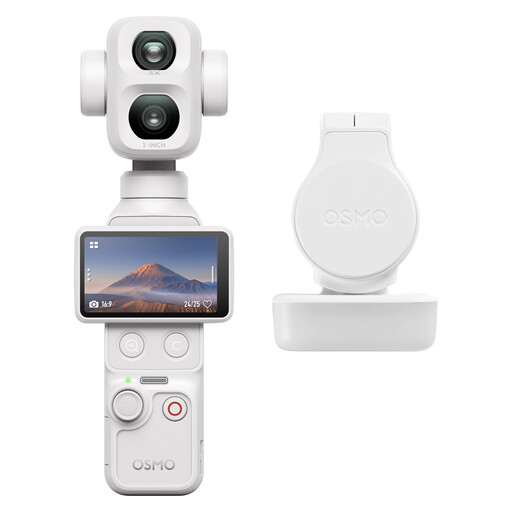
DJI Osmo Pocket 4P Standard Combo in white

DJI Osmo Pocket 4P Standard Combo (White)

The built-in gimbal could be useful for recording video from moving angles. Check separately whether you can mount the camera for a fixed view of your workbench.

The product description lists a built-in 3-axis gimbal, a touchscreen and 4K video recording.

View at Joybuy

AOC webcam for PC with microphone

AOC Webcam for PC with Microphone, 4K

The position can be adjusted according to the description, making it suitable for a PC view. Check that the field of view captures the framing you want.

Specifications include 4K at 30 fps, a 99° field of view, 180° tilt, 360° rotation and a built-in microphone.

View at Joybuy
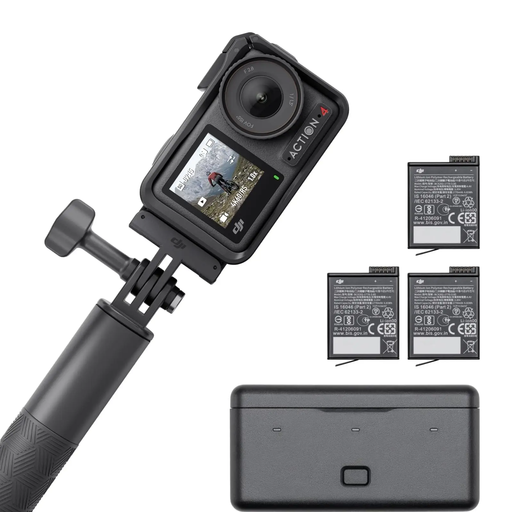
DJI Osmo Action 4 Adventure Combo

DJI Osmo Action 4 Adventure Combo

Could be worth considering for recording longer work sessions; check whether the wide-angle view captures the framing you want at your workbench.

The product description lists 4K/120fps, a 155° field of view and three additional batteries. The product title states a battery life of more than 7.5 hours.

View at Joybuy

Frequently asked questions

How can I check whether the solder joint looks sharp and large enough?

Decide on the component size, camera position and available working distance, then check the field of view and close-focus performance of the specific camera-and-lens combination. Focus distance and the clear space in front of the lens aren’t the same thing: Sony Deutschland gives a minimum focusing distance of 9.5 cm for the E 30 mm F3.5 Macro, but just 2.4 cm between the front of the lens and the subject.

How should I set up the lighting and focus for a fixed workbench view?

Secure the camera and check the focus on the same plane as the solder joint. Depth of field gets shallower at close range. A smaller aperture increases it, but lets less light reach the sensor. So test the lighting in your actual setup.

What should I test before a longer recording or livestream?

Test the power supply, storage or PC recording, and audio in the mode you intend to use. Canon lists two SD card slots for the LEGRIA HF G70, but notes that this model doesn’t output audio over USB when streaming via USB.

Can I ignore soldering fumes to get the camera positioned correctly?

No. BG ETEM describes fumes from soft soldering as a potential cause of irritation to the respiratory tract and eyes. Plan the camera angle so it doesn’t get in the way of suitable protective measures or fume extraction at your workstation. These recommendations aren’t presented as general legal requirements for every private home studio.

What rights apply when buying a camera online in Germany?

According to Verbraucherzentrale, a 14-day right of withdrawal generally applies to eligible consumer distance contracts; you must notify the retailer that you wish to withdraw. Verbraucherzentrale also distinguishes between the statutory guarantee and a voluntary warranty.

Can I show other people in a published soldering demo?

Recording your own work is different from publishing footage that identifies other people. If others can be recognised and personal data is processed, you should check that there’s an appropriate legal basis. The Federal Commissioner for Data Protection and Freedom of Information lists consent as one possible basis. Without further details, it isn’t possible to say generally whether consent is required in a particular case of publication.