If you’re showing each step live on a computer, an adjustable document camera is a sensible place to start. For video calls with the occasional view of your work surface, consider a webcam with a desk-view mode. A compact camera may be a good option if you want to record without keeping a computer connected. The key things to consider are the framing, focusing distance, a secure position and clear audio – not resolution alone.
Who are these recording options suited to?
Teachers who need a live overhead view
If you mainly demonstrate painting live and want both the ceramic piece and your hands to be visible at a small workstation, an adjustable USB document camera is one option to consider. IPEVO lists an adjustable arm for the V4K PRO 120; check that your computer and teaching app support the camera.
Teachers using video calls
If you usually speak directly to the camera and only occasionally switch to a view of your work on the table, a webcam with a desk-view mode may suit you. Logitech’s Brio 500 has a Show Mode; check that the camera angle and mount work in your space.
Creators recording without a teaching computer
If you want to record lessons independently, a compact camera may be an option. Canon lists microSD-compatible storage for the PowerShot V10, while Sony lists a fixed 18–50-mm zoom lens for the ZV-1 II. Check the positioning, power supply and framing you want at your table.
What should you look for when buying?
| Buying priority |
What to check |
Who will find this most important? |
| Framing and positioning |
Check that the ceramic piece and your hand movements are both visible in the preview; consider how much space the mount takes up. |
If I want to show both hands while painting, I need a suitable frame that doesn’t take over my small workspace. Around 28% of consumers are likely to consider framing their top buying priority. |
| Sharp details |
Measure the working distance and check the focus on the piece itself, not just on a face. |
If fine brushwork needs to be visible, the camera must focus on the ceramic and brush from the available distance. Around 22% of consumers are likely to prioritise detail. |
| Recording setup |
Decide in advance whether you’ll stream live through a computer or record independently; check the connections and app. |
If I’m teaching live or want to record lessons without a computer, the whole process – from the camera feed to the finished recording – needs to work. Around 22% of consumers are likely to weigh up the recording setup first. |
| Speech clarity |
Listen to a test recording made from your usual speaking position, with typical background noise. |
If my instructions need to remain clear while I’m painting, I want to assess the sound from my actual seated position. Around 17% of consumers are likely to put speech clarity first. |
| Lighting and colour |
Watch a recording made in your usual room lighting and look out for shadows cast by your hands or the camera. |
If viewers need to make out changes in colour and the painted areas, the image needs to be checked under my usual lighting. Around 11% of consumers are likely to prioritise lighting and colour accuracy. |
Common selection mistakes
-
Assuming high resolution means the framing will be right
A high resolution rating doesn’t tell you whether the ceramic piece, your hands and the brush will all fit in the frame from the available distance.
Check the recording area, working distance and focus together for your planned camera position.
-
Assuming a desk mode is the same as a secure overhead mount
Logitech’s Show Mode on the Brio 500 is designed to tilt the camera. Canon’s built-in stand on the PowerShot V10 doesn’t confirm that it can be securely mounted overhead.
Check the mounting options and make sure you have enough room to move your hands freely before choosing a webcam or compact camera.
Depending on your setup, you may need an additional compatible, secure mount.
-
Treating a USB camera and a standalone camera as the same thing
A USB camera needs a compatible computer and an app that recognises external cameras. For standalone recording, the storage and power supply need to suit your workflow.
Before buying, decide whether you’ll stream live through a computer or record video files first, then check that the entire recording setup works.
An overview of relevant brands
IPEVO
Document cameras for showing a work surface. For the V4K PRO 120, the manufacturer lists an adjustable arm and USB-UVC.
- IPEVO lists autofocus from 10 cm and a maximum capture area of 440 × 330 mm for this model; a microphone and LED light are also included in the specifications.
- These specifications don’t guarantee that the ceramic piece and your hands will both appear fully in focus in every arm position. For live use, your computer and app need to be compatible.
Logitech
Webcams for computer calls. The Brio 500 can be tilted to show your work on the table occasionally.
- Logitech lists Full HD, Show Mode and noise-reducing microphones for the Brio 500.
- This doesn’t confirm that it can provide a straight-down view or focus suited to close-ups. Logitech says you need to hold the mount while tilting the camera if the micro-suction pad isn’t securing it.
Canon
A compact camera for recording video independently; this overview looks at the PowerShot V10.
- Canon lists 4K UHD video, a built-in stereo microphone, microSD-compatible storage and an integrated stand.
- The stand doesn’t confirm that the camera can be securely mounted overhead above a small painting table.
Sony
A compact creator camera with a fixed lens; this overview looks at the ZV-1 II, also known as the ZV-1M2.
- Sony lists an 18–50-mm wide-angle zoom and a built-in three-capsule microphone for this model.
- These specifications don’t guarantee a suitable overhead setup or clear audio at your particular table. Check the positioning and sound beforehand.
Joybuy products for filming at a table
The Joybuy products below include compact cameras for standalone recording and webcams for computer-based video recording.
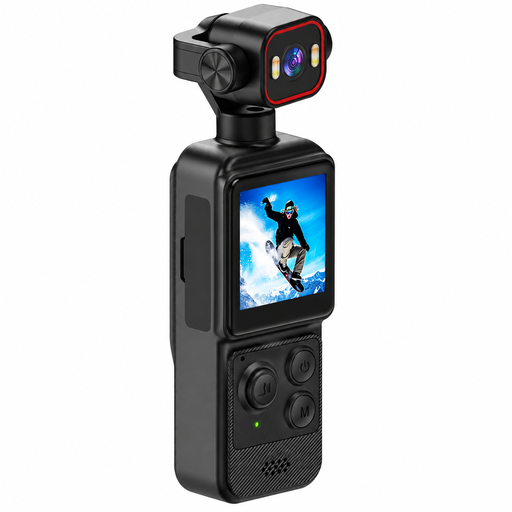 No image available
4K mini action camera with clip
May be worth considering for recording at your workstation if you can find a suitable, secure camera position.
The product title lists 4K, a 1.54-inch display and a 140° wide-angle lens.
The description mentions a rotating lens and two built-in LED lights.
It has a 1200-mAh battery; the title also mentions app control.
View at Joybuy
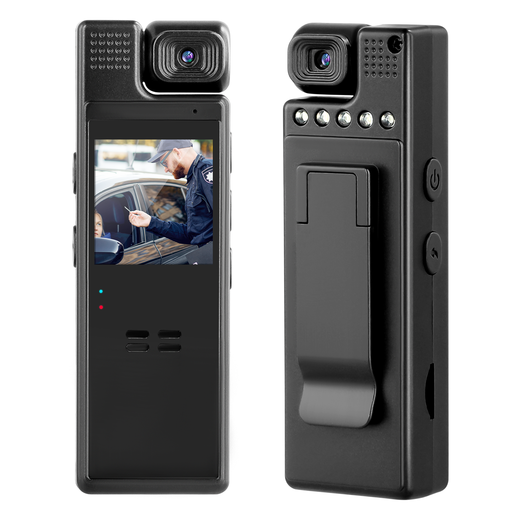 No image available
Compact camera with 1080p and 180° rotating lens
May suit standalone recording if you can check the framing and camera position at your table beforehand.
The product title lists 1080p and a lens that rotates through 180°.
The description mentions an included 64-GB card for video recording.
View at Joybuy
 No image available
AOC 4K webcam with 99° field of view
May be an option for computer-based recording with a voice track; check whether its position works for an overhead view at your small table.
The product title lists 4K and a 99° field of view.
The description mentions a built-in noise-reducing microphone and a mount that tilts through 180° and rotates through 360°.
View at Joybuy
 No image available
Philips 2K QHD webcam SPL6308S/00, EU version
May suit computer-based recording with a voice track if the monitor or screen mount and framing work at your table.
The product title lists 2K QHD and a noise-reducing microphone.
The webcam is described as having a clip mount for a laptop or desktop computer.
View at Joybuy
Frequently asked questions
How can I set up the camera without constantly adjusting it while I paint?
First, mark out where the ceramic piece will go and how much room your hands need to move. Then use the preview to set the framing and focus. Logitech says to tilt the camera for Show Mode on the Brio 500 and recommends holding the mount if the micro-suction pad isn’t securing it.
Can I use a USB document camera directly in my teaching app?
Not necessarily. IPEVO says the V4K PRO 120 is a USB-UVC camera, and the app you’re using must recognise external cameras. Also check that the connection is compatible with your computer.
What happens if a camera bought in Germany develops a fault?
For new goods, you generally have statutory rights against the seller. The Verbraucherzentrale states that these rights last for two years from delivery or receipt. A voluntary guarantee is separate. Check the terms of any guarantee and the contents of the specific offer separately.
Can I film other participants during a lesson?
If other people can be identified in the video or audio, check before recording and publishing what legal basis applies and how those affected need to be informed. The Federal Commissioner for Data Protection and Freedom of Information lists consent as one possible legal basis under Art. 6(1) GDPR. Whether it is required in a particular case depends on the circumstances and intended use.


