Campers with uncertain signal
If you want to download reading material at your pitch, first check whether your mobile network has usable coverage there. Ofcom describes its coverage checker as a prediction for outdoor areas.


For the occasional download to a single e-reader, your smartphone’s hotspot may be enough, provided your phone has a signal at your pitch and your data plan has sufficient allowance. A dedicated mobile Wi-Fi router with a battery makes more sense if several devices need their own connection, or you don’t want your smartphone tied up providing one. What matters most is the network at your specific pitch, power, SIM and data allowance – 5G alone won’t fix a dead spot or a limited data allowance.
If you want to download reading material at your pitch, first check whether your mobile network has usable coverage there. Ofcom describes its coverage checker as a prediction for outdoor areas.
If you charge your devices at your tent or while travelling, consider the stated battery life, suitable charging options and your power supply together. The manufacturer’s figures aren’t a guarantee of how long the device will last in real-world use.
If other people or devices need to use the connection, a separate router could be an alternative to your smartphone’s hotspot. Whether it’s right for you also depends on signal and your data plan.
Suitable if: You occasionally connect another device and your smartphone has a signal at your pitch.
Consider: You won’t need an extra router, but your smartphone and its data plan will provide the connection.
Suitable if: You want a separate connection for an e-reader, tablet or other people travelling with you, and 4G is available at your pitch.
Consider: You’ll need a compatible, activated SIM and will have to charge the router.
Suitable if: You need more than just downloads from your connected devices, and your location and data plan support 5G.
Consider: A higher advertised speed doesn’t guarantee faster downloads at your pitch.
Ofcom’s coverage checker shows predicted mobile coverage outdoors. Terrain, foliage and network congestion can all affect your connection at the pitch. So check the network and location first, then compare the devices’ features.
| What matters | What to look for when buying | Who is this especially important to? |
|---|---|---|
| Signal at your pitch | Check the provider and mobile network technology against coverage at your specific location. A coverage map is a prediction, not a guarantee of signal. | If I want to download reading material at my pitch, I first need a usable network there. Around 36% of consumers say signal is their top priority. |
| Using it without a plug socket | Check the stated battery life and charging port against the power source available to you. Battery life depends on how you use the device. | If I charge at my tent or while travelling, I want to know when I’ll need to recharge the router. Around 29% of consumers prioritise being able to use it without a plug socket. |
| Data allowance and plan | Check the amount you plan to download, your remaining data allowance and the terms of your contract. An additional router doesn’t provide any data allowance. | If I want to download several books or other reading materials, my plan needs to include enough data. Around 21% of consumers put data allowance and plan terms first. |
| Connecting several devices | Check how many devices need to connect at once and whether the hotspot supports them. The maximum number of connections doesn’t tell you the speed each device will get. | If the people travelling with me also want to get online, I want to connect their devices through one connection. Around 14% of consumers prioritise sharing a connection. |
Predicted outdoor coverage can’t tell you for certain what the connection will be like at a particular pitch. Terrain, foliage and network congestion can all have an impact.
Check the provider and your pitch first; only then consider the router’s advertised speed.
TP-Link notes that the actual battery life of the M7200 depends on factors including browsing habits and the number of connected devices.
Plan how you’ll recharge it and check that the charging port is compatible with your power supply.
A mobile 4G router needs a compatible data SIM; the device itself doesn’t provide a data allowance.
Before you buy, check the SIM format, activation requirements and plan terms.
The M7200 and M7350 are battery-powered 4G hotspots; the M7350 also has a display.
The DWR-932 is a compact, battery-powered 4G hotspot that can share a mobile connection.
Nighthawk mobile routers are worth considering if you want to compare extra features alongside a basic 4G hotspot.
This selection includes mobile 4G and mobile broadband routers for a separate internet connection. Before buying, check that the SIM, power supply and specific device features suit your pitch.
 No image available
For separate 4G internet access over Wi-Fi, provided you have a compatible, activated SIM and mobile coverage.
Stated mobile bands: B1/B3/B5/B7/B8/B20/B40. The description lists a SIM card slot and an EU plug for power.
 No image available
For separate 4G access when a suitable USB-C power source is available at your pitch.
Features listed include LTE Cat 6, Wi-Fi 6 AX 600 Mbps, 1× Gigabit LAN and Nano-SIM. The router requires USB-C power.
 No image available
For a mobile 4G hotspot with Nano-SIM when you want to connect several devices.
Features listed include support for up to 10 devices at once, 150 Mbps and a 2200-mAh battery. The stated battery life is up to 10 hours; this isn’t a guaranteed minimum.
 No image available
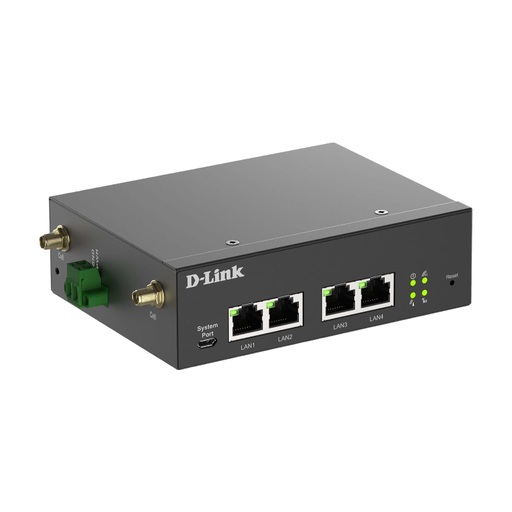
For applications described as industrial, where the specified DC power supply is available at the site.
Features listed include 5G NR, 4G LTE, two SIM slots and four Gigabit Ethernet ports. The specified DC power supply is 9–36 V.
 No image available
For a mobile 4G hotspot with Nano-SIM when you want several devices to share a connection.
Features listed include support for up to 10 connected devices at once, download speeds of up to 150 Mbps and upload speeds of up to 50 Mbps, plus a 2000-mAh battery. The stated battery life is up to 8 hours; this isn’t a guaranteed minimum.
Use Ofcom’s mobile coverage checker to look up your destination and the network used by your SIM. The checker shows predicted outdoor coverage; testing the connection when you arrive will give you a more practical idea, as woodland, valleys and network congestion can affect reception.
Use an activated SIM that’s compatible with the router, switch the device on and connect your e-reader to its Wi-Fi. Check the SIM size before buying: TP-Link specifies a Mini-SIM for the M7200 and says that an adapter isn’t included.
Compare the data allowance, contract length and terms with the amount you plan to download. For telecommunications contracts taken out online, the provider must give you a contract summary as an easily downloadable document before you sign up, as Ofcom points out.
Radio equipment placed on the market in the UK must meet the requirements of the Radio Equipment Regulations. Ofcom’s market surveillance checks include the correct CE marking, product identification and required documentation. Check these details for the specific version on offer; a brand or model name alone doesn’t prove that it complies.