What should you consider when buying?
First, check app compatibility and offline use. Then consider display size, charging plans and packed dimensions to help you choose.
| Buying priority |
What to look for |
Who it matters most to |
| Playing offline |
Check whether the specific app works offline and whether you’ve downloaded any content you’ll need in advance. |
If I want to solve puzzles at the campsite without Wi-Fi, my chosen app needs to work without a connection after installation. Around 31% of consumers rank offline play as their top priority. |
| Charging on the go |
Only compare battery life claims when they relate to similar usage, and check which charging accessories are included. Xiaomi gives the Redmi Pad 2 a capacity of 9.000 mAh; Lenovo claims up to ten hours of video playback for the Tab M11. |
If I can only charge occasionally, I want to plan my breaks more easily rather than assume a capacity figure tells me how many hours I can play. Around 25% of consumers prioritise long periods between charges. |
| Easy-to-read grid |
Weigh screen size against the tablet’s weight and check how your app looks in the lighting conditions you expect to play in. Xiaomi gives the Redmi Pad 2 a brightness of 500 cd/m² in Standard mode and 600 cd/m² in Outdoor mode. |
If I want to see the numbers clearly outdoors and perhaps make notes, I need a grid that’s the right size. Around 19% of consumers prioritise puzzle readability. |
| Size and weight |
Compare the dimensions and weight of the exact model, including any case you plan to use. Apple gives the Wi-Fi iPad (A16) a weight of 477 g; Xiaomi gives the Redmi Pad 2 a weight of 510 g. |
If I carry my tablet around the campsite a lot, I’d rather have a handy device than the largest possible grid. Around 13% of consumers prioritise a compact size. |
| App choice and extra costs |
Check that your chosen app is available for the operating system and whether its store listing mentions adverts or in-app purchases. Oakever Games marks one Sudoku app as containing adverts and in-app purchases. |
If I want to use a particular puzzle app and avoid unexpected extra purchases, the right app and its features matter to me. Around 12% of consumers prioritise app choice and additional costs. |
Joybuy products for number puzzles on the go
This selection includes Android tablets with larger displays that may suit puzzle apps and number grids. Before buying, check that your specific app is compatible and confirm which version of the device you’re considering.
 No image available
Samsung Galaxy Tab A11+ X230, 11-inch, Wi-Fi, 6 GB RAM and 128 GB, Grey
For a compatible Android puzzle app and a larger number grid.
11-inch display; 6 GB RAM; 128 GB storage.
According to the product description, the device is protected against dust and splashes in accordance with IP52; check the usage conditions for the exact model.
View at Joybuy
 No image available
Blackview MEGA 12, 12.2-inch, 36 GB (12 + 24 GB) and 256 GB, Black
The stated display size gives you room for a larger puzzle grid.
12.2-inch display with 2.4K resolution and 120 Hz; 36 GB (12 + 24 GB) and 256 GB storage; 10.000-mAh battery.
View at Joybuy
 No image available
GOODTEL G11, Android 15, 11-inch, 16 GB RAM (8 + 8 virtual) and 256 GB, with EVA case
For a compatible Android puzzle app; the 11-inch display gives you room for numbers and notes.
Display resolution: 2176 × 1600; 16 GB RAM (8 + 8 virtual); 256 GB storage; 10.000-mAh battery.
View at Joybuy
 No image available
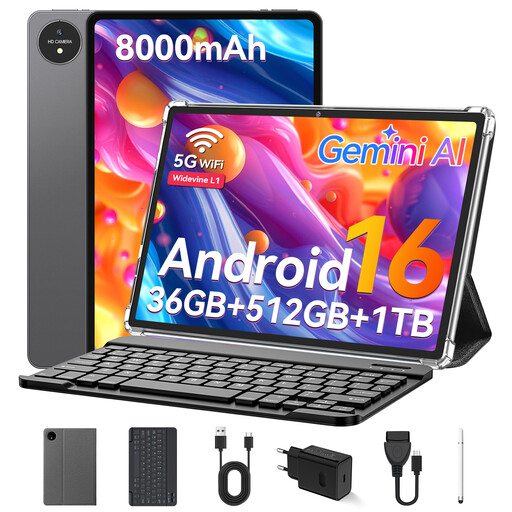
VANWIN YC1095T615M70, 11-inch, 32 GB RAM and 512 GB ROM, with keyboard
For a compatible Android puzzle app and a larger grid; the product name states that a keyboard is included.
T615 Octa-Core processor; 8.000-mAh battery; 32 GB RAM and 512 GB ROM (1 TB TF).
View at Joybuy
 No image available
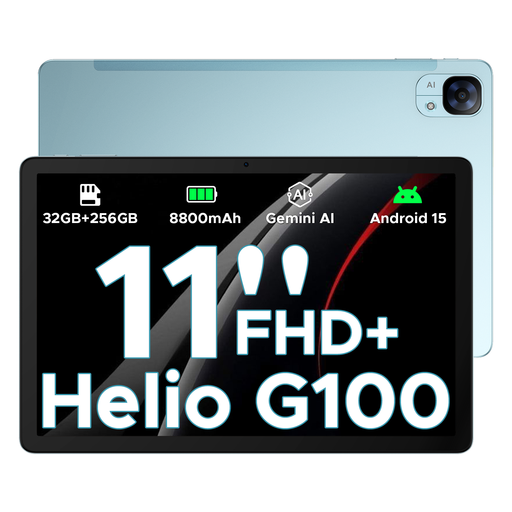
DOOGEE Tab E3, Android 15, 11-inch FHD+, 90 Hz, Blue
For a compatible Android puzzle app and an 11-inch puzzle grid.
11-inch FHD+ display with 90 Hz; 8.800-mAh battery; 32 GB + 256 GB/2 TB.
View at Joybuy
Frequently asked questions
Do I need internet to play Sudoku at the campsite?
Not necessarily: some Sudoku apps are described as playable offline. Install your chosen app before you travel and test it in aeroplane mode to see whether the content and features you need are available without a connection. The app descriptions from Oakever Games and Quartz Games apply to the specific apps described in each listing.
How much gaming power do I need for number puzzles?
Don’t choose a particularly powerful tablet just because it’s described as a ‘gaming’ device. First check that the app you want works with the device’s operating system. If you plan to play other games, check their requirements too.
Can I use a tablet in the sun while camping?
It depends on the device and the conditions. Apple advises against exposing iPads to direct sunlight for extended periods and gives an operating ambient temperature of 0 to 35 °C. This manufacturer guidance applies to iPads; also follow the advice for your chosen model.
What information should I check when buying a tablet sold in Germany?
For a tablet with wireless connectivity, check the CE marking and accompanying information required for that specific product. Germany’s Federal Network Agency checks CE information and required German-language instructions and warnings on devices of this type, among other things. Energy labelling rules also apply, according to the European Commission, to covered smartphones and slate tablets placed on the EU market from 20 June 2025; this doesn’t automatically apply to older units or other types of device.
Who should I contact if there’s a fault after buying online?
In general, the seller is your point of contact if a product is faulty. The Verbraucherzentrale explains that sellers are liable for two years for faults in new goods that were present at the time of delivery; this is separate from a voluntary guarantee. Online purchases also generally come with a 14-day right to cancel from the date you receive the goods, and you must notify the seller (Verbraucherzentrale, as at 13 August 2026).


