Which tablet is right for you?

Reading in daylight

If you’re reading outdoors for longer periods, screen reflections and text size are important things to check. Whether E Ink or a colour display suits you better also depends on whether your nature journal is mostly text or includes colour images. BOOX describes the Note Air5 C as an anti-glare colour E Ink tablet; Apple lists the iPad (A16) as having a brightness of 500 nits, which alone doesn’t guarantee good readability in direct sunlight.

Camping readers in changeable weather

If you also use your tablet outside the tent, rain, dust and gloves may influence your choice. Samsung lists the Galaxy Tab Active5 Pro as IP68 and says its screen can be operated with gloves. These details apply to this model, not to other tablets from the brand.

Reading without reliable facilities

If you can’t count on having Wi-Fi or a power socket at your pitch, download the content you need in advance and plan your power supply around how you’ll use the tablet. Apple notes that certain books need to be downloaded to an iPad before they can be read; TÜV-Verband recommends checking that power banks have the right technical specifications and connections.

What should you look for when buying?

E Ink tablet

A good fit if: Your journal is mostly text, or you’d like to annotate pages by hand. BOOX promotes the Note Air5 C as featuring colour E Ink, a front light and stylus functions.

Check: Make sure your files and preferred apps will work, and check weather protection separately.

Rugged outdoor tablet

A good fit if: You often use your device outside the tent and need an IP rating for the exact version. Samsung lists the Galaxy Tab Active5 Pro as IP68 and says its screen can be operated with gloves.

Weigh it up: Notebookcheck describes the Active5 Pro as relatively heavy and its display as reflective, so check its portability and readability too.

Conventional colour tablet

A good fit if: Your nature journal contains lots of colour photos or you’d like to use other apps. Apple lists the iPad (A16) as having 500 nits of brightness; Lenovo describes certain Tab M11 versions as having a matt IPS display.

Check: These specifications don’t guarantee readability in direct sunlight or weather protection. Check stylus compatibility and exactly what’s included with the version you’re considering.

Buying priority What to look for Who particularly values this?
Readability in daylight Check reflections and text size on a sample page in similar lighting conditions. Compare how it displays text and images separately. If I read outdoors for longer periods, I want to be able to see the text on my own journal pages clearly. Around 31% of consumers put readability in daylight first.
Protection from rain and dirt Check the IP rating, exact model version and the manufacturer’s conditions. A rugged design alone doesn’t prove that a device is weatherproof. If I use my tablet outside the tent too, I want to know what conditions the specific device can handle. Around 25% of consumers prioritise protection from rain and dirt.
Reading without internet or a power socket Open the file you need in offline mode before you leave. Check that the charging connections are suitable and plan your power supply for the trip. If there’s no reliable connection or power socket at my pitch, I still want to be able to open my content and plan how to charge my device. Around 25% of consumers prioritise offline access and power supply.
Colour images and annotations Try a sample page and check whether your preferred app supports notes. Confirm stylus compatibility and what’s included with the exact version. If I want to view photos or add my own notes, I need a suitable display and, if required, a compatible stylus. Around 19% of consumers prioritise images and note-taking features.

Common misconceptions when buying a tablet

  • A brightness figure doesn’t guarantee good readability in the sun

    Screen brightness and reflections are different things. Notebookcheck describes the Galaxy Tab Active5 Pro as reflective; the iPad (A16)’s stated brightness of 500 nits doesn’t, on its own, tell you how easy your pages will be to read in direct sunlight.

    If possible, check your journal pages in similar lighting and assess reflections and text size separately.

  • A rugged appearance doesn’t prove a specific IP rating

    Samsung’s IP68 rating applies to the Galaxy Tab Active5 Pro. A device’s appearance or brand name isn’t enough to assume that another tablet has the same protection.

    If you regularly use your device outside the tent, check its IP rating, the exact model version and the manufacturer’s conditions.

  • Cloud access and stylus support don’t mean everything is ready to use straight away

    Apple notes that certain books need to be downloaded to an iPad before they can be read. Stylus support also doesn’t automatically mean that a stylus is included.

    Download the file you need in advance and test it without an internet connection. For the model you’re considering, check stylus compatibility and what’s included. Depending on the version, you may need to buy a stylus separately.

Key brands at a glance

Samsung

The Galaxy Tab Active range may be relevant if you’re considering a rugged model; the features mentioned here apply to the Galaxy Tab Active5 Pro.

  • Samsung lists the Galaxy Tab Active5 Pro as IP68 and says it supports glove operation and has replaceable batteries.
  • Notebookcheck describes the model as relatively heavy and its display as reflective. This assessment doesn’t automatically apply to other Samsung tablets.

BOOX

The Note Air5 C is an E Ink option for readers who want to annotate pages by hand too.

  • BOOX promotes the model as having anti-glare colour E Ink, a front light and stylus tools.
  • Before buying, check that your files and preferred apps will work, and consider use in the rain separately.

Apple

The iPad (A16) is a colour tablet option for journals with images and for using a range of apps.

  • Apple lists a screen brightness of 500 nits and support for Apple Pencil (USB-C) and Apple Pencil (1st generation).
  • The brightness figure doesn’t guarantee readability in direct sunlight. Check stylus compatibility and offline access for the app you plan to use.

Lenovo

The Tab M11 is a colour tablet with note-taking features for readers who aren’t looking for a specifically rugged model.

  • For versions it sells, Lenovo lists a matt 11-inch IPS display with 400 cd/m²; one listed bundle includes a Tab Pen.
  • Check the display specifications and what’s included for the exact version. These details don’t indicate weather protection.

Joybuy products for reading while camping

The selection includes tablets described as rugged, an E Ink note-taking device and colour tablets for reading and making annotations. The description alone doesn’t prove that a device is weatherproof; check the specifications and limitations of the specific model for how you plan to use it.

Blackview Active 5 rugged tablet

Blackview Active 5 Rugged Tablet, 24 GB RAM, 128 GB

This model is described as rugged and may be suitable for use on the go; the product name describes it as waterproof. Check the IP rating and the manufacturer’s conditions before exposing it to rain.

The product name lists 24 GB RAM (6 + 18 GB virtual RAM), 128 GB storage, an 8.68 display, a 6.600-mAh battery and Android 15.

Joybuy
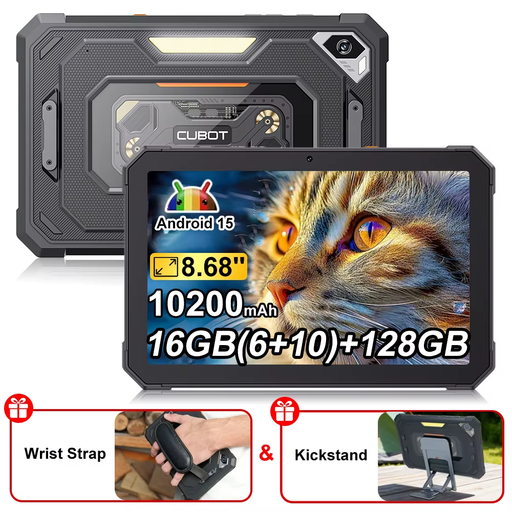
CUBOT Tab KingKong Mini rugged tablet

CUBOT Tab KingKong Mini Rugged Tablet

This model is described as a rugged tablet with GPS and a camping lamp. Check its exact IP rating if you plan to use it in rain or dust.

The product name lists an 8.68-inch display with 90 Hz, 128 GB storage and a 10.200-mAh battery.

Joybuy

10.1-inch tablet with Android 16, keyboard and stylus

10.1" Android 16 tablet with keyboard and stylus

This set may suit journal pages with your own annotations or text input; before buying, check whether the keyboard and stylus are included with the version on offer.

The product name lists a Quad-Core Unisoc T310, 36 GB RAM, 256 GB storage, 1 TB storage expansion and a 6.000-mAh battery.

Joybuy

iFLYTEK AINOTE 2 E Ink tablet with protective case

iFLYTEK AINOTE 2, 10.65" E Ink tablet

This E Ink note-taking device may suit longer reading sessions and handwritten annotations. The product description lists a stylus and a protective case.

The transcription feature described, which supports 16 languages, requires an internet connection, so don’t rely on it as an offline feature.

Joybuy

Teclast ArtPad Pro 2025 with 13.4-inch 2K display and T-Pen

Teclast ArtPad Pro 2025, 13.4" 2K tablet with T-Pen

The display and T-Pen are useful features for images and handwritten notes. However, the product information advises against prolonged exposure to sunlight, moisture and dusty conditions.

The product name lists 4096 pressure levels, a 10.000-mAh battery and Android 15. The recommended temperature range is stated as 0 to 35 °C.

Joybuy

Frequently asked questions

How do I prepare my nature journal for a campsite without Wi-Fi?

Download the file you need before you leave and try opening it without an internet connection. Apple notes that certain books need to be downloaded to an iPad before they can be read; check the offline features of any other apps you use.

What should I look out for when charging with a power bank?

Check that the connections and electrical specifications of the power bank and tablet are compatible. TÜV-Verband recommends checking technical details such as capacity and charging connections when buying a power bank. Use batteries as directed and don’t use them if they’re damaged.

What are my rights if my tablet is faulty?

When you buy from a trader in the EU, Your Europe’s consumer information states that you have a legal guarantee of at least two years from the date you receive the goods. This is separate from any additional manufacturer’s warranty on offer.

What should I check about product compliance for a tablet sold in Germany?

The Bundesnetzagentur lists correct CE marking, product identification and manufacturer information among the points to check. These general checks don’t confirm that a specific product listing is compliant, so check the documentation for the exact version.

How should I dispose of an old tablet or a removable battery?

Take electrical waste to a separate collection point and don’t put batteries in household rubbish. The Umweltbundesamt recommends removing the battery before returning the device, if this can be done easily, and disposing of it through a battery collection point.