Detail-focused craft table filming
You want to capture small movements and decorative details clearly. The key is getting the right framing and focus from a camera position that’s both practical and safe.


Choose a camera based on the framing you can achieve from a safe, practical position. For a computer-based overhead view, consider a USB document camera; for standalone recording, look at a compact camera or an interchangeable-lens model. A short minimum focusing distance alone won’t guarantee the right framing or ensure that your hands and small decorative details are clearly visible. When filming lit candles, a safe distance and a stable, non-flammable mount are more important than the framing you want.
You want to capture small movements and decorative details clearly. The key is getting the right framing and focus from a camera position that’s both practical and safe.
You want to show your hands and work surface without the camera or mount getting in the way. A USB document camera is particularly worth considering if you already record using a computer.
You want to show different angles or moving shots alongside a wide view. Consider whether a fixed lens, interchangeable lens or gimbal camera best suits your setup.
First, check the framing and focus from the planned camera position. Then you can adjust the lighting and recording setup to suit your workspace.
| What you’re looking for | What to check | Who it matters to |
|---|---|---|
| Decorative details from your working distance | Try a close-up from the planned mounting height; with interchangeable-lens cameras, check which lens is included. | If I want to show small decorative details, I need a sharp, sufficiently large image without blocking the work surface. Around 36% of consumers say close-ups are their top priority. |
| Overhead view on a small table | Compare the table area with the camera’s field of view from the planned mounting point; consider whether you’ll need a computer for a USB camera. | I want to show my hands and work surface together without the camera or mount taking up valuable space. Around 29% of consumers say space and an overhead view are their top priorities. |
| Exposing the flame and decorations | Take test shots with your actual setup and check how the flame and details appear, as well as for any potential LED flicker. | If the flame and darker decorations are both in the frame, I want to assess the lighting with my specific setup. Around 21% of consumers prioritise how the lighting looks. |
| Recording for longer and saving footage | Check the storage medium and power supply, and the software used with USB models. | I want to record a longer crafting session without storage or my computer setup becoming a bottleneck. Around 14% of consumers say their recording setup is their top priority. |
With interchangeable-lens cameras, the minimum focusing distance and framing depend on the lens you actually use. The camera body alone won’t tell you whether small decorative details will look large enough from your planned position.
Before you buy, check what’s included and try framing your subject from the distance you intend to use.
An interchangeable-lens camera may need an additional suitable lens. Also consider how you’ll mount the camera and lens on a small table.
A gimbal camera stabilises movement, but for a fixed shot you still need to position the camera correctly in relation to your work surface.
Choose a gimbal camera if you plan to move the camera, and check the mounting options and framing separately for a fixed overhead view.
A USB document camera needs a computer and recording software as part of the setup. Its stated sensor resolution doesn’t automatically tell you what resolution and frame rate your video file will achieve.
Check which recording resolutions and frame rates are available with the software you’ll actually use.
Changing your setup could reduce the distance between the flame, camera and flammable objects. The German Fire Service Association recommends using a stable, non-flammable holder, keeping candles away from flammable objects and never leaving lit candles unattended.
Adjust the camera position, framing or lens first, and follow fire safety guidance.
The PowerShot V1 has a fixed zoom lens, while the EOS R50 V is an interchangeable-lens camera. Your choice depends on whether you want to film without changing lenses or adjust the optics and framing to suit your needs.
The ZV-E10 II is an interchangeable-lens camera. Check whether the offer includes the 16–50 mm kit lens or just the camera body.
The Osmo Pocket 3 is a compact gimbal camera for capturing additional moving angles.
The V4K PRO is a USB document camera that lets you view your work surface on a computer.
The Z 30 with the 16–50 mm kit lens is another interchangeable-lens option for standalone video recording.
The Joybuy products listed here include compact gimbal and action cameras for standalone video recording. When filming candle decorations on a small table, check the framing, focus and that the camera can be securely mounted to your specific setup.
 No image available
A pocket-sized gimbal camera for standalone video recording, ideal if you want to switch between different framings.
The product title lists 4K video, 2× lossless zoom, a rotating screen and built-in storage.
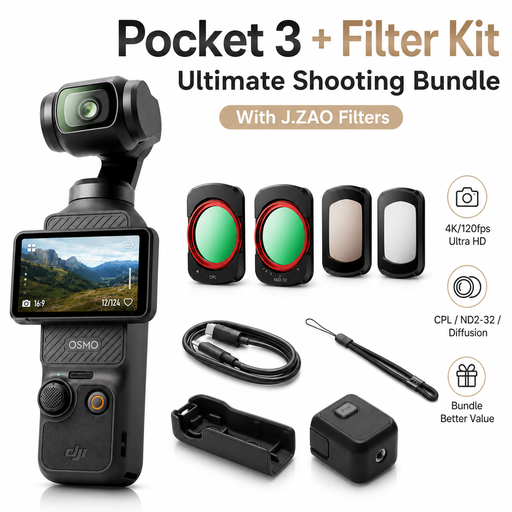 No image available
A compact gimbal camera for standalone recording. Check that the framing works from the position you intend to use.
The product title lists a 1-inch CMOS sensor, 4K/120fps video, a 2-inch rotating touchscreen and a 3-axis handheld gimbal.
 No image available
A pocket-sized gimbal camera for standalone video recording, with the option to vary your framing.
The product title lists a 1″ CMOS sensor, 4K/240fps, 2× lossless zoom, 107GB of built-in storage and a handle with a 1/4″ thread.
 No image available
A pocket camera kit for standalone video recording. Check that the mounting options suit your table setup.
The product title lists 4K/120fps and a 1-inch sensor.
 No image available
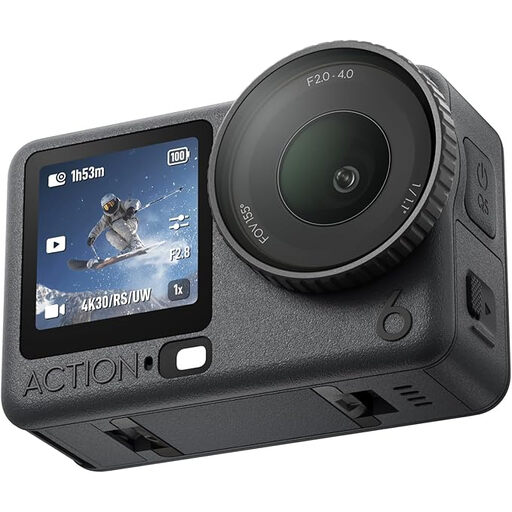
An action camera for video recording. Before you buy, check that its design and the framing you want will work in your small workspace.
The product title lists a 1/1.1″ square sensor, variable aperture and 4K video.
No, 4K alone won’t tell you that. Check the focus and framing from the planned mounting point: DJI lists a focus range starting at 0.2 m for the DJI Osmo Pocket 3, while Sony lists 0.25–0.30 m for the SELP16502 kit lens, depending on the zoom setting.
Plan the camera position and framing so that you can follow fire safety guidance. The German Fire Service Association recommends using a stable, non-flammable holder, keeping candles away from flammable objects and never leaving lit candles unattended.
Certain shutter speeds can cause flicker when recording under LED or fluorescent lighting. Canon notes that this effect can occur, so test the camera, light and settings together. This doesn’t mean there’s one shutter speed that works with every LED light.
Statutory consumer rights are different from a voluntary guarantee. The German Consumer Advice Centre explains the distinction. Check the specific terms of any additional guarantee, and contact the seller if your product develops a fault.
Whether you need consent depends on whether other people can be identified in the recording and how you use the video. The German Federal Commissioner for Data Protection and Freedom of Information describes consent as one possible, but not the only, legal basis under Article 6 of the GDPR. Check your specific circumstances before recording or publishing.