
Lieferung heute & morgen

Qualitätsgarantie

Willkommens-Angebote freischalten: KOSTENLOSE Lieferung | Bis zu 80 % RABATT | Kostenlose 30-Tage-JoyPlus-Testphase
App herunterladen
A Canon black ink cartridge is easy to order – but that doesn’t mean it’s right for your printer. Model numbers such as Canon PGI-550PGBK, Canon PGI-525PGBK, Canon PG-37 and Canon CLI-581XLBK may look similar, but they belong to different PIXMA ranges. If you search only for “black Canon cartridge”, you risk buying the wrong one, having to make an unnecessary return or ending up with a cartridge your printer doesn’t recognise.
This buying guide explains what to check before you buy and which products may suit different printing needs.
Canon uses several cartridge families for different printer ranges. A Canon PIXMA printer cartridge for the iP series won’t necessarily fit a PIXMA TS or PRO printer. Nor is the word “Black” enough to identify the right cartridge, as some printers use separate cartridges for pigment black and photo black.
So, check:
“XL” usually means a larger ink capacity or higher page yield within a compatible product family. It doesn’t mean that every XL cartridge will work with every printer. Page yield also depends on how much of each page is covered in ink, the print mode and the type of document.
A high-yield printer cartridge may be a good choice for a home office, while a standard cartridge could be more economical if you only print occasionally. Compare not just the pack price, but also the stated page yield and the cost per estimated page.
Pigment black ink is often used for printing text. In pigment ink, the colour particles are suspended in the carrier medium and can produce sharp edges on suitable paper. Dye-based black ink, on the other hand, is common in some photo-printing systems.
The ink type needs to match your printer. So don’t choose a cartridge based on the word “Black” alone. For example, Canon PGI cartridges may be for pigment black, while CLI cartridges may use dye-based ink. The exact configuration depends on the printer model.
The cartridge number is the key technical detail to check. Examples from Canon’s range include:
These details don’t replace checking the exact model of your printer. It’s especially important to check the model number carefully before buying for an older printer.
A genuine Canon ink cartridge is designed by the manufacturer for specific printing systems. This can make it easier to identify the right cartridge. Look for the terms “Original”, “Genuine” or “OEM”, and check what’s included. A single cartridge such as the PGI-550PGBK is not the same as a colour multipack such as the PGI-72.
For sealed cartridges, make sure the protective film and packaging are undamaged. Open the cartridge just before fitting it, and don’t touch the nozzles or electrical contacts.
Page-yield figures are estimates and depend on the method used to measure them. For example, the Canon PG-37 is stated to yield around 220 pages at 5 per cent coverage. The CLI-581XLBK is stated to yield up to 501 pages according to ISO figures. These figures aren’t directly comparable.
For everyday use, here’s what to consider:
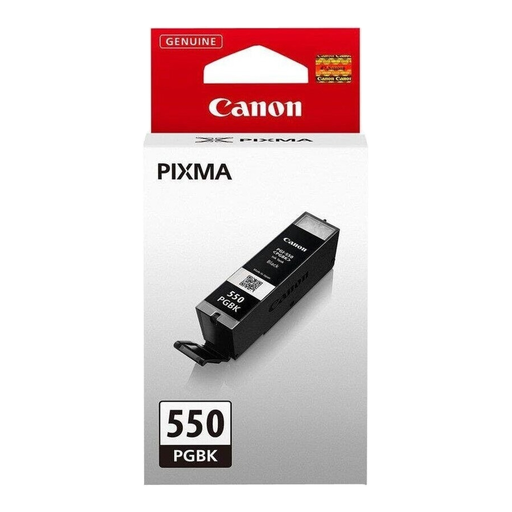
Why it suits this profile: This 15 ml single cartridge is designed for regular document printing at home, for studying and for home-office use, provided your printer supports this model number.
The precise model number and stated pigment ink help reduce the risk of choosing a cartridge that looks similar but isn’t compatible.
Genuine Canon product, 15 ml of pigment black ink and an approximate yield of 300 pages according to the product information.
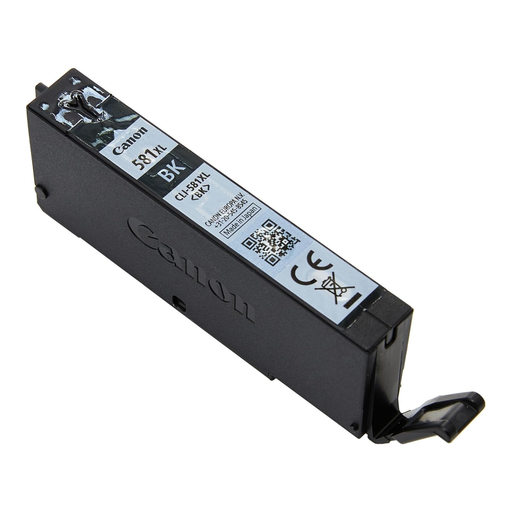
Why it suits this profile: The XL version is aimed at users with compatible PIXMA printers who print more often and want to change cartridges less frequently.
The stated compatibility list helps you check whether it works with selected TR and TS models. XL capacity doesn’t mean universal compatibility.
Genuine cartridge in XL format, with a stated yield of up to 501 pages according to ISO figures.
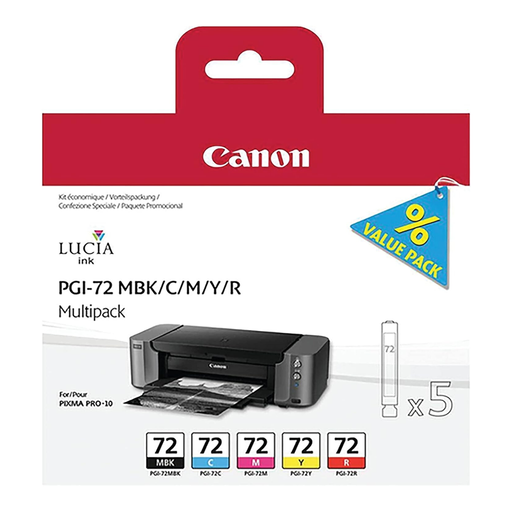
Why it suits this profile: This multipack is designed for compatible PIXMA PRO printers and suits users who need several ink tanks, including Matte Black.
The clearly stated contents help prevent users from accidentally ordering just one black cartridge for a multi-colour system.
Five genuine ink tanks, including Matte Black, plus LUCIA pigment ink according to the product description.
Switch on your compatible printer and wait for the cartridge holder to move into the replacement position. Remove the protective film and transport lock just before fitting the cartridge. Carefully press it into the slot marked with the matching colour or label until it clicks into place.
Also remember to:
For Epson printers, Canon cartridges aren’t automatically compatible. If you have an Epson Expression Home or WorkForce model, you’ll need the right Epson cartridge family, such as a 603XL Black. Always check the exact printer brand and model number.
We’ve put together a complete, regularly updated list of products that meet these strict selection criteria and fully comply with the safety regulations in force in the EU.
You can only find out by checking the exact model number. Compare the cartridge currently in your printer with the compatibility list for the new one. The PGI-550PGBK, PGI-525PGBK, PG-37 and CLI-581XLBK are each designed for different printer families.
Page yield depends on the ink capacity, print mode and page coverage. Figures such as around 300 pages for the PGI-550PGBK, 220 pages for the PG-37 or up to 501 pages for the CLI-581XLBK are useful guides, but they aren’t directly comparable.
Pigment ink is often used for text printing in compatible printing systems. However, whether it’s suitable for your printer depends on the cartridge series it’s designed to use. Only use the ink type and model number specified by the printer manufacturer for your device.