
Lieferung heute & morgen

Qualitätsgarantie

Willkommens-Angebote freischalten: KOSTENLOSE Lieferung | Bis zu 80 % RABATT | Kostenlose 30-Tage-JoyPlus-Testphase
App herunterladen
The right Canon toner affects more than print quality: it can also influence running costs, downtime and the lifespan of your printing system. Whether you’re buying for a home office, university, law firm or medium-sized business, the model name alone isn’t enough to help you choose the right Canon toner cartridge.
Canon has several product families and cartridge types. A Canon 040 toner, a CRG toner for i-SENSYS devices and a C-EXV toner for imageRUNNER systems aren’t automatically interchangeable. Even within the same series, standard- and high-capacity cartridges may be designed for different printer models.
Before buying, always check the following details against one another:
Figures such as “up to 5,400 pages” or “up to 60,000 pages” are technical estimates based on specific printing conditions. Actual yield depends on factors such as coverage, document type, colour areas and print settings.
A high-yield toner isn’t automatically the most economical choice for every household. If you print infrequently, a smaller cartridge may make more sense. A larger version is often a better fit for offices handling substantial print volumes.
For colour laser printers, Canon yellow toner, Canon magenta toner and Canon cyan toner must each match the designated slot and printer model. A similar colour name isn’t enough. When reordering from office stock, there’s a particular risk of buying a cartridge that’s the right colour but isn’t technically compatible.
The most important thing is an exact match with your printer model. Toner for Canon imageRUNNER uses different cartridge codes from toner for Canon i-SENSYS. Check the type designation on your old toner, in the printer menu or in the user manual.
Examples:
Genuine Canon toner is made by the printer manufacturer for specific device families. Wherever possible, the product name should include a unique part number as well as the series name, such as 0458C001, 0459C002 or 1252C004. This number makes it easier to check the cartridge against your printer and helps avoid mix-ups.
If you’re considering a compatible alternative, also check the supplier’s information about the chip, returns and the specific printer models listed. A low purchase price alone doesn’t tell you the true cost per page.
Compare yield against your expected print volume, not just the price on the pack. In colour printers, cyan, magenta, yellow and black are used independently. If you print in one colour much more often than the others, individual cartridges may run out at different rates.
For high-volume printing, consider models with a documented high capacity. The Canon C-EXV51Y, for example, is rated for up to 60,000 pages and is listed for specific imageRUNNER ADVANCE systems. Stated yields for smaller colour laser printers are considerably lower.
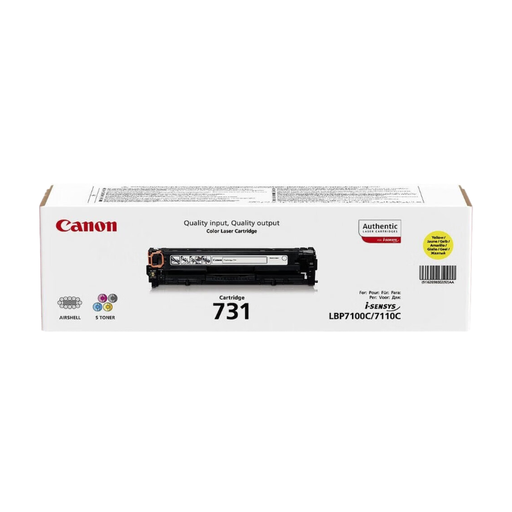
Why this product suits this profile: This genuine yellow cartridge is listed for selected Canon i-SENSYS and imageCLASS models, making it a good choice if you need a clearly identified individual cartridge.
The stated compatibility list and yield of around 1,500 pages make it easier to check whether it’s right for a smaller colour laser printer.
Genuine Canon cartridge in yellow, with specified compatibility for the LBP7100Cn, LBP7110Cw, MF8230Cn and MF8280Cw.
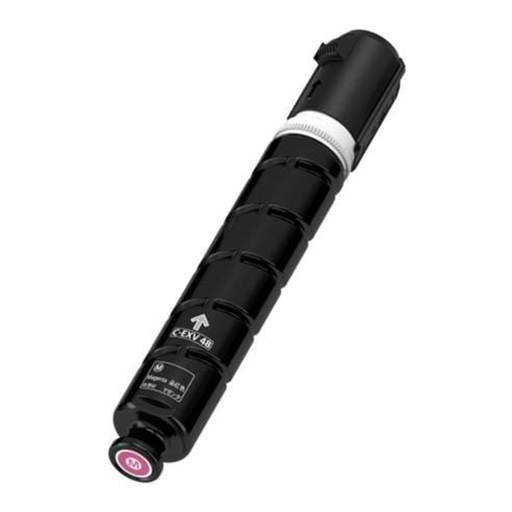
Why this product suits this profile: This cartridge is listed for the Canon imageRUNNER C1325IF, C1335IF and C1335iFC, making it a good fit for users with these specific office devices.
The specific C-EXV code helps prevent you choosing a cartridge based on colour alone. Its stated yield is up to 11,500 pages.
Genuine cartridge, magenta toner and clearly stated compatibility with selected imageRUNNER devices.
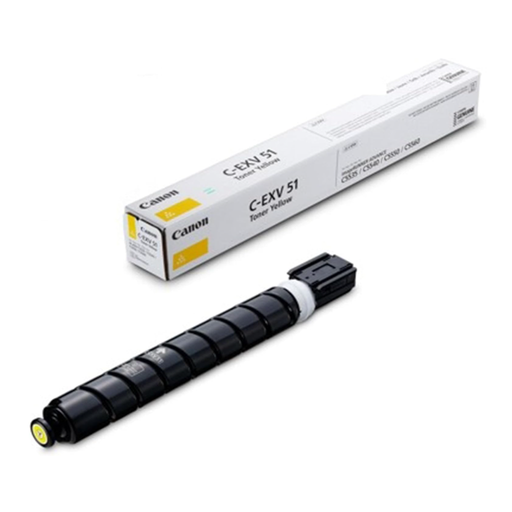
Why this product suits this profile: Its high stated yield makes it an interesting option for IT managers and offices with large colour print jobs, provided it matches the imageRUNNER model in use.
This cartridge isn’t recommended for every Canon device; it’s listed for specific imageRUNNER ADVANCE models, including the C5535, C5540i and C5560i.
Genuine yellow cartridge, laser technology and a stated yield of up to 60,000 pages.
We’ve put together a complete, regularly updated list of products that meet these strict selection criteria and fully comply with the safety regulations in force in the EU.
Make a note of your printer’s full model name and compare it with the toner code and compatibility list. Also check the colour and whether you need a standard or “H”, “XL” or high-capacity version.
Print life is usually given as a page yield. Depending on the model, this may be around 1,500, 2,300, 5,400 or 11,500 pages, or up to 60,000 pages. Actual yield varies with colour coverage, image content and print settings.
Genuine toner is intended for the Canon devices listed for that cartridge. Use it only if your printer model is explicitly included. An incompatible cartridge may trigger printer alerts, cause installation problems or affect print quality.