What should you look for when buying?
First decide whether your tutorial needs to show a PC display, a console signal, a camera view, or several of these sources at once. This determines whether you’ll need software capture, an HDMI input or additional signal paths.
| Priority |
What to check before buying |
Who is this important for? |
| The right picture without unnecessary extra hardware |
Before planning to buy an HDMI card, check whether OBS can capture the game or programme on the same PC. |
If I want to use as few devices as possible, I’ll first try the right software source. Around 29% of consumers would prioritise getting the right video source without unnecessary extra hardware. |
| Making controller inputs and hand movements visible |
Check whether your camera outputs a supported, unencrypted HDMI signal and whether your setup needs a separate video source. |
If viewers need to see which buttons I press, I’ll need a suitable camera view alongside the gameplay. Around 29% of consumers would put the visibility of inputs and picture details first. |
| Keep playing on your own monitor |
Compare the recording and passthrough modes for the same model: AVerMedia lists recording at up to 1080p60 and passthrough of up to 2160p60 HDR for the GC311G2; Elgato lists recording at up to 1080p60 and passthrough of up to 2160p60 for Game Capture Neo. |
If I want to play on my separate monitor while recording, its signal mode needs to suit my setup. Around 21% of consumers would give particular priority to using a monitor. |
| Recording game audio and commentary |
Check the console’s audio output, your recording software’s audio settings and the microphone connection with a short test clip. |
If I want the game audio and my explanation together in the file, I’ll test both audio sources separately. Around 14% of consumers would prioritise combining game audio with spoken commentary. |
| Keeping extra devices and cables to a minimum |
Compare the HDMI and USB connections you’ll need, and check what’s included against your camera, monitor and existing cables. |
Once I know which video source I’ll use, I want to find out in advance what other devices and cables my setup needs. Around 7% of consumers would give particular consideration to the overall amount of extra equipment required. |
Joybuy products for console recording
The Joybuy products below are selected for HDMI console recording, with the option of monitor passthrough. Compare the listed recording and passthrough modes with your specific setup.
 No image available
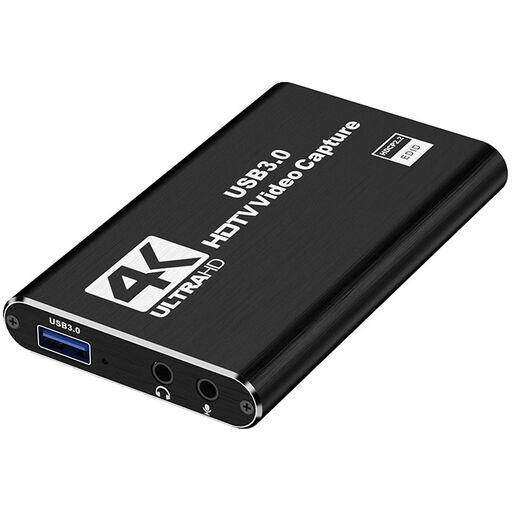
4K video capture card with USB 3.0
This device may suit an HDMI console setup with monitor passthrough. Check that its listed modes match the recording quality you want.
USB 3.0; 4K/60-Hz input and HDMI passthrough; 1080p/60-Hz recording; five ports.
Joybuy
 No image available
4K video capture card with loop-through
If you want to record an HDMI picture and send it to a monitor at the same time, compare these specifications with your setup’s requirements.
4K/60-Hz input; 1080p/60-Hz recording; loop-through; USB 3.0; five ports.
Joybuy
 No image available
HDMI capture card with input up to 4K/30 Hz
For an HDMI gaming source with monitor passthrough, consider the card’s input specification separately from its recording resolution.
USB 3.0; HDMI input up to 4K/30 Hz; recording at 1080p/60 Hz; HDMI passthrough.
Joybuy
 No image available
USB 3.0 video capture card with audio capture
If you want to record an HDMI gaming source and send it to a monitor, also check how your microphone and game audio will be connected.
USB 3.0; 1080p/60-Hz recording; 4K/60-Hz passthrough; audio capture; five ports.
Joybuy
 No image available
VIELLAN 4K HDMI video capture card
For an HDMI gaming source with a separate monitor, compare the recording and passthrough specifications with the modes you want to use.
USB 3.0; 1080p recording; 4K HDMI passthrough; microphone input and headphone output. According to the product description, performance may be limited when using a USB 2.0 port.
Joybuy
Frequently asked questions
Do I need a capture card for a controller tutorial on the same PC?
Not necessarily. For a game running on that PC, first try a suitable OBS game capture source on Windows. OBS Studio lists different display or window sources for macOS and Linux. You’ll also need a suitable camera source to show your hands.
How do I connect an external console and check the audio?
With a device that supports HDMI passthrough, the planned video path runs from the console to the HDMI input, from the HDMI output to the gaming monitor, and via USB to the recording computer. Add the card as a video capture source there, then check the game audio and microphone separately in a short test clip. Depending on your setup, audio from a controller headset may need its own signal path.
Can I fix a black screen by changing HDCP settings?
It depends on the source and content. PlayStation explains that HDCP can be disabled for gameplay on PS4, but is required for Blu-ray, DVD and DRM-protected streaming content. Don’t assume this guidance applies to another console, and remember that being technically able to record something doesn’t mean you have permission to publish it.
What happens in Germany if my newly purchased card develops a fault?
New goods are generally covered by two years of statutory rights against the seller; a voluntary guarantee is separate. The Verbraucherzentrale recommends contacting the seller if a product develops a fault.
Can I publish my recorded tutorial in Germany?
There’s no straightforward answer. Under certain conditions, § 53 UrhG covers individual copies for private use, but that alone doesn’t permit public communication; § 19a UrhG concerns making works available to the public. Before publishing, check the rights for any game, music, videos or other third-party material shown, as well as any applicable exceptions.


