Showcase creators using one PC
You’re playing the mod on the same Windows PC that OBS is recording on. OBS Project describes game capture as a direct source, so test the game and mod you’ll be using before budgeting for extra hardware.


If your game and OBS are running on the same Windows PC, try capturing the game directly first. According to OBS Project and NZXT Support Center, you don’t necessarily need a capture card for this. An external card may be worth considering for a second PC, console or HDMI camera. Compare recording and passthrough separately: 4K passthrough doesn’t automatically mean 4K recording.
You’re playing the mod on the same Windows PC that OBS is recording on. OBS Project describes game capture as a direct source, so test the game and mod you’ll be using before budgeting for extra hardware.
You want to send footage from a second PC or console to the recording PC. If you also want to play on a separate screen, check whether the exact card model has a suitable HDMI output.
You want to add a camera feed as well. Make sure the camera, capture device and OBS all support the signal path you need. A camera adapter isn’t automatically designed to connect a separate gaming screen.
Suitable if: Your game and OBS are running on the same Windows PC, and OBS can capture the game you’re using.
The trade-off: You won’t need a capture card or extra cables, but you should test game capture beforehand.
Suitable if: A second PC or console supplies the footage, and you want to pass it through an HDMI output to a gaming screen.
The trade-off: You’ll need space for the card’s connections and cables. The input, passthrough and recording modes must all suit your setup.
Suitable if: You want to add a camera feed to your mod showcase and the camera provides a suitable HDMI signal.
The trade-off: Check camera compatibility separately; this doesn’t automatically include an HDMI output for a gaming screen.
| What matters | What to check before buying | Who should consider it? |
|---|---|---|
| Extra hardware | Make a short OBS test recording of the game and mod you’ll be using before deciding whether you need an external card. | If you want to play and record on the same PC, first find out whether direct capture will do the job. Around 36% of consumers put hardware requirements at the top of their list when making this choice. |
| Passthrough and space | Check the exact model’s HDMI input and output, USB connection and host port, and make sure there’s room for the screen and cables. | If you’re playing from a second source and want to use a separate screen as well, you’ll need the right signal path. Around 29% of consumers prioritise passthrough and a tidy setup. |
| Recording resolution | Check the recording mode separately from the input and passthrough. A test recording will show whether the mod details are clear in the format you want. | If you want fine details in your mod to show up in the finished file, the actual recording resolution matters. Around 21% of consumers base their choice primarily on higher-resolution recordings. |
| Camera source | Check the camera’s HDMI output, the USB host connection and which OBS sources need to be visible at the same time. | If you want to include an HDMI camera in your presentation, its feed needs to fit into your recording workflow. Around 14% of consumers prioritise adding a camera source when making this choice. |
If your game and OBS are running on the same PC, direct game capture may be all you need. An untested extra card will only add more connections and cables to your small desk.
Try a short recording of the game and mod you’ll actually use before choosing an external device.
Passthrough sends the picture to your screen, while recording sends the signal to your recording software. For the Elgato Game Capture Neo, the manufacturer specifies passthrough up to 2160p60, but recording at up to 1080p60 only.
Check the input, passthrough and recording specifications separately for the exact model.
Razer describes the Ripsaw X as a camera capture card. By contrast, the AVerMedia GC311 and Elgato Game Capture Neo are listed with an HDMI output.
Only rely on a card to connect to a gaming screen if an HDMI output is explicitly specified for the exact model.
A capture card can record a signal, but it can’t tell you whether you’re allowed to show game, mod or music content publicly. Under Germany’s Copyright Act, publicly performing a protected work is generally an exclusive right of its author.
Check the applicable usage rights for the content in question, and use a permitted, unencrypted signal source.
According to the manufacturer, the external Game Capture Neo, HD60 X and 4K S support different recording formats.
According to AVerMedia, the Live Gamer MINI GC311 is an external Full HD option for a second HDMI gaming source.
According to NZXT, the Signal HD60 is designed to capture footage from a second gaming source.
Razer describes the Ripsaw X as a compact capture card for an additional camera source.
This selection is aimed at setups with an external HDMI source, such as a console or second PC, and at showcase creators who want to check passthrough or a screen connection.
 No image available
Could be suitable for an external HDMI source; before buying, check that the input, output and recording mode match your setup.
Listed in the product name: USB 3.0 and 5 ports.
 No image available
If you want to record from an external source, check before buying that the connections and recording mode suit both the source and the recording PC.
Listed in the product name: 5 ports.
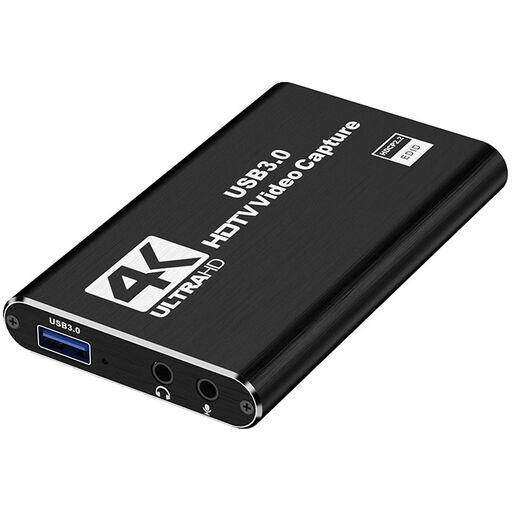 No image available
This model may suit an external HDMI source if the modes listed in the title match your recording needs.
Listed in the product name: HDMI input up to 4K 30 Hz and recording at 1080p 60 Hz.
 No image available
Could be suitable for an external gaming or camera source; check the exact signal path and recording resolution you need before buying.
Listed in the product name: USB 3.0 and 5 ports.
 No image available
Could suit a second HDMI source if 1080p recording meets your needs; check the signal modes supported by your source and recording PC.
Listed in the product name: USB 3.0 and 1080p recording. The title distinguishes this from the 4K passthrough specification.
Add a supported card to OBS as a “Video Capture Device” source, then choose a resolution and frame rate supported by the device. If your game and OBS are running on the same Windows PC, try “Game Capture” first.
Passthrough is the signal sent to the connected screen; capture is the signal sent to your recording software. Elgato specifies passthrough up to 2160p60 for the Game Capture Neo, but recording at up to 1080p60 only.
Check the source, cable, supported signal mode and device selected in OBS. Elgato says its capture devices can’t capture HDCP-protected HDMI signals; AVerMedia lists the same limitation for the GC311. Circumventing copy protection isn’t a requirement for your purchase.
Not simply because your capture card can record the signal. Under Germany’s Copyright Act, publicly performing a protected work is generally an exclusive right of its author. Whether you can show a particular mod, game content or soundtrack depends on the relevant rights and terms of use.