What should you look for?
First, work out whether you need to bring in a separate HDMI source at all. Then compare the signal path, recording format and audio controls with your planned review set-up.
| Buying criterion |
What to check before buying |
Who is it most relevant to? |
| Signal and pass-through |
Check the HDMI input, recording format and pass-through to your display separately; also check the display connection you need. |
If I'm connecting a console, the input signal and display need to be compatible; a high pass-through resolution doesn't tell me anything about the recording. Around 36% of consumers prioritise signal and pass-through. |
| Game audio and commentary |
Check how HDMI audio and the microphone are connected, and whether you can control the audio sources separately in the software. |
If I'm commentating in a shared room, I want to control game audio and my voice without unnecessary playback through speakers. Around 29% of consumers prioritise commentary and keeping noise down. |
| Recording for analysis |
Compare the actual recording format, not just the input or pass-through specification; make a short test recording and check the planned audio track assignments. |
If I want to discuss gameplay in more detail later, I need saved footage that suits my review and editing workflow. Around 21% of consumers prioritise editing and analysis. |
| Space and connections |
Check the USB data connection, required HDMI connections and included cables against your existing computer and set-up. |
If I'm sharing a bedroom workspace or have limited room, I want to be able to connect and position the card appropriately. Around 14% of consumers prioritise space and connections. |
Joybuy products for HDMI reviews
The external HDMI capture cards below are designed for reviews where the picture needs to be sent to a display while recording; the stated recording resolution is Full HD, depending on the model.
 No image available
USB 3.0 capture card with 4K/60Hz input and 1080P/60Hz recording, 5 ports
The stated pass-through is relevant if you want to review HDMI footage while displaying it on a screen at the same time.
Specifications include 4K/60Hz input and pass-through, as well as 1080P/60Hz recording. It isn't specified for 4K recording; USB 3.0 and 5 ports are also listed.
View at Joybuy
 No image available
Video capture card with 4K/60Hz loop-through and 1080P/60Hz recording, 5 ports
If you want to view the HDMI picture on a screen as well as recording a Full HD review, the stated loop-through feature is designed for this purpose.
Specifications include 4K/60Hz input and loop-through, as well as 1080P/60Hz recording. 4K recording isn't specified; the description also lists 5 ports.
View at Joybuy
 No image available
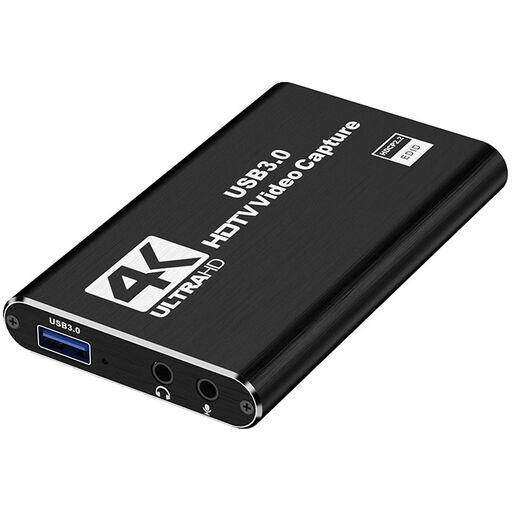
HDMI capture card with microphone input and headphone output
This model may suit a narrated review if you want to use the listed audio connections in your set-up.
Specifications include 1080P/60Hz recording and HDMI pass-through; the HDMI input supports up to 4K 30Hz. The description also lists a microphone input and headphone output.
View at Joybuy
 No image available
USB 3.0 video capture card with 4K/60Hz pass-through and 1080p/60Hz recording, 5 ports
The stated pass-through feature is relevant for a review where you want the picture to appear on a monitor at the same time.
Specifications include 4K/60Hz input and pass-through, as well as 1080p/60Hz recording. 4K recording isn't specified; USB 3.0 and 5 ports are also listed.
View at Joybuy
 No image available
VIELLAN 4K HDMI video capture card with 1080p recording
The product description lists both a microphone and headphone connection, making this an option for a narrated HDMI review.
The title specifies 1080p recording and 4K HDMI pass-through; 4K recording isn't specified. USB 3.0, a microphone input and a headphone output are also listed.
View at Joybuy
Frequently asked questions
Can I record my review directly on my gaming PC?
Yes. If the video source you need is already running on that PC, you don't necessarily need a capture card. For a separate HDMI source such as a console, a capture card can bring the picture into your streaming PC; NZXT's set-up guide explains this too.
How can I check the audio without causing an echo in a shared room?
Make a short test recording in OBS and listen back before going live. OBS Project warns that using the same audio device as both a global source and a scene-specific source can cause an echo. For later editing, you can assign audio sources to separate recording tracks.
Why is the console picture black in the capture software?
HDCP may be the cause: according to Elgato, its capture devices don't display an HDCP-protected HDMI signal. Elgato explains how to turn off HDCP for gameplay recordings on PlayStation 5; this doesn't make protected films or streaming apps available to record freely.
Can I rebroadcast someone else's tournament coverage in full with live commentary?
A capture card doesn't grant you the rights to do this. Under copyright law, public communication is reserved to the copyright holder; § 51 allows quotations from published works only where their extent is justified by the specific purpose of the quotation. Clarify the rights to the specific footage and the organiser's terms before publishing it.
Can my webcam show a flatmate who can be identified in the bedroom?
§ 22 KunstUrhG generally requires the consent of the person pictured if their image is distributed or displayed publicly; § 23 sets out exceptions, which depend on the circumstances of each case. Position your camera and scenes so that flatmates don't appear unintentionally, and check with them before planning to show them.


