What should you look for when buying a capture card?
First check whether your game and OBS run on the same PC. If you’re using an external HDMI source, consider the audio setup, monitor passthrough and recording format next.
The percentages show the most important buying priority for each respondent planning a co-op stream with an HDMI game source.
| Priority |
What to check before buying |
Who it matters to most |
| Game and team chat audio |
Plan how each voice will reach OBS; check your headset, controller and chat connections, then listen back to a test recording. |
If I want to control game audio, microphone and team chat separately, getting the full audio setup right is my top priority. Around 29% of consumers would make game and chat audio their most important buying priority. |
| Monitor picture |
Match the resolution, frame rate and, where applicable, HDR or VRR capabilities of the card, source and monitor. |
If you want to keep your preferred picture mode on your monitor while gaming, pay particular attention to passthrough. Around 29% of consumers would put their monitor mode first. |
| Recording format |
Check the recording resolution and frame rate separately from passthrough. Also check HDR requirements and the USB connection. |
If recorded picture quality is my top priority, the recording mode actually supported is what matters. Around 24% of consumers would prioritise the recording format. |
| Connections and setup |
Compare the USB port, system requirements, HDMI connections and included cables with your setup. |
If you want to plan a setup that works with the connections you already have, check the port and what’s included carefully. Around 18% of consumers would make setup and connections their top priority. |
Joybuy products for HDMI game sources
The products below are external HDMI capture cards for consoles or a second PC feeding the stream, with a monitor connection. The listed variants support recording at up to 1080p; compare this with the stream format you want to use.
 No image available
4K video capture card, USB 3.0, 5 ports
For a separate HDMI game source connected to a monitor and streaming PC.
4K/60 Hz input and pass-through; recording up to 1080p/60 Hz. USB 3.0; listed as compatible with Windows, macOS and Linux.
View at Joybuy
 No image available
4K video capture card with loop-through, 5 ports
For a setup that sends the HDMI signal to both a monitor and a recording device.
4K/60 Hz input and loop-through; recording up to 1080p/60 Hz. USB 3.0; listed as compatible with Windows, macOS and Linux.
View at Joybuy
 No image available
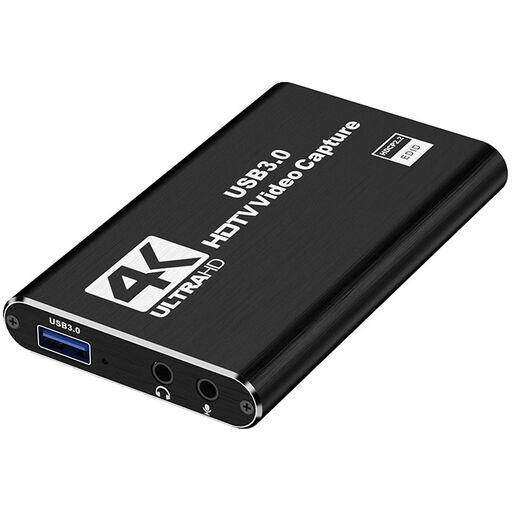
4K HDMI capture card, USB 3.0
For an HDMI game source with a separate monitor, plus microphone and headphone connections.
HDMI input up to 4K/30 Hz; recording up to 1080p/60 Hz. Microphone input and headphone output are listed.
View at Joybuy
 No image available
VIELLAN 4K HDMI capture card, USB 3.0
For a console or other HDMI source with monitor passthrough and Full HD recording.
4K passthrough and 1080p recording are listed. USB 3.0, microphone input and headphone output; compatible sources include PS4, Xbox and Nintendo Switch.
View at Joybuy
 No image available
VIELLAN HDMI capture card, USB 3.0
For an HDMI game setup with passthrough and separate microphone and headphone connections.
Recording up to 1080p and 4K HDMI passthrough are listed. Supports UVC and UAC; the product title states that no driver installation is needed.
View at Joybuy
Frequently asked questions about capture cards for co-op streams
How do I add a capture card in OBS?
Add it as a Video Capture Device and select a supported resolution and frame rate combination. OBS Project notes that an unsupported mode can result in a blank picture. Then check your audio sources separately.
What should I check with the audio before my first co-op stream?
Record and listen back to a test with game audio, your microphone and the chat channels you’ll actually use. OBS Project warns that capturing the same audio source globally and in a scene at the same time can cause an echo.
Why might my capture card show a black screen with a PlayStation 5?
On Elgato devices, HDCP may prevent capture when it’s enabled. For recording PS5 gameplay, Elgato explains how to turn it off under Settings → System → HDMI. This does not make copy-protected content available for recording.
What rights apply when buying a capture card online?
For a qualifying distance purchase from a business seller, you generally have 14 days from delivery to cancel, subject to statutory exceptions. EU consumer information also states that qualifying purchases of goods are covered by a legal guarantee of at least two years. This is separate from a voluntary manufacturer’s warranty.
Can I simply stream the voices and camera images of the people I’m playing with?
Not in every case: under certain conditions, § 201 StGB protects non-publicly spoken words from unauthorised recording, while § 22 KunstUrhG governs consent for distributing or publicly displaying images of people. Talk to everyone involved about the planned audio and video stream before you go live. The legal position depends on the circumstances.


