
Lieferung heute & morgen

Qualitätsgarantie

Willkommens-Angebote freischalten: KOSTENLOSE Lieferung | Bis zu 80 % RABATT | Kostenlose 30-Tage-JoyPlus-Testphase
App herunterladen
A car phone holder should keep your smartphone secure, leave your view unobstructed and work reliably every day. Yet some products can cause problems after only a short time: the holder tilts, the suction cup comes loose, your phone won’t fit against the magnetic surface with its case on, or the charging speed falls short of what was promised.
When choosing, mounting type, device compatibility and mechanical stability matter more than eye-catching marketing claims. This guide will help commuters, families, frequent drivers and iPhone and Android users find the right car phone holder.
A magnetic car phone holder may work with many smartphones, but it often needs a metal plate or a magnetic case. The connection may be weaker with thick, rugged cases. If you’re considering a MagSafe car mount, check that your smartphone or case actually has a compatible magnetic ring.
Clamp holders have their limits, too. Check the device size and weight specified by the seller. A model designed for smartphones won’t necessarily be suitable for a tablet.
A phone holder for an air vent takes up little space, but it can put strain on the vent’s slats. Loose, very thin or damaged slats aren’t suitable for heavy smartphones. The holder may also block airflow or be exposed to additional strain when the air is very hot or cold.
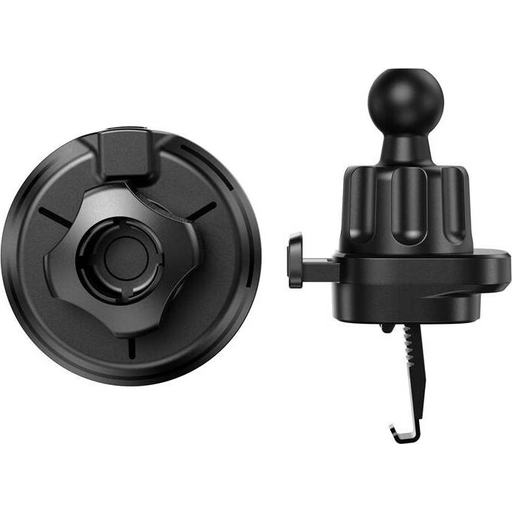
Before buying, check whether the clip is suitable for horizontal or vertical slats and whether it uses a hook or double-hook system.
A phone holder with wireless charging needs more than a compatible smartphone: it also needs a suitable power supply in your vehicle. Qi chargers operate at different power levels depending on the device and power adapter. So a rating of up to 15 W doesn’t mean you’ll get 15 W with every smartphone.
For a Qi2 or MagSafe car mount, also check for certification or clearly stated device compatibility. You may need a USB-C cable and a suitable car charger.
A clamp holder should support the sides and, ideally, the bottom of your smartphone securely. Soft silicone pads can protect contact points from scratches, but they don’t replace checking that the holder fits your phone. Check:
A 360-degree phone holder lets you switch between portrait and landscape and adjust the viewing angle. The joint should lock securely once you’ve set it.
With magnetic models, the connection between the holder, metal plate and smartphone is key. A metal plate may affect wireless charging if it sits between the charging surface and the device. With Qi chargers, keep items such as coins and cards with magnetic strips away from the space between the phone and the charging coil.
When driving, set up navigation and phone functions before you set off. The holder must not obstruct your view, controls or airbag deployment areas.
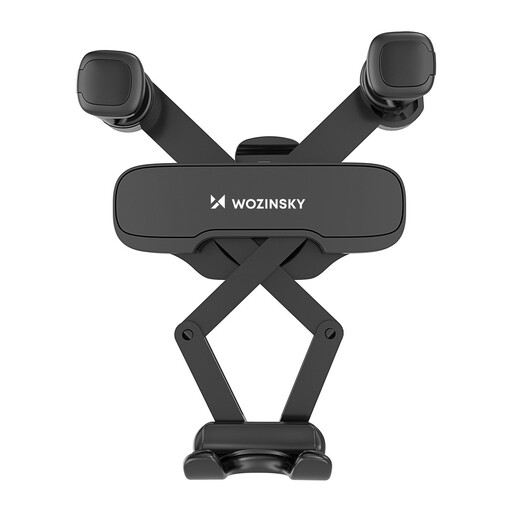
Why it suits this profile: This holder uses a gravity mechanism and attaches to the car’s air vent. It’s designed for smartphones measuring 4,7 to 6,9 inches and doesn’t need wireless charging accessories.
The supported device size is specified. Even so, check that the vent slats are sturdy enough and that the holder won’t obstruct airflow or controls before fitting it.
Gravity-powered clamp, 360-degree adjustment and air vent mounting.
Why it suits this profile: This model combines magnetic mounting, Qi2 support, charging at up to 15 W and 360-degree adjustment for compatible smartphones.
Charging speed is stated as depending on the device and power supply. For maximum charging speed, you’ll need a suitable USB-C power adapter and a compatible magnetic connection.
Qi2 support, N55 neodymium magnets, USB-C port and portrait or landscape positioning.
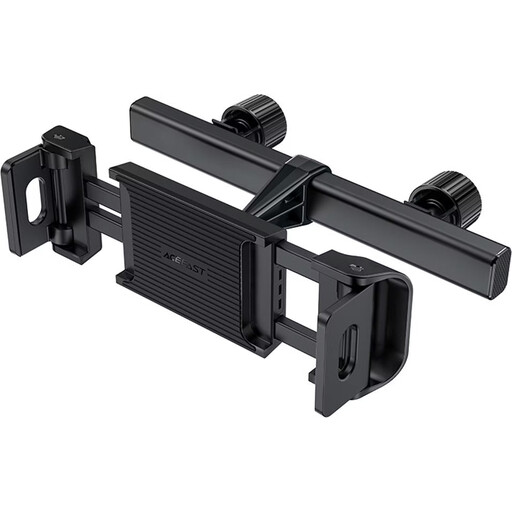
Why it suits this profile: This holder is designed for families and rear-seat passengers. According to the product details, its adjustable width of 135 to 230 mm makes it suitable for smartphones, tablets and portable consoles.
The dimensions of the headrest fitting are clearly specified. Before every journey, make sure the clip is secure and the device is fully seated in the holder.
Adjustable holder, horizontal swivel and metal, plastic and silicone materials.
We’ve put together a complete, regularly updated list of products that meet these strict selection criteria and fully comply with the safety regulations in force in the EU.
With suction cup models, a smooth, clean surface can improve the grip. Allow adhesive mounts enough time to set before putting them under strain. Keep metal plates away from sensitive cards or devices if the manufacturer warns against placing them nearby.
It depends on your iPhone model and the case you use. For iPhones with a compatible magnetic ring, a MagSafe car mount or Qi2 car mount may be suitable. If you don’t have a compatible magnetic connection, a clamp holder is often the simpler option. For wireless charging, your smartphone, holder and power supply all need to be compatible with one another.
A phone holder on an air vent is generally fine, provided it’s securely fitted and doesn’t obstruct your view, controls or airbag areas. The vent slats must be able to support its weight. Don’t use your smartphone while driving.
Its lifespan depends on the surface, temperature, cleaning and how much strain it’s under. Dust, heat or an uneven surface can cause a suction cup to come loose. Check the fitting regularly and replace the holder if the suction cup, joint or locking mechanism is damaged.