
Lieferung heute & morgen

Qualitätsgarantie

Willkommens-Angebote freischalten: KOSTENLOSE Lieferung | Bis zu 80 % RABATT | Kostenlose 30-Tage-JoyPlus-Testphase
App herunterladen
A car radio with wireless CarPlay and Android Auto can bring navigation, hands-free calling, music streaming and voice control to older vehicles. The choice ranges from a portable car radio to a permanently installed 1 DIN car radio. However, product names and marketing claims aren't always enough to judge how well something will actually work in everyday use.
Before you buy, it's worth comparing the installation type, connection technology and extra features. Three things in particular often lead to poor purchases.
With wireless CarPlay and Android Auto, the data connection works without a USB cable. However, the display or car radio still needs power. With a CarPlay screen for the car, power is usually supplied via the 12-volt socket, USB or USB-C.
So, you need to check:
An FM transmitter can be a handy solution for cars without a suitable audio input. However, sound quality and potential interference depend on your surroundings and the FM frequency you use.
A 7-inch car radio or a 10.26-inch car radio offers a different display experience to a compact screen. But the inch measurement only describes the diagonal. What also matters are:
A portable model is usually more flexible to mount and can be taken into another vehicle. A 1 DIN car radio, on the other hand, is installed into the dedicated slot. Before ordering, you should check the slot dimensions, installation depth, vehicle adapters and any existing steering wheel controls.
An advertised 4K car camera or a high-resolution display alone doesn't tell you everything about overall picture quality. Also important are the camera's resolution, how it performs in the dark, the viewing angle, storage and cable routing.
With a reversing camera, you also need to find out whether your car provides a reverse signal and whether the camera needs to be connected separately. A dashcam can add extra requirements for a memory card, power supply and mounting. So, always check the usage details against the product description and local legal requirements.
Wireless CarPlay is designed for iPhones, while Android Auto works with compatible Android smartphones. Exact device compatibility can vary depending on the operating system version. You may also find Bluetooth 5.0, voice control and MirrorLink.
These features serve different purposes:
Before buying, it's a good idea to check the manufacturer's compatibility list. Not every app and not every smartphone supports all features.
A touchscreen car radio should have clearly laid-out menus and controls that are large enough to use easily. With portable displays, the mounting angle and brightness adjustment are also important. A larger screen can show maps and menus more clearly, but it needs more space on the dashboard.
When deciding between 7 inches and 10.26 inches, drivers should consider not just the screen area but also its position in the car. The display must not block your view unnecessarily and should be securely fixed.
Depending on your vehicle, different transmission methods may be suitable:
The right solution depends on the car's age, existing features and model. A reversing camera or dashcam should also be routed so that cables don't get near pedals, airbags or moving parts.
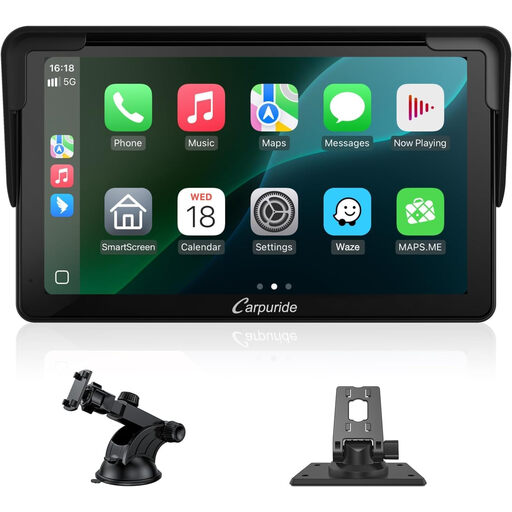
Why this product fits the profile: This portable 7-inch display is aimed at drivers who don't plan a fixed 1-DIN installation and want a retrofittable solution for an older car. According to the product details, it offers wireless CarPlay, Android Auto, Bluetooth 5.0 and MirrorLink.
The portable design reduces the risk of an incorrect radio slot size. Before buying, you still need to check the power supply, mount and audio output.
7-inch 1080p touchscreen with wireless CarPlay, Android Auto and Bluetooth 5.0 according to the product details.
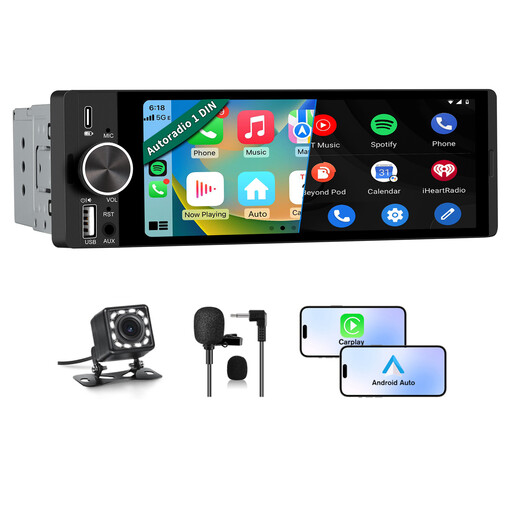
Why this product fits the profile: This 1 DIN car radio is designed for vehicles with a suitable installation slot and combines wireless CarPlay with Android Auto, voice control and a connection option for a reversing camera.
The product name lists specific ports and features: Bluetooth 5.0, FM, USB Type-C and reversing camera support. You'll still need to check the vehicle adapter and installation depth separately.
6.36-inch HD touchscreen, wireless CarPlay, Android Auto, voice control and Bluetooth 5.0 according to the product details.
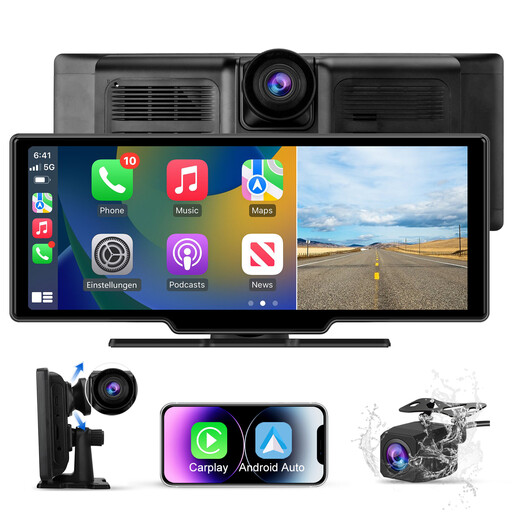
Why this product fits the profile: The 10.26-inch display is aimed at users who want to consider dashcam and camera functions alongside CarPlay and Android Auto. The product name mentions a dual camera, a 4K and a 1080P camera specification.
The camera features are clearly stated in the product name. Before using it, you should check storage, power supply, mounting and legal requirements for recording.
10.26-inch HD touchscreen, wireless CarPlay, Android Auto and dual camera with 4K+1080P specification according to the product name.
We've put together a full, regularly updated list of products that meet these strict selection criteria and the safety regulations in force in the EU.
First, power up the car radio. Then, activate Bluetooth and Wi-Fi on your smartphone and pair the device following the instructions. With Android Auto or CarPlay, you may need to confirm the connection once on your smartphone. For a stable connection, make sure your smartphone has enough charge while driving.
The lifespan depends on factors such as power supply, temperature, mounting, software support and mechanical stress. A portable display should be securely fixed and protected from direct heat. With a 1 DIN car radio, professional installation and suitable vehicle adapters are also important.
There are usually no monthly radio costs for the basic functions of CarPlay and Android Auto. However, mobile data charges can arise from navigation, streaming or other smartphone services. With dashcams, there may be costs for memory cards or additional accessories, depending on the model.