Travellers with SD and microSD cards
If your devices use different card formats, a reader with slots for both can save you having to switch readers. TP-Link and Lexar offer USB-C readers for SD and microSD cards.


Choose a card reader to suit your memory card format and the port on the device you’re copying to. For SD and microSD cards, a compatible dual-slot reader is handy; if you only use one format, a single-slot reader may be enough. UHS-II is mainly relevant when both the card and the device you’re copying to support the right setup. For a complete backup, you’ll also need a suitable destination device, and should check the copied videos before deleting them from the original card.
If your devices use different card formats, a reader with slots for both can save you having to switch readers. TP-Link and Lexar offer USB-C readers for SD and microSD cards.
If you regularly transfer large recordings, check the UHS support of both the card and reader. The SD Association describes UHS-II as a faster bus interface than UHS-I, but that doesn’t mean there’s a set time for a complete backup.
If you plan to use a smartphone or tablet to copy your files, the connection, access to the card and storage destination all need to work together. Apple explains how to access connected SD cards through the Files app; test the entire process with your device.
Start by checking the card format and the port on the device you’ll use to copy your files. Then consider the storage destination and how you’ll check the copies. UHS-II is another factor to consider if both your card and host support it.
| What matters | What to look for | Who should pay particular attention? |
|---|---|---|
| Compatible card format | Match your SD or microSD card format to the slots on the specific reader. TP-Link and Lexar offer dual-slot options, while Kingston has separate SD and microSD readers. | If I want to use cards from devices with both formats, I need a compatible reader. This is the main concern for around 31 % of consumers. |
| A backup you can check | Plan for the device you’ll use to copy your files, the available storage destination and a way to check the copied video files. | I want to make an extra copy and check it before removing anything from the original card. Around 25 % of consumers put this reliable backup process first. |
| Speed for large videos | Check the UHS support of both the card and reader, as well as the USB port on the host device. The SD Association describes UHS-II as a faster bus interface than UHS-I; a manufacturer’s stated reading speed doesn’t measure the time needed for the entire backup. | If I regularly transfer large videos, I want to use compatible card and device interfaces. Transfer speed is the main concern for around 25 % of consumers. |
| Copying without a laptop | Test the card reader, source card and planned storage destination together with your own smartphone or tablet. Apple lists conditions for external storage on iPhone, such as supported file systems and, in some cases, an additional power supply. | If I want to back up without a laptop, the entire copying process needs to work with my mobile device. Around 19 % of consumers put this mobile setup first. |
The card, reader, USB host and storage destination all affect the copying process. A stated maximum reading speed doesn’t automatically tell you how long the whole process will take.
Check that both the card and reader support UHS-II, and that the port on your copying device is compatible. The SD Association explains the differences between bus interfaces; a manufacturer’s figures don’t measure the time needed for your complete hotel-room backup.
Kingston’s MobileLite Plus models are separate readers for SD and microSD cards. So an SD-only slot won’t automatically take a microSD card too.
Before you buy, check the format of every card you use against the slots on the specific model.
For another card format, you may need a separate compatible adapter or a different reader.
Accessing the source card and saving a checked extra copy are two different steps. Simply connecting a card doesn’t back up its videos to a second device.
Test the process from the source card to the destination file before your trip, and check the copied videos before removing the originals.
Depending on how you copy your files, you may also need a storage destination, compatible adapters or a power supply for an external drive.
The UA440C is a USB-C reader with SD and microSD slots.
The Professional USB-C Dual-Slot Reader is designed for SD and microSD cards.
MobileLite Plus includes separate USB-A readers for SD and microSD cards.
The USB-C to SD Card Reader is an SD option for compatible Mac, iPad and iPhone devices.
The Extreme PRO SD UHS-II Card USB-C Reader/Writer is a single-slot SD reader for USB-C hosts.
The products below are card readers or adapters with card-reading functionality for SD and TF cards. Choose one that suits the port on your copying device, and check that it supports your card formats.
 No image available
Consider this option if your copying device uses USB-C and you’re looking for a built-in card reader.
The product title lists an SD/TF card reader.
 No image available
Consider this if you plan to copy files with an iPhone or iPad. The connection and access to your chosen storage destination need to work with your device.
The product description lists SD and microSD cards, as well as USB 3.0 at up to 5 Gbit/s.
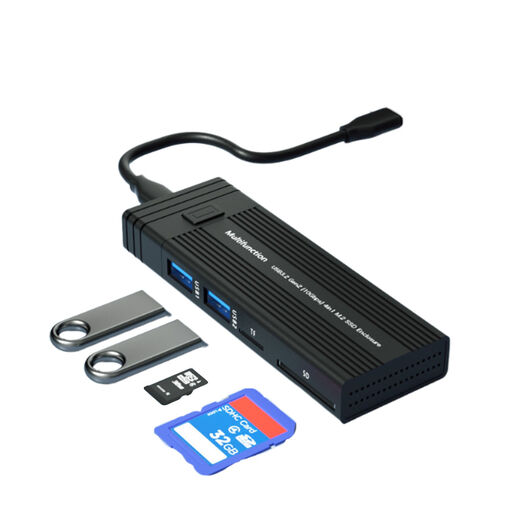 No image available
Consider this combination if you want to use a compatible M.2 SSD as your storage destination.
The product title lists NVME/SATA and B-Key/B&M-Key; the product description lists SD and TF card readers.
 No image available
Consider this compact option for travelling if your host has a compatible USB-A port.
The product description lists SD and TF cards, with support for both at the same time.
 No image available
Consider this reader for travelling if your copying device uses USB-A and you want to access SD or TF cards.
The product title lists USB-A and SD/TF cards.
No, a card reader alone won’t create a complete backup. You’ll also need a copying device and a suitable storage destination. Check the files there before removing any recordings from the original card.
No, the plug alone doesn’t guarantee that the whole copying process will work. Check that your iPhone is compatible, that you can access the card and that it supports your chosen storage destination. Apple explains how to access external storage through the Files app and lists requirements for these devices.
Check that the expected files are on the storage destination and that they play, and keep the originals on the card until then. Germany’s Federal Office for Information Security recommends making regular external backups; simply connecting a card reader isn’t a backup.
No, take an old card reader to an appropriate collection point. Germany’s Federal Environment Agency describes ways to return small electrical devices, including local collection points and retailers required to accept them under the applicable conditions.