What should you look for when buying?
First, match your software to your footage. Then plan your storage and backups, before deciding which form factor will suit your workspace.
| What you need |
What to check before buying |
Who is it important to? |
| Shared use and software |
Check the operating system and software version are compatible; agree who is responsible for accounts, licences and project folders. |
If we’re taking turns to use the computer, we need compatible software and organised access to projects. Around 29% of consumers prioritise team workflows and software compatibility. |
| Editing your own footage |
Compare the resolution, codec, tracks and effects in a typical project with the requirements of the software version you use. |
If previewing and editing our own footage matters, the specification should suit both the footage and software. Around 29% of consumers prioritise editing performance for their actual project. |
| Working and backup storage |
Estimate storage needs based on your own projects; plan a separate working drive and independently stored backup. |
If we’re keeping lots of original footage and project versions, we need space to work and a separate backup. Around 28% of consumers prioritise file storage and backups. |
| Desk space and expandability |
Check where you’ll place the computer and which connections you need; compare the available RAM, SSD and graphics options with your plans. |
If space is limited or you’re planning future upgrades, the form factor and specific configuration need to suit your setup. Around 14% of consumers place particular importance on size or expandability. |
Suitable desktop PCs at Joybuy
This selection includes compact Mac mini and Windows mini PC options for a shared editing workstation. Before buying, check that the editing software, footage and storage you need are all suited to the configuration.
 No image available
Apple Mac mini M6, 16 GB Unified Memory, 256 GB SSD
Could be a good fit if your editing software is compatible with macOS and a compact computer suits your workspace.
The listed specifications include 16 GB Unified Memory, 256 GB SSD, Thunderbolt 4 and HDMI.
View at Joybuy
No image available
Apple Mac mini M6, 16 GB Unified Memory, 512 GB SSD
Could be a good fit if your editing software is compatible with macOS and you’re looking for a compact design.
The listed specifications include 16 GB Unified Memory, 512 GB SSD, Thunderbolt 4 and HDMI.
View at Joybuy
No image available
Apple Mac mini M6, 24 GB Unified Memory, 512 GB SSD
Could be a good fit if your editing software is compatible with macOS and you’ve checked that the listed memory configuration suits your footage.
The listed specifications include 24 GB Unified Memory, 512 GB SSD, Thunderbolt 4 and HDMI.
View at Joybuy
 No image available
Firebat Mini PC F1 P, AMD Ryzen 7 H 255, 16 GB DDR5 RAM, 512 GB SSD
Could be a good fit if your editing software is compatible with Windows 11 Pro and the specific configuration suits your footage.
The product title lists 16 GB DDR5 RAM, a 512-GB SSD and USB4.0.
View at Joybuy
 No image available
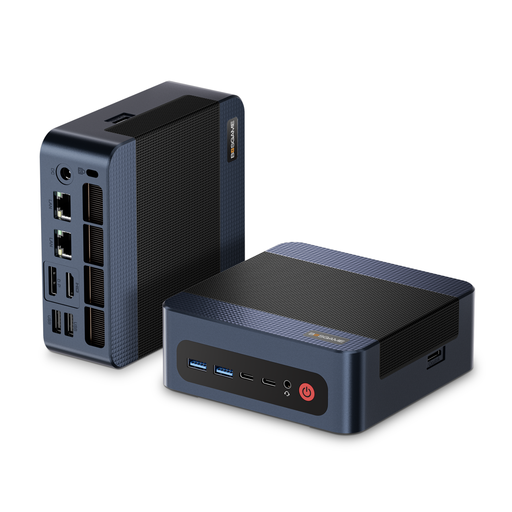
BOSGAME M4 Plus, AMD Ryzen 9 7940HS, 32 GB DDR5 RAM, 1 TB PCIe SSD
Could be a good fit if your editing software is compatible with Windows 11 Pro and the configuration suits your projects.
The product title lists 32 GB DDR5 RAM and a 1-TB PCIe 4.0 SSD. The product description mentions a second PCIe SSD slot.
View at Joybuy
Frequently asked questions
How should we set up the computer for several editors?
Set up a separate operating system account for each person and agree on a clearly named shared project folder. Microsoft describes how to use separate accounts in Windows; Apple Support recommends individual accounts when several people use the same Mac. Also agree on access permissions and who is responsible for backups.
Can proxies make up for a PC with lower specifications?
No, proxies don’t automatically replace suitable hardware. Adobe explains that low-resolution proxy copies can make it easier to edit suitable high-resolution files in Premiere, but they don’t prove that any computer will be powerful enough for effects or exporting. Test the workflow with your own footage.
What ongoing costs and service terms should we check?
As well as the computer, budget for the editing software you need, working and backup storage, and, if required, a monitor and input devices. Adobe notes that Premiere may involve additional membership costs. The documented Lenovo offer lists the monitor, keyboard and mouse as optional or sold separately. Compare service offers separately from your statutory warranty rights.
Can we publish carnival videos showing identifiable people without any further checks?
Buying an editing PC doesn’t give you permission to publish videos. The Rhineland-Palatinate State Commissioner for Data Protection and Freedom of Information explains that, as a rule, you need to check whether consent or another relevant legal basis is required to record and use footage of identifiable people. The purpose and specific circumstances of the recording matter; check what applies to your situation before publishing footage.


