
Lieferung heute & morgen

Qualitätsgarantie

Willkommens-Angebote freischalten: KOSTENLOSE Lieferung | Bis zu 80 % RABATT | Kostenlose 30-Tage-JoyPlus-Testphase
App herunterladen
By the Joybuy Product Recommendation Officer, August 28, 2026
Many drivers of older vehicle models want modern infotainment features like navigation, music streaming, and hands-free calling without having to undertake a costly professional installation or even change vehicles. A CarPlay display with a dash cam offers an attractive solution: it modernises the cockpit, increases driving comfort, and simultaneously enhances safety.
But the market for retrofit solutions is crowded and confusing. If you're not careful, you could invest in a device that causes more frustration than joy. Before you make a decision, you should be aware of the typical pitfalls that often only become apparent after the purchase.
retrofit Wireless CarPlay but use outdated wireless modules. The result is constant connection drops between the smartphone and the display, especially in urban areas with a high level of signal interference. The navigation freezes or music playback stops—exactly when you can least afford it.To avoid these problems, you should base your selection on objective technical parameters. Three features are of central importance.
A stable, wireless connection is the foundation of a good user experience. Look for devices that support dual-band Wi-Fi (2.4 GHz and 5 GHz). The 5 GHz band is less congested and offers a significantly higher data rate, which is essential for smooth and lag-free transmission of CarPlay or Android Auto. An up-to-date Bluetooth standard (e.g., 5.0 or higher) also ensures stable pairing and good audio quality for calls or music playback through the car speakers.
Resolution alone (e.g., 4K or 1080p) says little about the actual image quality. The crucial factor is the combination of a light-sensitive image sensor and a high-quality wide-angle lens (typically 140 degrees or more). Only then can the dash cam capture clear and detailed recordings, even at dusk or in the rain. For a rear-view camera kit, water and dust resistance (e.g., to IP67 standard) is also an important quality feature for a long service life.
A true portable car display is characterised by its straightforward installation. The device should come with a stable mount for the dashboard or windshield and draw its power directly from the 12V-24V cigarette lighter socket. This type of plug-in Apple CarPlay requires no interference with the vehicle's electronics and is ready to use within minutes.
Based on these criteria, we have identified several products suitable for different requirements and budgets.
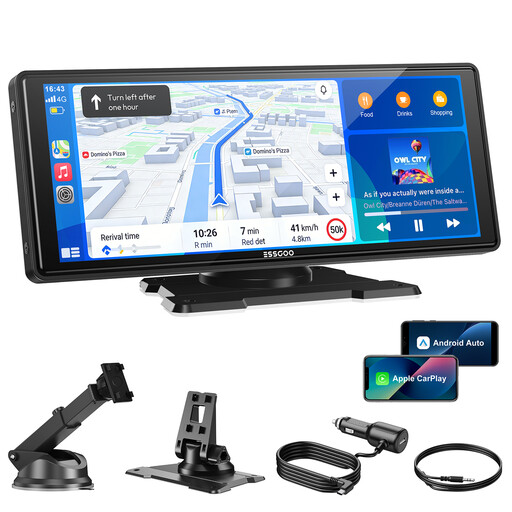
Why This Fits Their Persona: Ideal for drivers who primarily want a reliable, large screen for Wireless CarPlay and Android Auto but don't yet need a dash cam. It offers the core features at an attractive price.
Thanks to dual-band Wi-Fi (2.4/5 GHz) and Bluetooth 5.3, it specifically addresses the problem of unstable connections. Connectivity is stable and fast.
Large 10.26-inch HD display (1600x600) and true plug-and-play installation via the cigarette lighter socket. Supports OTA updates for future improvements.

Why This Fits Their Persona: The perfect all-in-one solution for anyone wanting to combine infotainment and safety in a single device. Ideal for commuters and families who value complete documentation of their journeys.
This kit avoids the pitfall of misleading camera specs by combining a 4K front camera and a 1080p rear camera with 140° wide-angle lenses. A 64 GB memory card is already included.
Complete safety package: Loop recording, split-screen display, and a waterproof rear camera (IP67) make it a comprehensive solution.
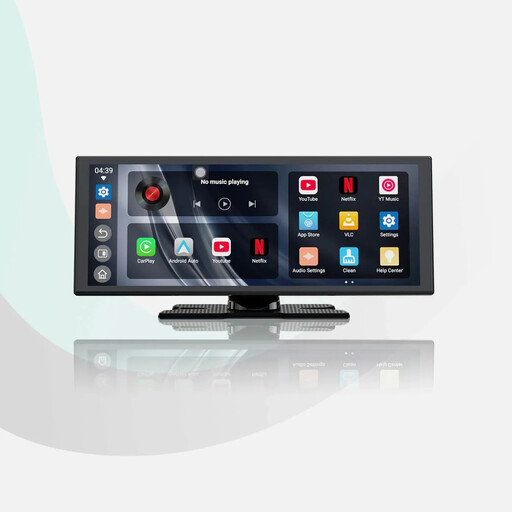
Why This Fits Their Persona: For drivers who want to turn their car into a mobile entertainment centre. Perfect for breaks or long journeys with passengers who want to watch videos.
Addresses the need for maximum stability with dual Wi-Fi and dual Bluetooth. One Bluetooth module connects to the phone, the other to the car stereo, minimising interference.
Pre-installed apps like YouTube and Netflix (internet access via hotspot required). The audio-mixing feature allows music playback while navigation prompts are active.
We have compiled a complete, up-to-date list of products that fully meet these strict selection criteria and rigorous safety standards.
1. How is a portable CarPlay display powered? Most of these devices are designed for a simple plug-and-play installation. They are powered by your vehicle's cigarette lighter socket (12V-24V). The included cable simply plugs into the socket, and the device is ready to go. No intervention in the vehicle's electrical system is necessary.
2. Can I play audio through my car's speakers? Yes, there are usually several ways to do this. You can send the audio to your car radio via an FM transmitter, establish a direct connection with an AUX cable, or pair the display with your vehicle's audio system via Bluetooth. Connecting via an AUX cable or Bluetooth often provides the most stable and highest-quality audio transmission.
3. Is installation really possible without a trip to the workshop? Yes. The device is mounted using a suction cup or adhesive mount that attaches to the dashboard or windshield. After connecting the power cable to the cigarette lighter socket, you just need to pair your smartphone with the display via Bluetooth and Wi-Fi. The entire process usually takes no more than five minutes.