
Lieferung heute & morgen

Qualitätsgarantie

Willkommens-Angebote freischalten: KOSTENLOSE Lieferung | Bis zu 80 % RABATT | Kostenlose 30-Tage-JoyPlus-Testphase
App herunterladen
Modern infotainment features like Apple CarPlay or Android Auto have become indispensable for many drivers. They provide safe and convenient access to navigation, music, and apps directly on the vehicle's display. But what if your car, often a model built after 2016, only has a wired solution or lacks such a system entirely? The market for retrofit solutions is vast but overwhelming. Many products overpromise and underdeliver, leading to frustration instead of enhanced driving comfort.
This guide will help you identify the common pitfalls and make an informed decision. We'll show you which technical specifications truly matter and which solutions are best suited for different needs.
Before you invest in a new car gadget, you should be aware of the most common issues found in low-quality products.
To avoid a bad purchase, you should check three core technical aspects before making a decision. These largely determine the performance and reliability of the retrofit solution.
The most important point is compatibility with your vehicle. Check the product's requirements carefully:
Modern wireless standards are crucial for a stable connection.
If you want to do more than just use standard CarPlay functions and run apps directly on the screen, hardware performance is critical.
Depending on your vehicle's equipment and personal needs, different products are suitable. Here are some recommendations tailored to specific user profiles.

Why This Fits Their Persona: Ideal for drivers who already have factory-wired CarPlay or Android Auto and simply want to eliminate the hassle of plugging and unplugging the cable. The plug-and-play installation requires no technical expertise.
Addresses the compatibility trap with clear specifications (for vehicles from 2016+ with factory CarPlay, not for BMW/Tesla). Its use of 5.8 GHz Wi-Fi and Bluetooth 5.2 prevents connection issues and latency.
Supports both wireless CarPlay and wireless Android Auto in one device. The connection is established automatically every time the car starts after the initial setup.
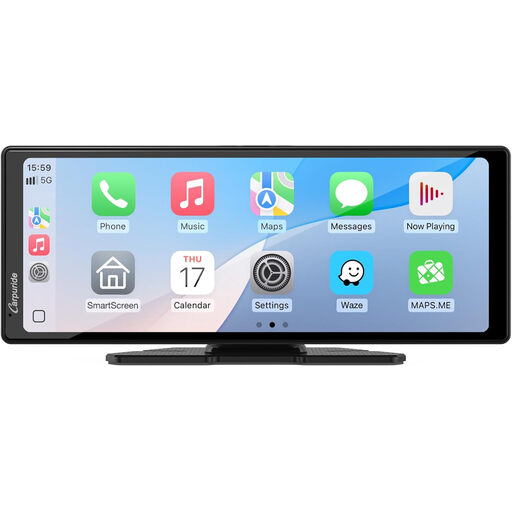
Why This Fits Their Persona: Perfect for owners of older vehicles, modern classics, or commercial vehicles (trucks, RVs) without a built-in screen. This device allows you to retrofit a car display without needing a costly and complicated permanent installation.
Completely bypasses the compatibility trap by functioning as a standalone system. It doesn't rely on the vehicle's electronics, offering a universal solution.
Large 10.26-inch HD touchscreen for a clear display. Easy to mount on the dashboard and powered via the 12V socket. Supports wireless CarPlay and Android Auto.
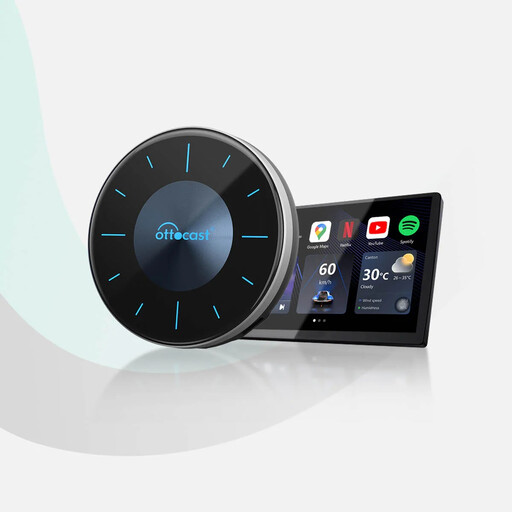
Why This Fits Their Persona: For users who want to transform their existing CarPlay display into a full-fledged Android system. Ideal for families or commuters who want to watch videos (YouTube, Netflix) during breaks or use a wide range of apps from the Google Play Store.
Avoids the over-promising trap with powerful hardware. The Qualcomm Snapdragon 665 processor and its 8 GB RAM + 128 GB ROM configuration ensure the smooth performance needed for video streaming and demanding apps.
Transforms the screen into an Android 12 system with Play Store access. An HDMI output allows screen mirroring to a rear-seat monitor—perfect for passengers in the back.
Beyond just infotainment upgrades, there are other useful car gadgets. An OBD2 Bluetooth diagnostic tool like the THINKCAR ThinkDiag Mini, for example, allows you to read vehicle fault codes directly on your smartphone, giving you a better overview of your car's technical condition.
We've compiled a complete, real-time updated list of products that fully meet these strict selection criteria.
1. Can I retrofit CarPlay in any car? It depends on your vehicle's existing equipment. If your car already has a screen and an infotainment system (ideally with a USB port), you can use either an adapter for a wireless connection or an AI box for more features. For vehicles without a screen, a portable display is the easiest and most universal solution to retrofit an infotainment system.
2. Does a wireless CarPlay adapter drain my smartphone's battery? Yes, the continuous use of Wi-Fi and Bluetooth for the wireless connection consumes more battery power than a wired connection. It's therefore advisable to use a charging solution simultaneously. A car phone mount with charging is a practical addition, as it holds the smartphone securely while supplying power.
3. What is the difference between a wireless adapter and a CarPlay AI Box? A Wireless CarPlay Adapter has a single function: it converts an existing wired CarPlay connection into a wireless one. The user interface and available apps remain those of Apple CarPlay or Android Auto. A CarPlay AI Box, on the other hand, is a standalone mini-computer with a full Android operating system. It uses your car's screen as a monitor and allows you to install and use almost any app from the Google Play Store, such as video streaming services.