
Lieferung heute & morgen

Qualitätsgarantie

Willkommens-Angebote freischalten: KOSTENLOSE Lieferung | Bis zu 80 % RABATT | Kostenlose 30-Tage-JoyPlus-Testphase
App herunterladen
Do you drive a vehicle built before 2018? Then you probably know the feeling: while newer models come equipped with large touchscreens, seamless smartphone integration, and advanced driving aids, you often have to make do with an outdated radio or cumbersome phone mounts. The desire to retrofit Apple CarPlay is strong, but the market is confusing and full of potential pitfalls.
As your Joybuy Product Recommendation Officer, I'm here to help you separate the wheat from the chaff. We'll highlight the most common purchasing errors and show you which technical features truly matter, so you can make an informed decision for a modern and safe driving experience.
Many products promise a simple solution, but in practice, overlooked details often lead to frustration and unnecessary expenses. Pay special attention to these three points:
To avoid a bad purchase, you should check three core parameters before making a decision. These are crucial in determining the functionality and longevity of your new system.
Most retrofit solutions can be divided into two categories: dongle adapters and external screens.
With an Android Auto Display or CarPlay screen, the display quality is critical. A resolution of 1600x600 pixels or higher on a 10-inch display ensures a sharp and clear presentation of maps and menus. Also, check the audio connection options:
Modern retrofit systems are often more than just a display. An integrated car radio with screen and reversing camera significantly increases safety. Look for the following specifications:
To make your choice easier, we have matched products to three typical use cases.

Why This Fits Their Persona: This device is an all-in-one solution for drivers of older vehicles. It combines a large, high-resolution screen for Wireless CarPlay/Android Auto with an integrated 4K dash cam and a 1080p reversing camera. Installation is simple and requires no permanent fitting.
It doesn't require an existing CarPlay system, thus bypassing the compatibility trap. The high-resolution screen and multiple audio options (including AUX) prevent the typical quality issues of cheaper models.
Combines navigation, entertainment, and safety (4K dash cam + reversing camera) in one device. A 64GB memory card is already included in the package.

Why This Fits Their Persona: For drivers whose vehicle already has a display with wired CarPlay or Android Auto. This adapter eliminates the hassle of plugging and unplugging the cable and retrofits a stable, wireless connection.
The product description clearly states that a factory-wired CarPlay/Android Auto system is a prerequisite. This prevents a bad purchase by drivers of cars without a compatible system.
Plug-and-play installation with no tools required. Uses a fast 5.8GHz Wi-Fi connection for low latency and retains the full functionality of the original controls (steering wheel buttons, touchscreen).
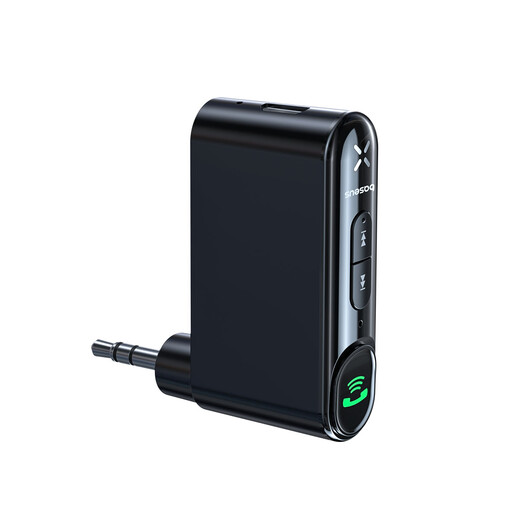
Why This Fits Their Persona: For drivers who simply want to stream music wirelessly from their smartphone to the car radio and don't need a screen. Ideal for very old vehicles that only have an AUX port (3.5mm jack).
This product focuses on a single, clearly defined function: turning an AUX input into a Bluetooth receiver. It doesn't create the false impression of being a complex CarPlay solution.
Very cost-effective and easy to install. The built-in battery allows for up to 10 hours of playback, and the Bluetooth 5.0 connection ensures a stable transmission. Includes a hands-free calling function.
We have compiled a complete, up-to-date list of products that fully meet our strict selection criteria and current regulations.
1. How stable is the power supply from the cigarette lighter socket? The power supply from the cigarette lighter socket (12V or 24V port) is designed for operating portable screens and dash cams and is generally very stable. Ensure the plug is firmly seated in the socket. High-quality devices have protective circuits to compensate for voltage fluctuations.
2. Can I play audio through my original car speakers? Yes, that is the recommended way to get the best sound quality. Most external CarPlay screens offer several options for this. Connecting via an AUX cable (3.5mm jack) is often the most reliable method. Alternatively, you can send the audio to your car radio via Bluetooth, provided it supports Bluetooth audio streaming. Transmission via an FM transmitter is also possible but is more susceptible to interference.
3. Will a portable CarPlay screen work in any car? Essentially, yes. Since these devices come with their own software and hardware and only require a power source (the cigarette lighter socket), they are independent of brand and model. They work in almost any vehicle, from older compact cars to commercial vehicles, as long as a 12V or 24V port is available.