
Lieferung heute & morgen

Qualitätsgarantie

Willkommens-Angebote freischalten: KOSTENLOSE Lieferung | Bis zu 80 % RABATT | Kostenlose 30-Tage-JoyPlus-Testphase
App herunterladen
Owners of vehicles built before roughly 2018 often face a challenge: the core vehicle technology is solid, but the infotainment system no longer meets modern standards. Retrofitting a modern system can be costly and complex. A portable infotainment system that combines a CarPlay screen with a dash cam offers a flexible and cost-effective solution. However, the market is crowded, and not every product delivers on its promises. This guide will help you avoid common pitfalls and make an informed decision.
Many offers sound tempting, but in practice, they often reveal flaws that severely limit their usefulness. Pay close attention to these three points to avoid a bad investment:
To find the right device, you should carefully examine three core areas. These largely determine the functionality and longevity of your new system.
The seamless connection between your smartphone and the display is the heart of the system. Check whether the device supports both Wireless CarPlay and Wireless Android Auto. Some models also offer Mirror Link to mirror the entire smartphone screen. Ensure that the software version specified by the manufacturer is compatible with your current smartphone operating system (iOS or Android). Dual-band Wi-Fi support (2.4 GHz and 5 GHz) can further enhance connection stability.
A 10-inch car radio replacement should offer a sufficiently high resolution to display maps and menus sharply. A resolution of 1600x600 pixels or higher is recommended for this display size. For the integrated camera, resolution is crucial for evidentiary purposes. A 4K car dash cam at the front delivers detailed recordings that allow you to read license plates even from a distance. For the rear camera, a resolution of 1080p (Full HD) is a good standard for clearly identifying obstacles when parking.
A true portable infotainment system is characterized by its simple installation. Powering it via the 12V socket is the most straightforward method and requires no permanent modifications to the vehicle's electronics. Look for a robust mount (e.g., for the dashboard or windshield) that minimizes vibrations and allows for flexible positioning of the screen.
Based on these criteria, we have identified a few products that are suitable for different types of drivers and their specific needs.

Why This Fits Their Persona: Ideal for drivers seeking a comprehensive, non-permanent upgrade. This device combines navigation, media, and safety (front and rear cameras) in a single plug-and-play solution, making it perfect for commuters, leased vehicles, or the family's second car.
The device uses dual-band Wi-Fi for a stable wireless connection. The 10.26-inch display with 1600x600 resolution is clearly legible, and the 12V installation avoids complex wiring.
Combines a 4K front camera and a 1080p rear camera with Wireless CarPlay/Android Auto. A 64GB memory card is already included in the package.
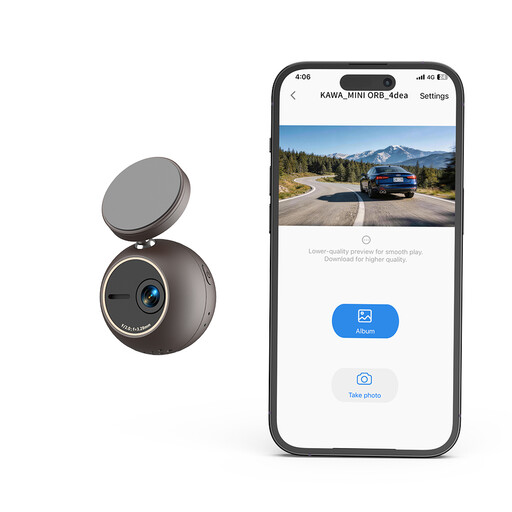
Why This Fits Their Persona: Suitable for drivers whose priority is purely trip recording and who already use another solution for navigation and media. The compact, unobtrusive design does not obstruct the field of view and focuses on the core function of safety.
By focusing on a single function, this device bypasses the potential complexity and failure points of multi-function devices. The installation is extremely simple, and operation is reduced to the essentials.
Offers clear 2K video resolution in a very compact housing. Features like voice control and a G-sensor for automatic recording upon collision enhance its practicality.
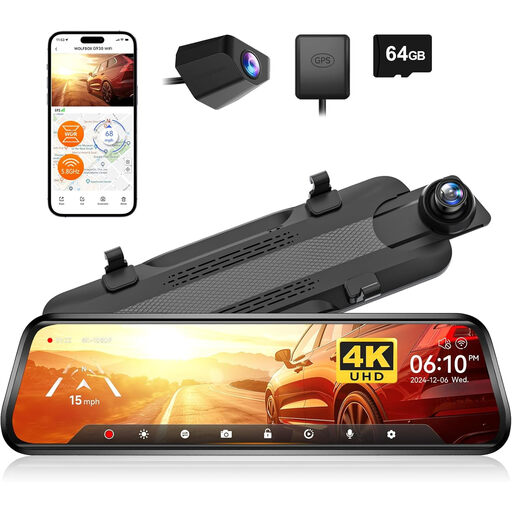
Why This Fits Their Persona: An alternative for drivers who prefer a clean, factory look and don't want to mount additional devices on the dashboard. This system replaces the existing rear-view mirror and discreetly integrates the display and camera functions.
Solves the problem of "cable clutter" and a crowded dashboard by integrating seamlessly into the interior. The screen is only active when needed and otherwise does not interfere with its function as a normal mirror.
Combines a 4K front camera and a rear-view camera in a 10-inch touchscreen mirror. It offers a very discreet way to retrofit camera functions. Note: This model focuses on camera functions and does not include CarPlay/Android Auto integration.
We've compiled a complete, up-to-date list of products that fully meet these strict selection criteria.
No, the portable models presented here are designed for DIY installation. Power is supplied via the 12V socket (cigarette lighter), and they are mounted on the dashboard or windshield using adhesive pads or suction cups. Routing the cable for the rear camera requires a bit more effort but is generally manageable without professional help.
The initial pairing of the smartphone with the display is done via Bluetooth. Subsequently, the system automatically establishes a more stable connection via Wi-Fi every time the vehicle starts. This allows your smartphone to remain in your pocket while all functions like navigation, calls, and music are available on the large screen.
Some models offer a parking monitoring function. In most cases, this requires a permanent power supply via a so-called hardwire kit, which is sold separately and connected to the vehicle's fuse box. The camera then uses a G-sensor to activate recording when a vibration or impact is detected on the parked vehicle.