For the occasional photo of ceramics on a tripod, the self-timer or a camera-compatible app is often all you need to start with; you don’t necessarily need an extra device. If you take photos frequently, a suitable wired shutter release can be easy to use, while Bluetooth or radio control can give you more distance. What matters is your exact camera model, the right connection and the features you actually need.
Who would benefit from a remote shutter release?
Tripod photographers using their existing camera
If you photograph ceramic bowls in changing light by a window and want to avoid touching the camera when taking a shot, first check your camera model and the remote-control features it already offers. Canon Germany and Nikon Germany, for example, describe compatible wired shutter releases; the self-timer may also be an option.
Ceramics shops taking repeated shots
If you’re photographing several bowls or different angles, being able to take the shot from beside the arrangement can be useful. Depending on your camera model, you could use a cable, Bluetooth or a radio remote shutter release; Nikon Germany and Rollei list features for specific compatible cameras and versions.
Photographers who want a smartphone preview
If you want to check the framing on your smartphone, see whether your camera supports an app for this. Nikon Germany describes remote control via SnapBridge with connected, compatible cameras.
What should you look for when buying?
Self-timer or camera app
A good fit if: You’re photographing individual bowls on a tripod and don’t want to buy a separate device just yet.
Bear in mind: The self-timer delay needs to suit your workflow, and app features depend on your camera model.
Wired shutter release
A good fit if: Your camera has a specifically compatible socket and you’re happy to stay within cable reach.
Bear in mind: The connection type and cable length limit your choice and where you can operate it from.
Bluetooth remote control
A good fit if: You want to work without a shutter-release cable and your camera supports that specific remote control.
Bear in mind: Bluetooth on the camera alone doesn’t guarantee compatibility with every model or button function.
Radio remote shutter release with receiver
A good fit if: You want to take repeated shots from a little way off or use a supported interval function.
Bear in mind: You may still need a compatible camera cable to connect the receiver to your camera.
| Buying priority |
What to check |
Who is it important to? |
| Camera compatibility |
Check your camera model, connection and exact shutter-release type. Canon Germany, for example, distinguishes between E3 and N3 connections. |
If I want to avoid buying the wrong product, I check the exact camera and shutter-release combination. Around 36% of consumers put compatibility first. |
| Steady shooting |
Try the self-timer and app first; if needed, check whether the shutter release operates the camera without you touching it. Canon Germany describes both options for compatible cameras. |
When taking a photo on a tripod, I don’t want to shift the framing as I take the shot. Around 29% of consumers prioritise a steady shot. |
| Preview and operating distance |
Decide whether you only need to take the shot or also want to see the camera image on your smartphone; check model and connection support. Nikon Germany describes remote control with image viewing via SnapBridge for supported connections. |
If I’m rearranging bowls from where I’m taking the photo, I want to see the image or be able to stand further away from the camera. Around 21% of consumers prioritise this. |
| Extra features and accessories |
Check what’s included, whether you need a camera cable and whether you really need interval functions. Rollei notes that the Wireless Remote Shutter Release 28146 requires a camera cable. |
When taking repeated shots, I only want to plan for the features and accessories I actually need. Around 14% of consumers focus mainly on extra features and what’s included. |
Common buying and usage mistakes
-
Choosing by camera brand alone, rather than checking the model and connection
Connections and supported remote controls can vary even within the same brand. The brand name alone therefore won’t tell you whether a shutter release will work with your camera.
Check your exact camera model, connection and the shutter release’s full model number against the relevant compatibility information.
-
Assuming ‘wireless’ means there’s no cable to the camera
With a radio remote kit, only the connection between the handheld remote and receiver may be wireless; the receiver could still need to connect to the camera by cable.
Before buying, check which cable version you need and what’s included.
The Rollei Wireless Remote Shutter Release 28146 requires a camera cable. If it isn’t included in the version you choose, you’ll need to factor in buying one separately.
-
Buying a basic shutter release when you need an image preview
Taking a shot and viewing the camera image on your smartphone are two different functions. A basic remote shutter release won’t necessarily offer a preview.
Decide in advance whether you only want to take the shot or need to see the framing from where you’re taking it. If you’re using an app, check that it supports your camera model.
Camera brands to consider
Canon
Canon Germany describes wired shutter releases for cameras with compatible E3 or N3 connections, as well as remote control via Camera Connect for supported models.
- The cable options listed vary by connection: the RS-60E3 is 60 cm long and the RS-80N3 is 80 cm.
- Check the connection and app support for your exact EOS model; this information doesn’t automatically apply to every camera in the range.
Nikon
Nikon Germany lists the MC-DC2 wired shutter release for certain cameras and the ML-L7 Bluetooth remote control for compatible models.
- Nikon says the MC-DC2 releases the shutter without you having to touch the camera; the ML-L7 includes shutter-release and video-recording buttons, among others.
- Compatibility depends on the model. Also check whether a smartphone app with image viewing suits your photography workflow.
Sony
Sony describes the RMT-P1BT as a Bluetooth remote control for compatible cameras and the RM-VPR1 as a wired alternative.
- According to Sony, the RMT-P1BT uses the camera’s built-in Bluetooth receiver; the RM-VPR1 offers shutter-release, video and zoom controls.
- The features listed don’t remove the need to check that your specific camera and accessory version are compatible.
Rollei
Rollei describes the Wireless Remote Shutter Release 28146 as a radio remote kit with programmable features for compatible cameras and versions.
- Interval functions may be useful for repeated shots, if they’re supported by the version you choose.
- Rollei says a compatible cable is needed to connect it to the camera; 28146 should not be confused with models with different numbers.
JJC
JJC lists the RM-E2 as an infrared option for cameras with a suitable built-in infrared receiver.
- The product description lists specific camera models for each version.
- A compatible camera brand alone isn’t enough: check for an infrared receiver and confirm the model’s compatibility information.
Joybuy products for smartphone photography
The products below are designed for taking photos with your smartphone as the camera. They won’t replace a remote shutter release connection for a separate camera.
 No image available
Verbex K60 Bluetooth selfie stick with tripod
Only suitable when your smartphone is the camera: the product details list a Bluetooth remote for taking photos and videos from a distance.
Features a 360° rotating smartphone holder; no connection option for a separate camera is listed.
View at Joybuy
 No image available
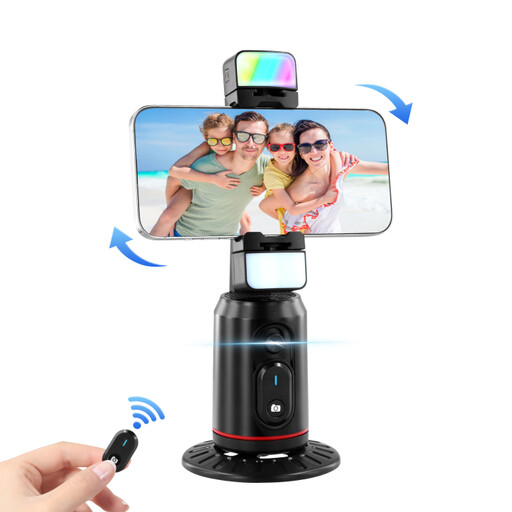
Auto Face Tracking Tripod with 360° rotation
For smartphone photography if you’re looking for a phone holder with remote control for livestreams, vlogs or videos.
The product name mentions gesture control and a fill light; no connection option for a separate camera is listed.
View at Joybuy
 No image available
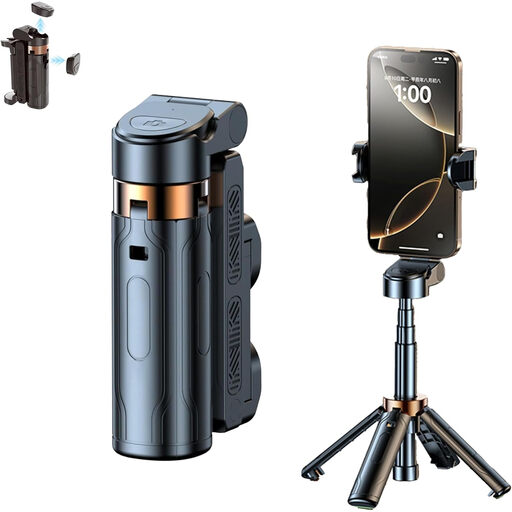
3-in-1 Bluetooth selfie stick with tripod
Only suitable when your smartphone is the camera: the description mentions wireless remote photography, so you don’t need to touch the device to take a shot.
Features a foldable smartphone tripod and rotating phone holder; no connection option for a separate camera is listed.
View at Joybuy
 No image available
KINSI smartphone tripod with Bluetooth remote control
For hands-free smartphone photography: the product description lists wireless remote shooting from a distance.
The tripod is described as foldable and height-adjustable; no connection option for a separate camera is listed.
View at Joybuy
 No image available
Ulanzi JJ02 smartphone tripod
For taking smartphone photos and videos from a distance; the product description lists a Bluetooth remote control.
Described as a 3-in-1 phone tripod with a smartphone holder and 2 Cold Shoes. The stated maximum smartphone size is 6.0 inches; no connection option for a separate camera is listed.
View at Joybuy
Frequently asked questions
Is the self-timer enough for a single photo of ceramics?
Yes, if your camera has a self-timer and its delay suits your workflow. It can help prevent camera shake caused by pressing the shutter button; Canon Germany describes this use. If you’re taking photos frequently or want to trigger the shutter straight away, a compatible separate release may be more practical.
How do I set up a radio remote shutter release with a receiver?
First, choose the right camera cable and check whether it’s included in the version you’ve selected. Rollei notes that the Wireless Remote Shutter Release 28146 needs a cable to connect to the camera. Set up the specific kit according to its instructions, then test the shutter release before you start your photo session.
If the product develops a fault, do I have to use the manufacturer’s warranty?
No. Your statutory rights against the seller and a voluntary manufacturer’s warranty are separate, as explained by the Verbraucherzentrale. The warranty is subject to its own terms and conditions; it doesn’t automatically replace your statutory rights.
Where should I dispose of used batteries and an electronic remote shutter release?
Take used batteries to a designated collection point; according to the Federal Environment Ministry, returns are free of charge. Waste electrical equipment must also not go in household rubbish; take it to an authorised collection point instead. The Battery Law Implementation Act has applied since October 2025, replacing the former Battery Act.


