Photographers with a camera already
When choosing an accessory, first check that the connector or wireless remote works with your exact camera model. Nikon Germany and Fujifilm both list compatibility for specific models.


A separate remote shutter release can be worthwhile if you want to avoid touching your camera on the tripod when taking a shot, and an app or the self-timer doesn’t suit your workflow. A cable is better suited to a fixed shooting position; Bluetooth is an option if you want to take the shot from beside your drawing or lighting – provided you have a compatible camera model. A remote shutter release won’t prevent banding or colour shifts caused by artificial light.
When choosing an accessory, first check that the connector or wireless remote works with your exact camera model. Nikon Germany and Fujifilm both list compatibility for specific models.
If you’re photographing a drawing from a tripod, you can take the shot without pressing directly on the camera body. Canon Germany describes remote shutter release as a way to avoid movement when taking a shot.
If you want to stay beside your drawing or lights when taking the shot, a wireless remote may be suitable – provided your camera supports it. Canon and Sony describe these features for specific models.
A good fit if: you’re taking shots from a fixed tripod position and your camera supports the connector used by the specific cable model.
Bear in mind: the cable and, where necessary, any adapter must suit your camera model and setup.
A good fit if: you want to take the shot from beside your drawing or lights, and your camera supports the model.
Bear in mind: check pairing and the features available for your camera. Manufacturers’ information about individual models doesn’t apply to all Bluetooth remotes.
A good fit if: your existing app supports the remote shutter release you need, or the self-timer is enough for your fixed setup.
Bear in mind: the features available in the app depend on your camera model; Canon Europe highlights these differences.
| What matters | What to check before buying | Who is it important to? |
|---|---|---|
| Compatibility | Check the full camera model and the specific connector or Bluetooth support; check whether you need an adapter. | I want to be sure the remote and camera will work together; around 36% of consumers put compatibility first. |
| Taking a shot without touching the camera | Check whether an app, self-timer or compatible remote shutter release will do the job. | I don’t want to touch the camera when taking a shot from a tripod; around 29% of consumers prioritise taking photos with minimal contact. |
| Freedom of movement | Consider where you’ll be when taking the shot, as well as any model-specific information about range or line of sight. | If I’m staying beside my drawing or lights, I want to be able to take the shot from there; around 21% of consumers prioritise this freedom of movement. |
| Avoiding unnecessary accessories | Try out the app features you need or the self-timer with your own setup before buying. | I’d rather check what I already have before buying an accessory; around 14% of consumers mainly want to avoid an unnecessary extra purchase. |
When photographing a charcoal drawing under artificial light, you should also check a test shot. Canon Academy notes that artificial light can cause banding or colour shifts. Check the white balance and lighting conditions separately from the way you take the shot.
A matching brand name doesn’t prove that a particular cable connector or Bluetooth remote will work with your camera. For certain camera models, Fujifilm says the RR-100 also requires an adapter.
Check your camera’s full model name against the information for the specific remote, and find out whether you need an adapter.
Taking a shot without touching the camera helps prevent movement when pressing the shutter. It won’t prevent banding or colour shifts caused by artificial light.
Check a test shot for banding and colour casts, and assess the light source and camera settings separately.
A camera app that supports your model may already let you take shots remotely. According to Canon Europe, the features available depend on the camera model.
Try the app or self-timer with your setup first. Only choose a separate remote if it offers a feature you need that’s missing.
For compatible Canon cameras, you can use Camera Connect or a separate remote such as the BR-E1.
Nikon offers the MC-DC3 wired remote and the ML-L7 Bluetooth remote for compatible cameras.
The RMT-P1BT is a Bluetooth option for owners of compatible Sony cameras.
The RR-100 is a wired option for the X and GFX cameras listed by Fujifilm.
The RM-WR2 is a Bluetooth remote for the OM SYSTEM cameras listed on the product page.
This selection includes smartphone tripods and grips with remotes for taking photos from a fixed position. The product information doesn’t state that they’re compatible with standalone cameras.
 No image available
For taking photos with your smartphone from a fixed position when you want to trigger the shutter remotely. According to the product information, it extends, doubles as a tripod and has a detachable Bluetooth remote.
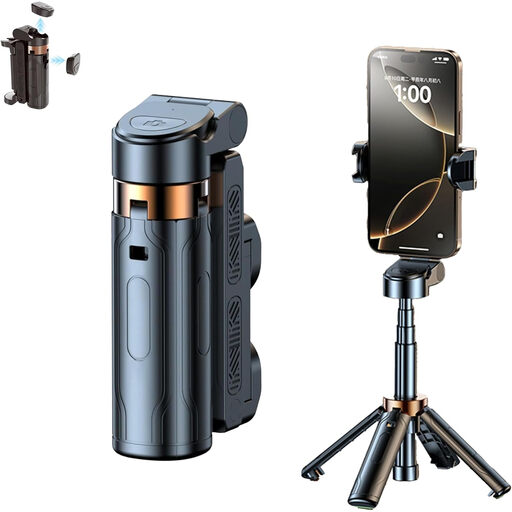 No image available
For hands-free smartphone photography with a remote. The product information describes an extendable, foldable design and a smartphone holder that rotates through 360°.
 No image available
For smartphone photography at a table or outdoors when you want to trigger the shutter remotely. According to the product information, the tripod folds down and its height is adjustable.
 No image available
For a fixed smartphone setup with remote shutter release. The product description lists an extendable mini tripod stand and two cold shoe mounts for accessories such as a microphone or LED light.
 No image available
For smartphone photography when you want to trigger the shutter remotely. According to the product information, the grip has a detachable Bluetooth remote, a 1/4-inch tripod thread and a cold shoe mount.
First, position your camera and drawing, then connect only a remote shutter release listed as compatible with your camera model. For Bluetooth, pair the supported remote. Then take a test shot without touching the camera or changing its position as you press the shutter. For certain cameras, Fujifilm says the RR-100 also requires an adapter.
No. A remote shutter release won’t prevent banding or colour shifts caused by artificial light; it simply lets you take a shot without touching the camera. Check the light source, white balance and a test shot separately. Canon Academy describes the banding and colour shifts that can occur under artificial light.
For a wireless remote, check the battery information for the specific model. According to the Verbraucherzentrale, consumers buying online in Germany generally have 14 days from delivery to give notice that they wish to cancel their purchase. Your statutory rights if goods are faulty are separate from any voluntary guarantee.
As part of its market surveillance, the Bundesnetzagentur checks matters including correct CE marking, whether the product can be identified and whether the manufacturer’s details are correct. These regulatory checks don’t prove that any individual listing meets the requirements.