For ready-made charging cables, suitable flexible flag or wrap-around labels are a good option; Brother recommends TZe-FX231 for both application methods. Choose between typing directly on the device and designing labels on a smartphone, tablet or computer, depending on how you prefer to work. Self-laminating labels have an extra protective layer, while heat-shrink tubing is only suitable if it can be slipped over the end of the cable and the heat treatment is safe for that particular cable.
Which device is right for you?
Lots of existing charging cables
If you want to quickly tell plugs and cables apart in your craft room, clearly legible flag or wrap-around labels can be added afterwards. Brother describes TZe-FX231 as suitable for wrapping around cables and for making flags.
Cables that are moved frequently
If you often move your cables around, make sure the material and application method suit how you use them, rather than wrapping an ordinary device label around a cable without checking. Brother offers flexible and self-laminating tapes, among others, for this purpose.
Labelling without a smartphone
If you want to enter short cable names directly on the device, a built-in keyboard is worth considering. Brother specifies a QWERTZ keyboard for the PT-H110.
What should you consider when buying?
Flexible flag or wrap-around tape
Suitable if: you want to label ready-made charging cables without taking them apart. Brother recommends TZe-FX231 for wrapping around cables and for making flags.
Bear in mind: A flag sticks out to the side; if you wrap the tape around the cable, check that the text remains legible on your particular cable.
Self-laminating wrap-around label
Suitable if: you want an extra protective layer over the printed area and the cable size and printer are compatible with the tape.
Bear in mind: Brother specifies an object diameter of 3.0 to 10.4 mm for the 36 mm-wide TZe-SL661; these specifications do not apply to other tapes across the board.
Printable heat-shrink tubing
Suitable if: you can slide the tubing over the end of the cable before shrinking it, and heat treatment is safe for that particular cable.
Bear in mind: According to the manufacturer, Brother HSe-211E is suitable for cables with a diameter of 0.8 to 3.1 mm and has a recommended shrink temperature of 110 to 140 °C; a heat tool is required.
| What matters |
What to check when buying |
Who should consider this? |
| Applying labels afterwards and legibility |
Check the available space and legibility on your cable, and whether the tape is designed for use as a flag or wrap-around label. |
If I want to label existing charging cables without taking them apart, I need a clearly legible flag or a wrap-around label that fits on the cable. Around 36% of consumers put applying labels afterwards and legibility first. |
| Material for cables that are moved |
Check the intended material type, compatibility with the printer and, for self-laminating tapes, the specified cable diameter. |
If you often move cables around, you’ll want tape designed for the job rather than an ordinary device label. Around 29% of consumers prioritise labels suited to how they’ll be used. |
| Typing on the device or using an app |
Check whether you prefer a built-in keyboard or to control the printer using a smartphone, tablet or computer. |
If I want to enter short names directly at my craft table, a keyboard on the device is important. Around 21% of consumers prioritise entering text on the device. |
| Compatible consumables |
Check the full tape name, the permitted tape width and which compatible tapes are available for the specific model. |
If I only label things occasionally, I want to know in advance which compatible tapes I can buy later. Around 14% of consumers prioritise finding compatible consumables. |
Avoid common buying mistakes
-
Sharing a tape range doesn’t mean every tape fits every device
Brother TZe-SL661 is 36 mm wide, exceeding the maximum tape widths specified for the PT-H110 and CUBE Plus.
Before ordering, check the full tape number and permitted width against the specifications for your printer model.
-
Heat-shrink tubing isn’t a universal solution for ready-made charging cables
The tubing must be slipped over the end of the cable and then heated. The tubing specifications don’t confirm that a particular charging cable can withstand the heat.
Check the size of the plug and the cable specifications. If you can’t confirm that heat treatment is safe, choose a flag or wrap-around label that can be applied afterwards without heat.
-
Don’t assume an older model is still available
Epson lists the LabelWorks LW-K400 as discontinued and the compatible LK-4WBA5 tape as currently unavailable.
Check the device’s technical suitability and where to buy both the device and compatible tape separately. Finding both may take extra time.
Key brands at a glance
Brother
Depending on the model, P-touch handheld label makers let you enter text using a keyboard or control the device from a mobile phone or computer. A range of tapes is available for labelling cables.
- Brother describes the 12 mm-wide TZe-FX231 as suitable for wrapping around cables and for making flags. For the PT-H110, Brother specifies TZe tape widths of 3.5 to 12 mm.
- The 36 mm-wide TZe-SL661 won’t fit devices with a lower maximum tape width; check compatibility for the exact model.
DYMO
According to DYMO, the Rhino range includes features for cable wraps, flags and heat-shrink tubing.
- DYMO lists these formats for the Rhino 4200; according to the manufacturer, flexible nylon tape is compatible with certain Rhino models.
- International product information doesn’t confirm whether a particular version is available in Germany.
Epson
LabelWorks documentation lists wrap and flag formats, as well as compatible consumables for specific devices.
- Epson lists Wrap and Flag formats for the LW-K400.
- Epson lists the LW-K400 as discontinued and the LK-4WBA5 tape as currently unavailable. Information about older models therefore doesn’t confirm that you can buy the device now.
NIIMBOT
NIIMBOT lists app-based label printers and advertises cable labels as consumables.
- NIIMBOT’s international websites list the B1 and cable labels as product offerings.
- This information doesn’t confirm whether a particular roll of cable labels is compatible with the B1 or available in Germany. Check compatibility for the specific device and tape separately.
Label printers at Joybuy
The Joybuy products below are label printers. Before buying, check whether the relevant model is designed for use with compatible flag or wrap-around tape for the type of cable labelling you need.
 No image available
Phomemo M110 label printer with 1 roll of labels
This model may be suitable for general labelling tasks; for charging cables, check whether compatible cable tape is designed for this specific printer.
The product name mentions a roll of labels, as well as labels for product labelling and logos.
Joybuy
 No image available
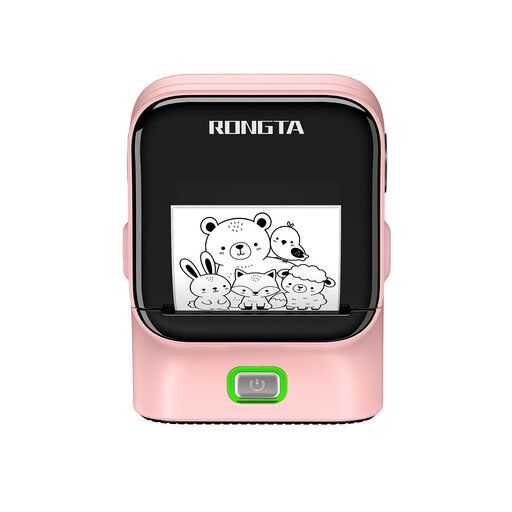
RONGTA R22B label printer
This model may be suitable for general organisation labels; for charging cables, check whether flag or wrap-around tape is designed for this specific device.
The product name mentions Bluetooth, USB and NFC detection.
Joybuy
Frequently asked questions
Can I simply apply printed heat-shrink tubing to an existing charging cable?
Not in every case. Brother says to slide the tubing over the cable before fitting the connector, then shrink it with a heat gun; for HSe-211E, the manufacturer recommends a shrink temperature of 110 to 140 °C. Check that the tubing fits over the end of the cable and that the cable can withstand the heat. If you can’t confirm this, a label that can be applied without heat is an alternative.
Will every self-laminating TZe tape fit every Brother P-touch device?
No. Brother TZe-SL661 is 36 mm wide; Brother specifies a maximum width of 12 mm for the PT-H110 and 24 mm for the CUBE Plus. Check the full tape name and its compatibility with your specific printer model.
How should I dispose of a label maker that’s reached the end of its life in Germany?
According to the German Environment Agency, electrical waste must not go in household rubbish. Remove the batteries before disposal if possible, and take them to a separate battery collection point.
Does a CE mark prove that a label is suitable for my charging cable?
No. The European Union explains that the CE mark indicates that the manufacturer declares the product complies with the applicable EU product rules. It doesn’t prove that a particular label is suitable for your cable. You should also check tape compatibility, how it is applied and the specifications for the cable itself.


